Kiwibit Bird Feeder 2 Pro vs Birdfy Feeder 2 Pro: Better Value or Sharper Detail?
TL;DR
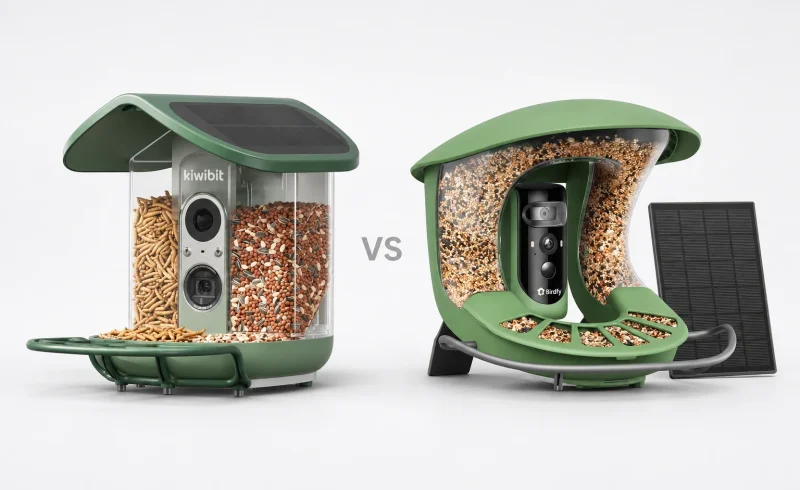
Kiwibit 2 Pro puts autofocus and detailed 4K clips at the center of a bird visit. Birdfy Feeder 2 Pro, in its Standard bundle, records a wide view and a moving portrait view together. For most buyers Birdfy is the better pick: it costs $80 less on sale, includes species ID, can tag several birds on the perch at once, and WIRED rates Birdfy's app above Kiwibit's. Kiwibit suits photography fans who want its sharper autofocus stills, local microSD recording, 5 GHz Wi-Fi or Alexa, though its focus can miss a fast visitor.
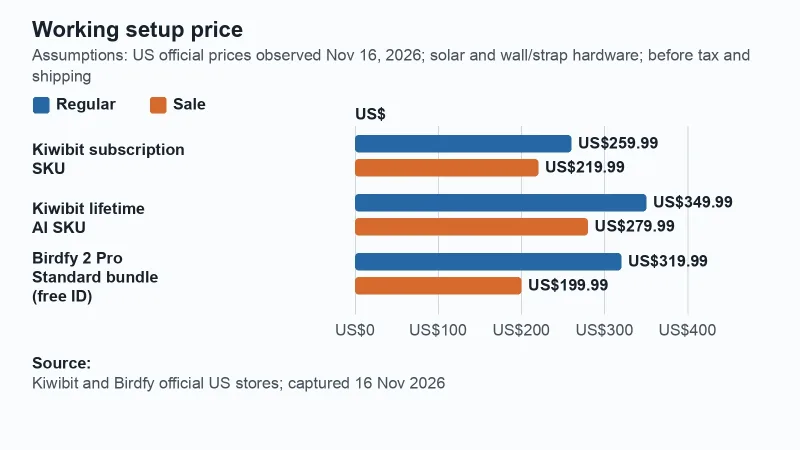
For two years of automatic species ID, Kiwibit's Lifetime AI version costs $349.99 regularly and Birdfy 2 Pro costs $319.99. On November 16, 2026, their US sale prices were $279.99 and $199.99, making Kiwibit 40% more expensive. Kiwibit's subscription version totals $399.97 over two years at sale prices, with the Family plan at its current $89.99 discount, and $469.97 at the regular $104.99.
| Feature | Kiwibit Bird Feeder 2 Pro BW513 | Birdfy Feeder 2 Pro (Standard bundle) |
|---|---|---|
| Camera arrangement | Autofocus camera | Simultaneous rotating portrait and fixed wide views |
| Normal recording | 3840 × 2160 at 15 fps | Portrait 1536 × 1536 at 20 fps; wide 1920 × 1080 at 20 fps |
| High frame-rate modes | 1080p at 60 or 120 fps | Portrait 768 × 768 at 100 fps; wide 1280 × 720 at 20 fps |
| Night vision | No | White light |
| Automatic species ID | 30-day trial, then Family or Lifetime AI version | Included free for life |
| Free cloud and local storage | 1-day cloud; optional microSD up to 128 GB | 30-day Moments, 5 GB collection; cloud-only, microSD playback unavailable |
| Clip length | Plus up to 3 minutes | Free 20 sec; Plus 30 sec; Pro 60 sec |
| Wi-Fi | 2.4 and 5 GHz | 2.4 GHz |
| Alexa live view and voice commands | Yes | No |
| Google Assistant / Apple Home / Matter | No / no / no | No / no / no |
| Sharing | Up to 20 users | Unlimited guests with viewing access |
| Battery and included solar | 5,200 mAh removable; integrated 5 W roof | 9,000 mAh; separate 3 W panel |
| Weather rating and operating range | IP65; −4 to 122°F | IP66; 14 to 113°F |
| Hopper | 1.7 L total, two compartments | — |
| Working setup, regular / Nov. 16 sale | Subscription $259.99 / $219.99; Lifetime AI $349.99 / $279.99 | Standard $319.99 / $199.99 |
Manufacturer specifications and US prices as of November 16, 2026. Setups include solar and supplied wall/tree mounting hardware, using existing Wi-Fi, a phone, seed and a suitable mounting surface. Optional poles, memory cards, tax and shipping are excluded.
📑 Table of Contents
- Kiwibit's sharp focus and Birdfy's two views catch different moments
- Kiwibit's slow motion divides reviewers
- Birdfy includes species ID; Kiwibit makes the version matter
- Kiwibit keeps local clips; Birdfy organizes visits in the cloud
- Birdfy moves the solar panel away from the feeder roof
- Kiwibit's divided hopper and Birdfy's removable camera change upkeep
- The November sale reverses the starting-price order
- Final Verdict
- FAQ
Kiwibit's sharp focus and Birdfy's two views catch different moments
Kiwibit's autofocus can deliver a detailed portrait after the bird settles, yet a short visit may end before it locks. In coastal Oregon, Better With Birds' Jaymi Heimbuch found that quick chickadees and nuthatches often escaped sharp focus. Movement between the perch and seed tray could also leave the focus catching up. She liked the images once focus locked, but discouraged choosing the feeder solely for autofocus.
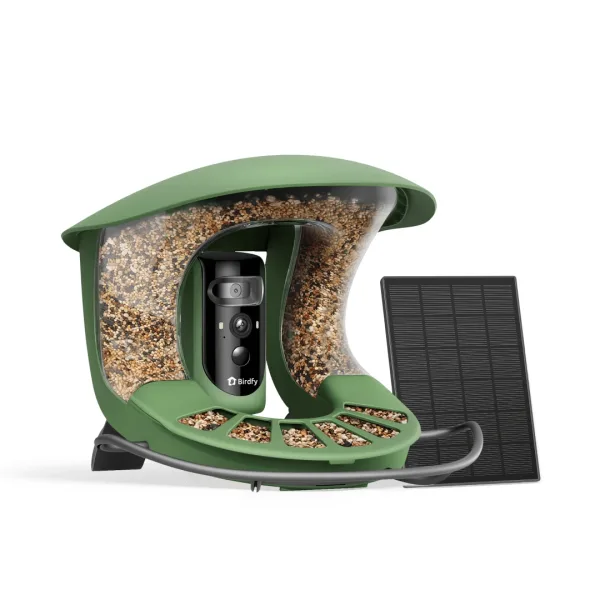
Birdfy keeps a wide view of the perch alongside a panning portrait view. In roughly two months with the Pro camera supplied in a Duo kit, PCMag called it the best the reviewer had tried for capturing visits. The portrait camera scanned only part of the perch, though, and a good pose was hit or miss. Shaded footage on sunny days had excellent color with smudginess and compression artifacts; overcast footage looked grainier and duller. The reviewer still recommended Bird Buddy Smart Feeder Pro for its camera and app, a separate rival.
 Birdfy
Kiwibit sometimes misses a visit before focus becomes the issue. WIRED saw only a handful of missed visits over four weeks in western Washington and sometimes saw lens movement startle birds. TechRadar often found recordings began after landing. iTechGuides prefers Kiwibit's specified 4K autofocus for detail and Birdfy's simultaneous perspectives for observing a visit.
One Birdfy owner on Reddit reported that new Moments stopped arriving and the tracking lens stayed black with a spinner, even after a pin reset.
Kiwibit's slow motion divides reviewers
Kiwibit's 4K mode trades motion smoothness for detail at 15 frames per second. TechRadar's Sam Kieldsen found the clips jerky and preferred 1080p at 60 fps. Autofocus usually worked in his southeast England garden, but birds close inside the tray sometimes had sharp bodies and soft eyes or beaks.
Kiwibit's 120 fps mode looked like 15 fps to TechRadar despite setting changes. Its reviewer heard no sound in either slow-motion mode, even at normal playback speed, though ordinary clips captured bird sounds. That slow-motion result contradicts Kiwibit's announcement that normal-speed playback includes audio. Better With Birds found slow motion useful for following quick birds, while Notebookcheck described some choppiness and occasional audio lag when streaming clips in the app.
Birdfy specifies 20 fps for both normal views, with a 100 fps portrait mode at 768 × 768 and a 20 fps wide view at 1280 × 720 in its high-frame setting. PCMag observed about 1080p at 20 fps and 2–4 Mbps in most saved primary-lens clips.
Birdfy specifies white-light night vision, and PCMag saw it activate without recording a nocturnal visitor. Kiwibit's exact-model specification says no night vision, while Better With Birds describes an Auto Night Vision setting in the app. For nocturnal visitors, Birdfy's white light is the surer bet.
Birdfy includes species ID; Kiwibit makes the version matter
Birdfy includes automatic species identification free for life under its November 2026 policy. Kiwibit's subscription version includes a 30-day trial, then requires Family for feeder AI; the Lifetime AI version includes continuing identification and 60-day cloud storage. The two Kiwibit versions change the continuing cost of the same camera choice.
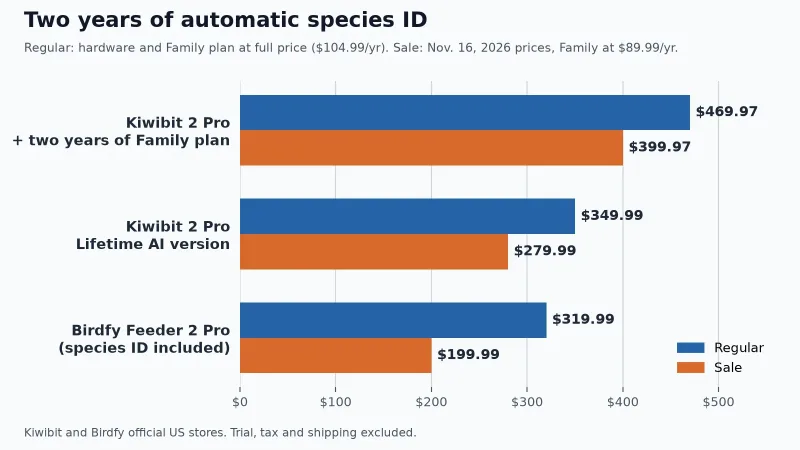
Two years of ID at November 16 sale prices total $399.97 for Kiwibit's subscription version, $279.99 for its Lifetime AI version and $199.99 for Birdfy 2 Pro. At regular prices, with Family at $104.99 a year instead of the current $89.99, the totals are $469.97, $349.99 and $319.99. The trial is excluded.
Both feeders can misidentify birds, but only Birdfy tags several birds on the perch at once. WIRED notes that, unlike Birdfy feeders, Kiwibit cannot ID multiple birds at a time, and TechRadar saw a Kiwibit clip with three species receive a single tag after it identified four of five visiting species. WIRED's Kat Merck encountered numerous wrong IDs over four weeks, including species outside her area. PCMag saw correct Birdfy IDs as well as errors with poor poses, partial birds and motion blur. WIRED finds Birdfy's app more intuitive and calls Kiwibit's subscription view a bit chaotic; TechRadar also found it cluttered, while Digital Camera World liked it. For casual bird-watchers, WIRED points to a more polished experience at less than half the price, while photography fans may find Kiwibit's image quality worth the fee.
Kiwibit keeps local clips; Birdfy organizes visits in the cloud
Kiwibit offers local microSD recording alongside its cloud service, while Birdfy 2 Pro is cloud-only, with microSD playback unavailable. Kiwibit currently specifies an optional card up to 128 GB, supplied separately, despite WIRED's report of support up to 512 GB.
Birdfy's free tier keeps 20-second Moments for 30 days with a 5 GB collection. Plus extends those limits to 30 seconds, 60 days and 20 GB; Pro to 60 seconds, 90 days and 100 GB. Kiwibit Plus allows clips up to three minutes and 60-day cloud storage. For long uninterrupted visits, that three-minute limit differs substantially from Birdfy's tiered short clips; for a local archive, Kiwibit supplies the card option.
Kiwibit connects on 2.4 or 5 GHz and includes Alexa live view and voice commands. Birdfy uses 2.4 GHz. PCMag's connection stayed stable for two months but needed a manual reset after an internet outage and used about 2 GB upstream on a typical day. For family viewing, Kiwibit allows up to 20 users; Birdfy allows unlimited guests, who can view but cannot change settings or delete videos.
Birdfy moves the solar panel away from the feeder roof
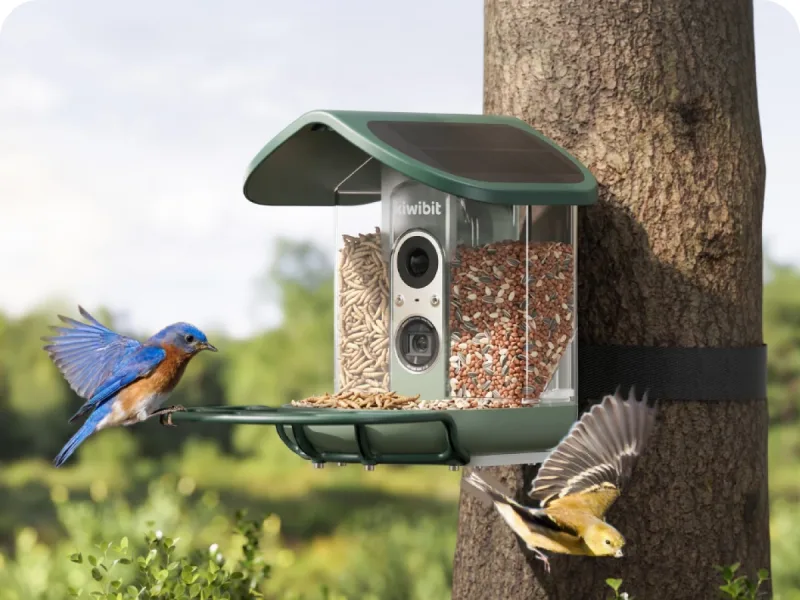
Birdfy's included 3 W solar panel mounts separately, so the panel and feeder can occupy different positions. Kiwibit's 5 W solar roof keeps both in one place. Kiwibit has a removable 5,200 mAh battery; Birdfy has a 9,000 mAh battery. Birdfy's panel has a permanently attached USB-C cord. PCMag's reviewer had lost previous panels to chewed or frayed cords, an experience with earlier panels, not this Pro unit.
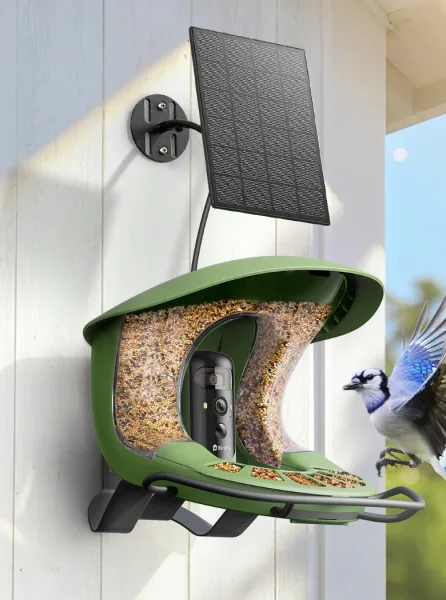
Solar kept both feeders charged in their reviewers' gardens. Kiwibit remained at 99% weeks after a full USB charge in TechRadar's sunny late-summer and early-autumn test, with a few hours of direct sun daily. WIRED's unit stayed charged over four weeks that included cloudy days. Birdfy remained above 80% after a rainy week and above 90% in sunny periods with frequent visits in PCMag's test.
Kiwibit's divided hopper and Birdfy's removable camera change upkeep
Kiwibit holds 1.7 L total in two seed compartments and has a removable hopper. Better With Birds found the camera itself nonremovable. Birdfy's detachable camera separates that part from feeder cleaning, although its top drew a mixed first impression in an unboxing: removal was less straightforward than expected and the perch felt flimsy.
Birdfy's removable camera suggested simpler cleaning in Kurtis's first-impression assessment (06:35). PCMag found the feeder straightforward to fill and clean during use.
Two customers on Birdfy's product page separately reported seed needing daily shaking and squirrels damaging plastic within two weeks. For a metal alternative when chewing is the concern, the Kiwibit 2 Pro versus Birdfy Metal 2 4K comparison examines that different Birdfy model.
Kiwibit carries IP65 and a −4 to 122°F operating range; Birdfy carries IP66 and 14 to 113°F. Kiwibit's stated temperature range extends further at both ends, while Birdfy has the higher ingress rating.
The November sale reverses the starting-price order
Kiwibit's subscription version starts at $259.99 regularly, against $319.99 for Birdfy 2 Pro. On November 16, the sale prices were $219.99 and $199.99, reversing that order. Kiwibit's Lifetime AI version moves from a regular $30 premium to an $80 premium at sale prices, $279.99 against $199.99.
Both prices cover solar and supplied wall/tree mounting hardware, with optional poles outside the totals. An existing pole can work, but fit changes the experience. Jared Desrosiers's setup conclusion (06:40) describes a simple Birdfy installation on his pole without drilling a hole.
Birdfy's mount still has to fit the surface: PCMag's strap was too short for a thick tree and its clamps too large for the pole he had.
Final Verdict
For most backyards, Birdfy Feeder 2 Pro is the better buy: it costs less, includes species ID without a subscription, identifies several birds at once and has the friendlier app in WIRED's view. Kiwibit 2 Pro is the pick for photo-quality stills and local recording, if you accept its subscription or Lifetime AI premium.
- Casual watching, families and the lowest two-year cost: Birdfy 2 Pro, with portrait framing and image smudging among PCMag's reservations.
- Photo-quality stills and selectable motion modes: Kiwibit 2 Pro, which WIRED credits with camera-quality images; TechRadar preferred 1080p at 60 fps over its jerky 4K.
- Local recording and continuing ID on Kiwibit: the Lifetime AI version, plus an optional microSD card, avoids the subscription version's annual Family payments.