TP-Link Deco BE63 vs eero Pro 7: Which Mesh System Fits Your Home?
TL;DR
The TP-Link Deco BE63, also sold as the Deco 7 Pro BE10000, costs $279.99 for a 2-pack at TP-Link's online store as of Nov. 24, down from $449.99. The eero Pro 7 2-pack has a sale price of $399.99 on eero.com, down from $549.99, and eero's Black Friday sale runs through Nov. 29. That puts the eero $120 higher at sale prices and $100 at list. With TP-Link's Security+ and Advanced Parental Controls on one side and eero Plus on the other, two years come to $387.95 for the Deco and $599.97 for the eero at those sale prices.
- Speed: Tom's Hardware measured the BE63 faster on 6 GHz and 5 GHz at 6 and 25 feet, and RTINGS' head-to-head comparison agrees. Tom's Guide had the eero ahead at 50 and 75 feet from the main router, 994.4 vs 610.7 Mbps at 50 feet. CNN found little difference on an internet speed test.
- Two-floor homes: with Ethernet between floors, the Deco's main node still has two free ports and the eero's none. With a wireless link, a BE63 satellite upstairs delivered 859.9 Mbps to the eero's 401.8 in Tom's Guide's tests, while RTINGS found the eero satellite fit for calls and light gaming and the BE63 satellite jittery.
- Wired devices: each Deco node has four 2.5 GbE ports and a USB port that shares a drive; each eero has two 5 GbE ports, so more wired gear needs a switch. The eero's ports pay off only with internet or wired gear faster than 2.5 Gbps.
- Smart home and setup: the eero works as a Thread and Zigbee hub and a Matter controller, which counts if you don't already own a hub, and it set up faster in Tom's Guide's tests.
| Deco BE63 | eero Pro 7 | |
|---|---|---|
| Price, 2-pack, Nov. 24 | $279.99 at TP-Link (list $449.99) | $399.99 at eero.com, sale through Nov. 29 (list $549.99) |
| Wi-Fi | Wi-Fi 7, tri-band (BE10000) | Wi-Fi 7, tri-band (BE10800) |
| Rated coverage, 2-pack | 5,800 sq ft | 4,000 sq ft |
| Ethernet ports per node | 4 × 2.5 GbE | 2 × 5 GbE |
| USB | 1 × USB 3.0, drive sharing | None (USB-C for power only) |
| Ethernet backhaul | Yes | Yes |
| Thread | No | Yes |
| Zigbee hub | No | Yes |
| Matter controller | — | Yes |
| Voice assistants | Alexa, Google Assistant | Alexa |
| Free parental controls | Profiles, pause, content and URL filters, bedtime | Profiles, pause, time limits, device blocking |
| Paid plans | Security+ $35.99/yr, Advanced Parental Controls $17.99/yr | eero Plus $99.99/yr |
| Warranty | 2 years | 3 years |
Prices as of Nov. 24, 2026: Deco at TP-Link's online store, eero at eero.com. Coverage is each maker's rating; eero rates each Pro 7 node for 2,000 sq ft.
📑 Table of Contents
- Tom's Hardware measured the Deco BE63 faster on 6 GHz and 5 GHz
- The eero reaches farther from the router; the Deco runs faster through an upstairs satellite
- The eero Pro 7 stays steadier on a satellite node
- The BE63 has more Ethernet ports; the eero's are faster
- eero's app gets a network running faster; Deco's offers more controls
- Only the eero Pro 7 is a Thread and Zigbee hub
- Filtering and protection cost about $200 less over two years on the BE63
- Final Verdict
- FAQ
Tom's Hardware measured the Deco BE63 faster on 6 GHz and 5 GHz
Six feet from the router on 6 GHz, the Deco BE63 pushed 1,900 Mbps to the eero Pro 7's 1,607 in tests by Tom's Hardware's Brandon Hill, who reviewed both the BE63 and the eero Pro 7. At 25 feet the BE63 held 786 Mbps to the eero's 585, and on 5 GHz it posted 1,287 vs 992 at six feet and 523 vs 463 at 25. On 2.4 GHz the two were level: 89 vs 83 Mbps up close and 54 vs 55 at 25 feet. RTINGS reached the same verdict in its head-to-head comparison, which says the BE63 "delivers faster top speeds" than the eero.
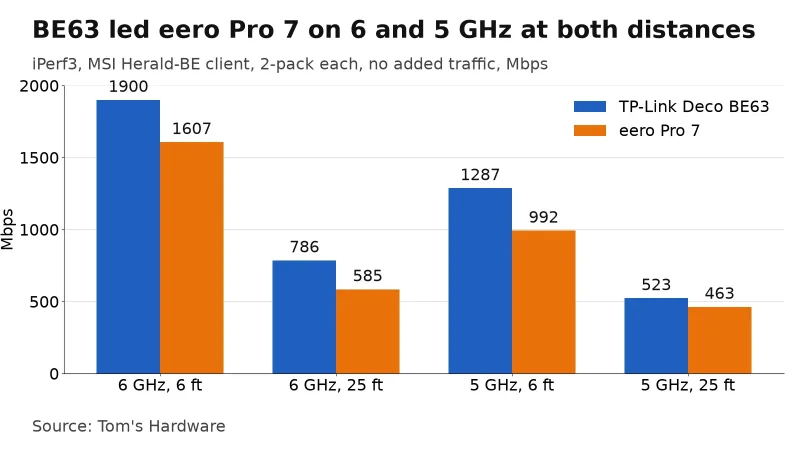
The gap widens on a busy network. With six other devices streaming 4K YouTube, the BE63 held 1,940 Mbps on 6 GHz at six feet while the eero fell to 1,217; on 5 GHz the BE63 kept 1,197 Mbps and the eero 595. At 25 feet both lost a similar share.
On a home internet line the difference shrinks to almost nothing: CNN Underscored found both within 1 to 15 Mbps of the Asus ZenWiFi BT6's 652.7 Mbps average in its apartment tests.
The eero reaches farther from the router; the Deco runs faster through an upstairs satellite
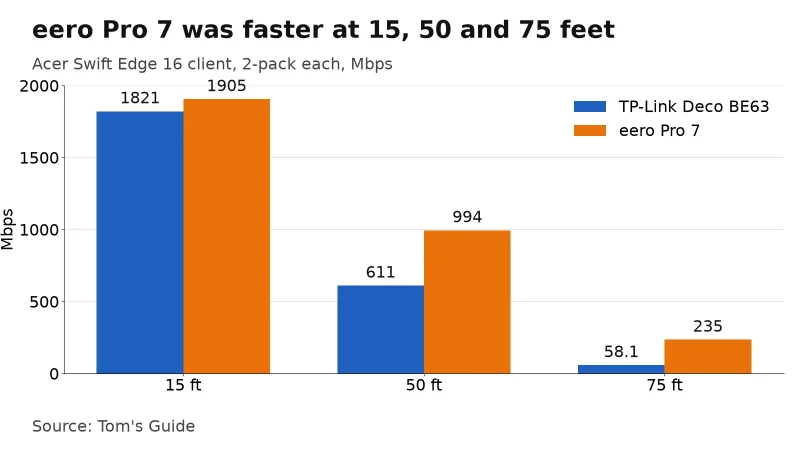
Measured from the main router, the eero Pro 7 kept more speed at a distance: Tom's Guide's eero Pro 7 review recorded 994.4 Mbps at 50 feet and 234.7 Mbps at 75 feet, and the site's BE63 review measured 610.7 and 58.1 Mbps at the same distances. Next to the router the eero led 2.309 to 2.069 Gbps, at 15 feet the two were close (1.905 vs 1.821 Gbps), and at 90 feet both were down to about 20 Mbps (20.8 vs 17.1).
Upstairs, through a satellite linked over Wi-Fi, the order flips. With the test laptop a floor above the router and 40 feet from the upstairs node, the same reviews measured 859.9 Mbps on the BE63 and 401.8 Mbps on the eero. BroadbandNow's second-floor test (05:16) of a three-node BE63 kit got 542 Mbps, and 441 with the network fully loaded. Those are download speeds; for calls and games on a satellite, latency decides, and on that count the eero's satellite held up better in RTINGS' tests.
RTINGS also ranks the BE63's range higher. Its eero Pro 7 review found the eero's 5 GHz band "notably slower at longer distances than expected," and its comparison credits the BE63 with longer range on both 5 GHz and 6 GHz. For a large house, it advises starting with a BE63 2-pack and adding a unit if weak spots remain.

With Ethernet run between floors, the wireless link stops mattering: in landpet's wired-backhaul test (09:48), every system except the Orbi 870, these two included, matched its single-router speeds through a satellite. In that layout the choice comes down to free ports on the main node.
TP-Link rates a BE63 2-pack for up to 5,800 sq ft; eero rates the Pro 7 2-pack for 4,000. Brian Nadel, who wrote both of those reviews, found that two BE63 units "left several areas uncovered" in a 3,500 sq ft home; in his eero Pro 7 review, two units nearly covered a 100-year-old home, and he expected a third to fill the dead spots.
The eero Pro 7 stays steadier on a satellite node
RTINGS' BE63 review found "disappointingly high jitter" on a BE63 satellite and called Wi-Fi gaming there disappointing; on an eero satellite, latency was only slightly worse than at the router and adequate for calls and light gaming. Wired's Simon Hill had "some lag with PC gaming" on a BE63 satellite linked to the router over Wi-Fi, and in his mesh guide reports "zero drops" with the eero Pro 7 overall.
For a gaming PC, a console or a work laptop on video calls in a satellite's room, the eero is the safer choice. On the Deco, Wired's advice is to connect it to the main node or run Ethernet between the nodes; both systems support a wired backhaul. Tom's Hardware also had to bind a TV to the nearer Deco node by hand in the app after it kept connecting to the distant main unit and stuttered.
The BE63 has more Ethernet ports; the eero's are faster
Every Deco BE63 node carries four 2.5 GbE ports that detect WAN or LAN on their own, plus a USB 3.0 port; each eero Pro 7 has two 5 GbE ports and a USB-C jack that only takes power.
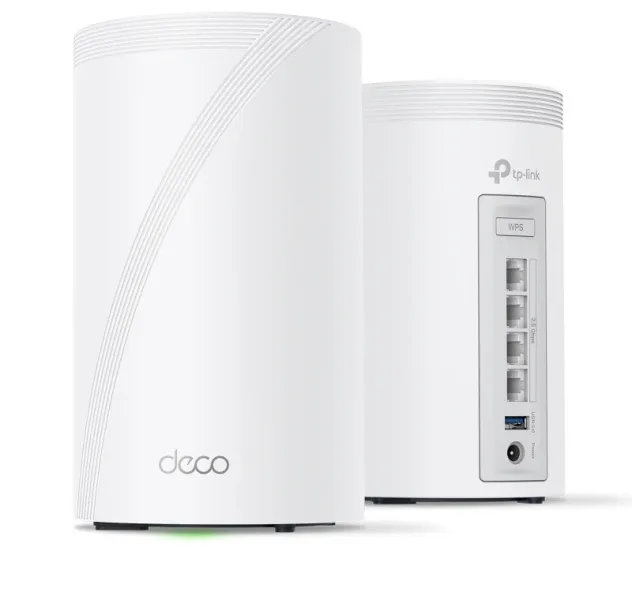
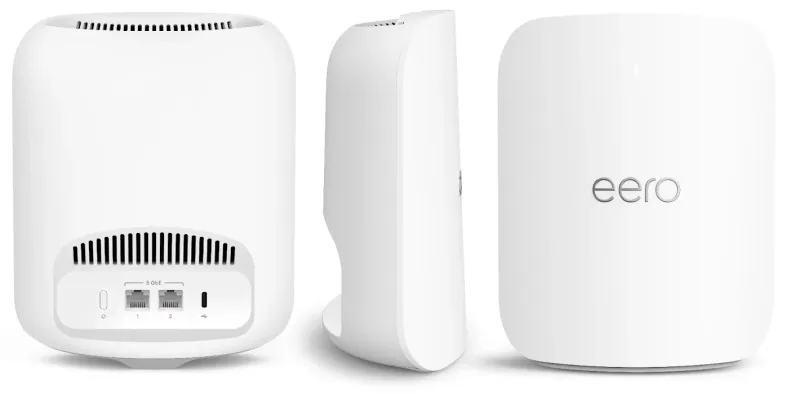
On the main node one port goes to the modem, which leaves three free on the Deco and one on the eero. Run Ethernet back to a satellite and the main node is down to two free ports on the Deco and none on the eero; Wired notes that using the eero's ports for backhaul "leaves no room to plug in other wired devices."
An Ethernet printer or network drive works on either system. On the eero it takes the free LAN port, and once that is gone, more wired gear needs a switch. The Deco adds a way the eero lacks: its USB port shares a USB drive across the network as an FTP, media or Samba server.
The eero's faster ports pay off only above 2.5 Gbps, whether that is the internet plan, a wired computer or the link between nodes. On a 5 Gbps plan, landpet's internet speed test shows the BE63 capped just under 2.5 Gbps by its port, while the eero's port, in the reviewer's words, "allows up to 5 gigs" though its Wi-Fi can't go that fast. Over a cable, Tom's Guide measured 3.797 Gbps through the eero's 5 GbE port.
CNN's Henry T. Casey points homes with many devices to hardwire toward systems with four Ethernet ports per unit.
eero's app gets a network running faster; Deco's offers more controls
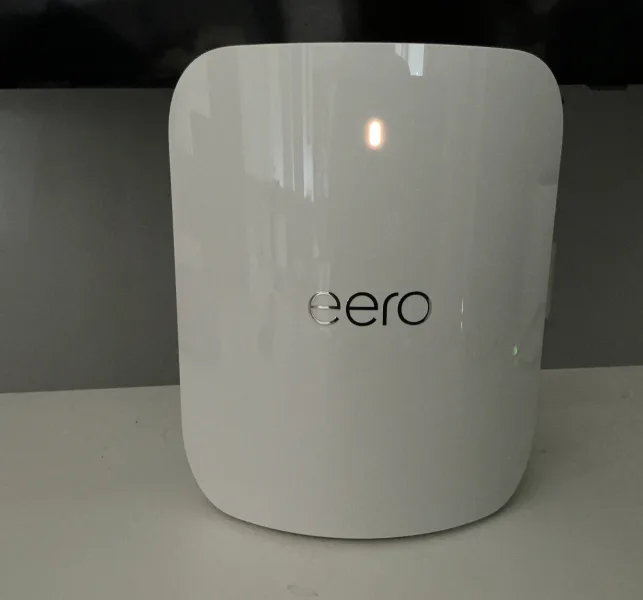
CNN found "no easier solution for managing your mesh Wi-Fi router than Eero's mobile app," and Wired names eero the simplest mesh system to set up. Tom's Guide's setup took a little under 7 minutes for the eero Pro 7 and 10 minutes 50 seconds for the BE63, both including a firmware update. In Kephren's review (02:09), swapping an older eero Pro 6E for the Pro 7 takes about five minutes.
TP-Link's app can get in the way: CNN found it "a little annoying with unnecessary notifications," including a back-to-school sales alert. BroadbandNow needed three hard resets of the modem before the first BE63 node connected.
The Deco app lets you give a work laptop or game console priority over other devices, a manual QoS setting by device. It also runs a separate network for smart plugs, a VPN server and WPS pairing. Tom's Hardware's reviewer, who usually prefers a router's web interface, calls the Deco app "so well-designed that I didn't mind using it," while in his eero review he notes that eero doesn't support WPS and that the app "doesn't offer much granular control."
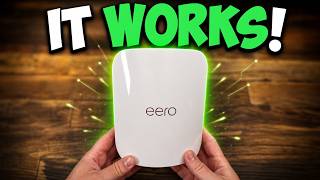
For a network that never needs a visit to the settings, the eero gets there with less effort.
Only the eero Pro 7 is a Thread and Zigbee hub
Each eero Pro 7 node has Thread and Zigbee radios and works as a Matter controller, so in a home without a hub, Zigbee sensors and Thread devices connect to the router itself. PCMag lists cameras and door locks among the smart home devices the eero Pro 7 can control, and the system works with Alexa. A home that already runs a Zigbee hub or a Thread border router gets no new ability from these radios.
The BE63 works with Alexa and Google Assistant, and Tom's Hardware controlled TP-Link Kasa switches and bulbs straight from the Deco app. Tom's Guide describes the app's Discover area as the place for Matter and surveillance cameras. The BE63 has no Thread or Zigbee radio, so without an existing hub a Zigbee motion sensor or a Thread lock needs one.
Filtering and protection cost about $200 less over two years on the BE63
Content filters are free on the Deco and paid on the eero. RTINGS lists profiles, pausing, content and URL filters and bedtime in TP-Link's free HomeShield tier; eero's free app covers profiles, pausing, time limits and blocking devices, while content filters need eero Plus at $99.99 a year or $9.99 a month. eero Plus also bundles ad blocking, a VPN, antivirus for up to 20 devices and 1Password.
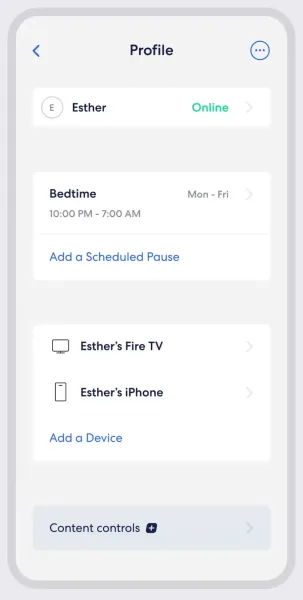
TP-Link sells its extras separately: Advanced Parental Controls at $17.99 a year adds per-app filters and limits, history and reports, and Security+ at $35.99 a year adds web protection and intrusion prevention. Paid yearly, those two TP-Link plans against eero Plus cost $557.95 vs $749.97 over two years at list prices, though the eero bundle covers more. TP-Link's Total Security, which adds antivirus and a VPN, brings the Deco to $479.97 at the sale price. If content filters are all a household needs, the Deco needs no plan, while eero Plus adds $199.98 over two years. Wired notes that the free HomeShield tier offers "only limited security."
Electricity trims the gap a little. Tom's Guide measured 15.2 watts per BE63 node and 10.1 and 8.1 watts for the eero pair, about $42.60 vs $25.50 a year at 16 cents per kWh, so the eero uses about $34 less electricity over two years.
eero covers the Pro 7 for three years, TP-Link the BE63 for two. Both systems are on sale in the US, and FCC rules allow updates that reduce security risks on previously authorized routers until at least Jan. 1, 2029; eero also holds an FCC Conditional Approval to get new models authorized through Oct. 31, 2027.
Final Verdict
For most homes, the Deco BE63 is the pick: it costs less, has four Ethernet ports and a USB port per node, includes content filters for free, and led on 6 GHz and 5 GHz in Tom's Hardware's tests and RTINGS' comparison.
- Several wired devices or Ethernet between floors: Deco BE63, which keeps two free 2.5 GbE ports on the main node even with a wired backhaul, plus USB drive sharing.
- Fast downloads upstairs over a wireless link: Deco BE63, 859.9 vs 401.8 Mbps through a satellite in Tom's Guide's tests.
- Video calls and gaming on a wireless satellite: eero Pro 7, adequate for calls and light gaming in RTINGS' tests, where the BE63 showed high jitter.
- Content filters without a subscription: Deco BE63, free in the HomeShield tier.
- Zigbee sensors or Thread devices and no hub yet: eero Pro 7, which works as the hub and a Matter controller.
- Internet faster than 2.5 Gbps or the quickest setup: eero Pro 7, with 5 GbE ports and a setup under 7 minutes in Tom's Guide's test.
- Skip the Deco BE63 if your smart home runs on Zigbee or Thread and you don't already have a hub, or you game over Wi-Fi on a satellite with no Ethernet to it.
- Skip the eero Pro 7 if you want several wired devices at the main node without adding a switch, or content filters without a subscription.