Mecpow X3S 7W vs ATOMSTACK Swift 12W: Cutting Power or Workspace?
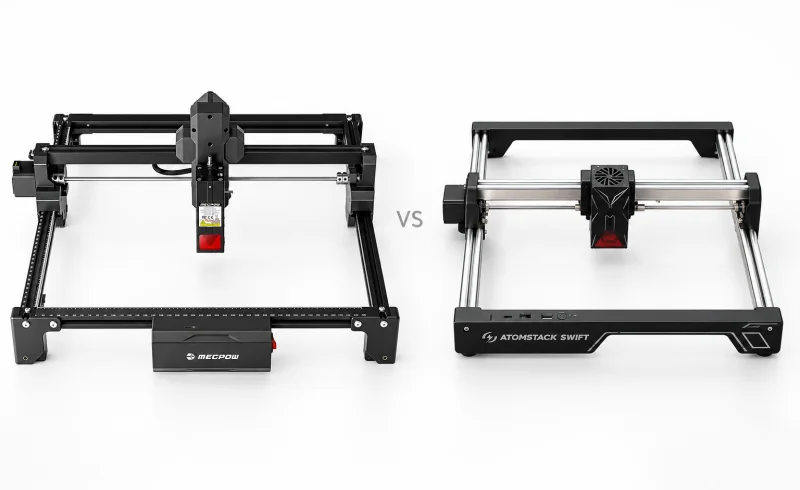
Choose the Mecpow X3S 7W for larger flat designs or LaserGRBL, or the ATOMSTACK Swift 12W for blue-laser work across a wider operating temperature range.
TL;DR
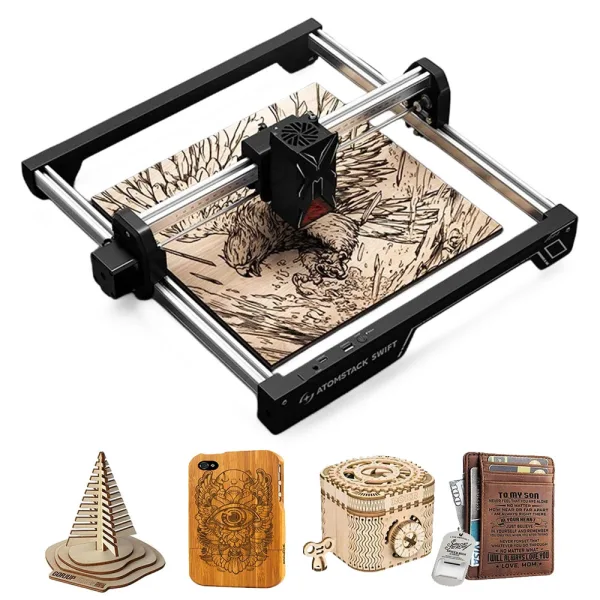
The ATOMSTACK Swift 12W has the advantage for regular wood cutting, while the Mecpow X3S 7W offers more room for larger designs. The difference starts with their laser modules: Swift delivers 12W of optical output versus the X3S's 7W. That extra power gives Swift more flexibility when cutting thicker stock or reducing the number of passes. It does not automatically produce sharper engravings.
The X3S provides a 360 × 360 mm working area, compared with Swift's 300 × 300 mm. It also supports LaserGRBL, which AtomStack specifically advises against using with Swift. For larger signs, plaques, or an established LaserGRBL workflow, those differences may matter more than laser power.
Both are open-frame diode machines that require proper laser protection, ventilation, and fire precautions. Neither is a fully enclosed desktop appliance.
| Feature | Mecpow X3S | ATOMSTACK Swift 12W |
|---|---|---|
| Setup and operation | ||
| Focus method | Lower head until deployed tab touches material; lock and retract tab [1] | Lower module onto deployed focus block; lock height and turn block back [2]Guide specifies a 4 mm focal length. |
| Software and connection options | LaserGRBL, LightBurn, MKSLaser; Wi-Fi or Type-C [1]Manufacturer lists Windows, macOS, Android, and iOS support. | AtomStack Studio, AtomStack app, LightBurn; Type-C or Wi-Fi [3] [2]Wi-Fi requires Studio Beta; wired recommended. LaserGRBL discouraged due to baud-rate instability. Mac guide specifies connecting through a hub/dock's USB-A port, not directly to USB-C. |
| Cutting and work area | ||
| One-pass plywood cutting | Not confirmed | 7 mm plywood at 100% power, 110 mm/min [3]Manufacturer claim for the 12W module. |
| Standard and expanded work area | 360 × 360 mm; expandable to 360 × 730 mm [1]Expansion requires a Y-axis extension kit. | 300 × 300 mm; expandable to 300 × 600 mm [3] [4]Expansion requires an extension kit. |
📑 Table of Contents
- What does 12W versus 7W actually change?
- Which machine accommodates larger projects?
- Materials: Where both blue diode lasers have limits
- Air assist, rotary engraving, and daily setup
- Software: An important difference for existing workflows
- Safety, ventilation, and workshop conditions
- Maintenance: What changes with regular use?
- Final Verdict
- FAQ
What does 12W versus 7W actually change?
Laser power matters most when a project involves cutting through material rather than marking its surface.
With comparable wood, focus, and cutting conditions, a 12W diode generally has more room to increase cutting speed or reduce the number of passes than a 7W diode. That difference becomes more noticeable when producing multiple identical pieces. Saving a pass on one small ornament is modest; avoiding additional passes across dozens of pieces can make a meaningful difference to the overall job.
The manufacturers provide useful examples, although their figures are not directly comparable:
- Mecpow X3S 7W: The manufacturer's operating guide lists a single-pass cut through 3 mm poplar board at 150 mm/min and 100% power.
- ATOMSTACK Swift 12W: AtomStack specifies a single-pass cut through 7 mm plywood at 110 mm/min and 100% power.
Those examples illustrate the different capabilities the manufacturers claim, not a controlled comparison. Poplar board and plywood behave differently under a laser, and neither specification establishes how both machines perform on the same sheet.
There is also some published hands-on evidence for Swift. In a January 2026 review by Hoffman Engineering, a 12W Swift cut 3 mm birch plywood in one pass at 500 mm/min without air assist. The reviewer also reported slight scorching around some deeper engraved areas. The review used a machine supplied by AtomStack, and its results should be treated as one test rather than a guarantee for every material.
Does the stronger laser also engrave better?
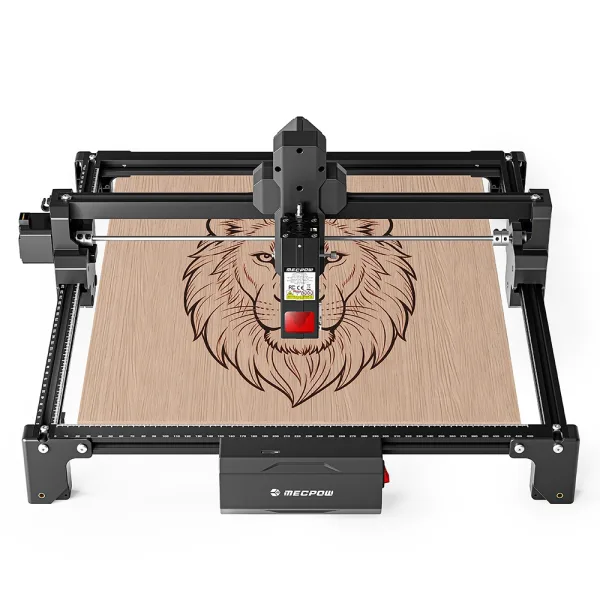
Not necessarily. Both manufacturers specify maximum engraving speeds of 10,000 mm/min, but that figure says little about the contrast, depth, or consistency achievable on a particular material.
Mecpow advertises a 0.05 × 0.07 mm laser spot for the X3S 7W, while AtomStack lists 0.08 × 0.04 mm for Swift. Both are small on paper. Neither measurement alone establishes which machine will reproduce tiny lettering, photographs, or QR codes more reliably.
For engraving, the material and settings often become the deciding factors. A dark mark can look sharp while losing detail through excessive charring. A lighter mark may preserve fine lines but lack sufficient contrast.
A Swift user's October 2026 wood-engraving experiments illustrate the problem: QR codes remained readable at 2500 mm/min with both 25% and 35% power, yet uneven charring made the final appearance less predictable. The author explored additional coloring steps to improve consistency.
For either machine, testing a small version of the actual design on leftover material is more informative than relying solely on the advertised laser spot or maximum speed.
Which machine accommodates larger projects?
The X3S has a straightforward physical advantage: 60 mm of additional travel on each axis.
Its standard 360 × 360 mm engraving area accommodates a 330 mm square plaque or design. The Swift's 300 × 300 mm area cannot accommodate that same artwork at full size without dividing or resizing it.
For smaller objects, such as coasters, keychains, ornaments, and labels, both working areas provide room for individual pieces or groups of pieces arranged together.
The difference becomes more substantial with optional extension kits:
- Mecpow X3S: Up to 360 × 730 mm.
- ATOMSTACK Swift: Up to 300 × 600 mm.
A long wooden sign measuring 650 mm along its longest side falls within the X3S's extended travel but exceeds Swift's extended 600 mm dimension. The additional 60 mm of width also matters for designs that cannot be rotated to fit.
These measurements describe the available engraving area, not the maximum thickness of a workpiece. Raised objects, clamps, honeycomb beds, and rotary attachments introduce separate clearance requirements.
For flat projects comfortably within 300 × 300 mm, the larger X3S frame offers little practical advantage by itself.
Materials: Where both blue diode lasers have limits
Wood, bamboo, suitable leather, cardboard, and certain dark acrylics are natural applications for these machines. But the material's composition and optical properties matter as much as the laser's power.
A 12W blue diode does not suddenly become capable of cutting everything that a 7W diode cannot.
For example, opaque black acrylic can absorb enough blue laser energy for cutting, while clear acrylic largely transmits that wavelength. Neither machine is an appropriate solution for cutting transparent acrylic with its standard blue diode module.
Metal presents another limitation. These machines can mark some coated or anodized surfaces, and certain stainless-steel marking effects may be possible under suitable conditions. Neither standard blue diode module is designed to cut metal.
Both manufacturers offer optional infrared modules for different marking applications:
- Mecpow lists a 1.2W infrared module compatible with the X3S.
- AtomStack lists a 1.8W infrared module compatible with Swift.
These are separate laser modules, not additional power applied to the standard blue diode. Infrared compatibility may matter for certain metal-marking projects, but the wattage figures alone cannot establish which accessory will produce the required result.
The LightBurn explanation of laser wavelengths provides a useful distinction between blue diode, infrared, and CO₂ lasers.
Material safety is equally important. PVC, vinyl, and unidentified plastics or coatings can release dangerous fumes when heated by a laser. Neither higher power nor improved ventilation makes an unsuitable material safe to process.
Air assist, rotary engraving, and daily setup
The accessories surrounding a laser engraver can change its usefulness considerably. Both machines support additional equipment, but their compatibility requirements differ.
Air assist for cleaner wood cutting
Air assist directs a stream of air toward the cutting point. It helps clear smoke and debris from the beam path and can reduce scorching around cut edges.
The X3S supports an external air pump, which is not included as standard equipment.
Swift has a more specific compatibility requirement. According to AtomStack's setup instructions, its laser module does not have a preinstalled air-assist nozzle. The manufacturer specifies the F40 air-assist system, which includes nozzles that must be fitted to the appropriate laser module.
For occasional surface engraving, air assist may be less important than it is for frequent cutting. For repeated plywood cuts, it can affect both the appearance of the edges and the amount of cleaning afterward.
Air assist should not be confused with smoke extraction. Moving smoke away from the laser spot does not remove hazardous fumes from the room.
Cups, bottles, and other cylindrical objects
Neither machine engraves a curved surface in the same way it engraves a flat board. A rotary attachment turns the object while the laser follows the design.
Mecpow identifies its G3 Pro and G5 rotary rollers as compatible accessories for the X3S.
AtomStack supports the R6 roller and R8/R8 Pro rotary attachments for Swift. The distinction matters: a roller supports and rotates an object on its surface, while a chuck-style attachment grips the object. A chuck can be more appropriate for shapes that do not sit reliably on rollers.
Swift also requires additional height under the frame. AtomStack specifies threaded riser feet for its recommended rotary setup.
With the compatible R6 or R8, the supplied accessory cable connects to Swift's accessory port for recognition. However, automatic recognition does not eliminate all software setup. In LightBurn, the correct rotary type and dimensions still need to be configured.
If cylindrical objects are a major part of the intended work, consider the shape and dimensions of the actual objects rather than treating rotary compatibility as a simple yes-or-no feature.
Focusing and workpiece clearance
Both machines use manual focusing, although the mechanisms differ.
On the X3S, a folding focus tab establishes the laser's height above the material. Swift uses a focus knob beneath the laser module. The knob is extended until it touches the workpiece, then retracted after the module is secured.
Neither method is especially complicated, but clearance deserves attention.
The Hoffman Engineering Swift review specifically notes that the laser module sits close to the material when focused. Raised clamps, protruding hardware, or portions of a rotary attachment can obstruct the moving head.
That is particularly relevant for uneven wooden blanks, assembled objects, or materials secured with tall hold-downs. Check the full movement path before starting a job, not just the clearance directly beneath the laser at its initial position.
Software: An important difference for existing workflows
Both machines support LightBurn, so an established LightBurn workflow does not automatically favor either model.
The bigger distinction concerns alternative software.
Mecpow X3S: LaserGRBL and MKSLaser
The X3S supports LightBurn, LaserGRBL, and the MKSLaser mobile application.
For someone already working with LaserGRBL on Windows, that compatibility avoids switching to unfamiliar software solely to operate the engraver.
Mecpow also supports Wi-Fi control through MKSLaser. Its user manual notes an important detail: a TF card must be inserted for engraving-file transfers through the mobile application.
The Wi-Fi feature is therefore useful, but it is not the same as unrestricted wireless control from any design program.
ATOMSTACK Swift: AtomStack Studio and LightBurn
AtomStack recommends AtomStack Studio and LightBurn for Swift.
Studio includes material presets and automatically sets the engraving area when the correct machine is selected. That reduces some initial configuration work, particularly for someone without an existing library of laser profiles.
In LightBurn, the Swift's work area must be set to 300 × 300 mm or configured using the file supplied on the TF card.
AtomStack explicitly discourages LaserGRBL because Swift communicates at 460800 baud, which the manufacturer says LaserGRBL does not handle reliably in this configuration. The potential symptoms include interrupted movement and data errors.
Swift also supports Wi-Fi through AtomStack Studio Beta, but AtomStack recommends a wired connection for normal use.
There is an additional consideration for Mac users: AtomStack instructs users to connect Swift through a USB-A port on a hub or docking station, rather than directly to a Mac's USB-C port. The USB-C cable also needs to support data transfer, not charging alone.
In practice, the decision is simple: LaserGRBL compatibility favors the X3S, while AtomStack Studio may appeal to someone starting without an established software workflow. LightBurn remains an option with either machine.
Safety, ventilation, and workshop conditions
The open-frame design is one of the most consequential similarities between these machines.
Both use high-power Class 4 lasers. The beam and potentially hazardous reflections are not fully contained by the machine frame. The small protective shield around a laser head is not equivalent to a properly rated, enclosed and interlocked laser system.
Appropriate wavelength-rated laser eyewear, a suitable enclosure, controlled access to the operating area, and effective extraction of smoke and fumes all matter. A fire extinguisher should be accessible, and the machine must not be left running unattended.
Mecpow lists a tilt alarm that stops the X3S when the frame exceeds a specified tilt angle, along with travel limit switches. AtomStack documents a power button that can quickly interrupt Swift's operation.
Those controls serve useful purposes, but they do not eliminate the risks of reflected laser light, harmful fumes, or material ignition.
AtomStack recommends the FB2 protective enclosure for Swift, with the D3 purifier as a compatible extraction option when used with an enclosure. Mecpow lists the FC1 enclosure and P50 purifier among compatible X3S accessories.
Check the actual enclosure configuration, exhaust arrangement, and laser-safety requirements rather than assuming that a compatible accessory automatically provides complete protection.
Does garage temperature affect the decision?
It can, especially where temperatures change significantly between seasons.
The X3S manual specifies an operating temperature of 5–30°C and relative humidity of 35–65%.
AtomStack gives Swift's blue-light laser an operating range of 0–35°C. Its optional infrared module has a narrower 10–30°C range.
Swift therefore has a wider stated operating-temperature range with its standard blue diode module. That can matter in an unheated workshop or a room that becomes particularly warm.
Neither rating means the equipment is suitable for damp conditions, condensation, or uncontrolled exposure to dust. A garage that regularly becomes wet or develops condensation needs environmental improvements regardless of the engraver selected.
Maintenance: What changes with regular use?
Laser engraving creates smoke, fine debris, and deposits that can accumulate on optical surfaces and moving components.
Dirty optics can reduce effective laser output and make previously reliable cutting settings less consistent. That matters particularly when a machine appears to require slower speeds or additional passes over time.
Mecpow recommends periodic lens cleaning for the X3S.
AtomStack provides a more detailed Swift maintenance schedule. For frequent use, it recommends daily optical cleaning; for lighter use, weekly cleaning.
Swift's 12W module has both a focus lens and a removable window lens. AtomStack specifies 99% anhydrous ethanol or a suitable optical lens cleaner, used gently with a lint-free cloth. Cleaners containing ammonia or acetone should be avoided.
Its guide rails also need attention: AtomStack recommends weekly brushing in dusty environments and monthly cleaning in cleaner surroundings.
These requirements do not establish that Swift is inherently harder to maintain than the X3S. They illustrate the routine attention an open-frame engraver needs, particularly in a workshop where wood dust and smoke are common.
Final Verdict
The Mecpow X3S 7W is better suited to larger flat engraving projects and existing LaserGRBL workflows. Its 360 × 360 mm workspace gives it a meaningful advantage for plaques and signs that exceed Swift's standard dimensions. The optional extension kit increases that advantage for longer artwork.
The ATOMSTACK Swift 12W is better suited to regular wood cutting within a smaller working area. Its higher optical output provides more cutting headroom than the X3S 7W, particularly where material thickness and repeated passes matter. AtomStack Studio also offers a defined starting workflow for users unfamiliar with laser software.
For predominantly surface engraving on small wooden objects, the decision is less clear. Both machines have fine advertised laser spots, similar maximum engraving-speed specifications, LightBurn compatibility, and optional rotary and air-assist equipment. There is insufficient comparable testing to declare either one consistently superior in engraving quality.
The distinction is ultimately between more physical working space on the X3S and more standard laser output on Swift. If projects require both a larger engraving area and 12W output, Mecpow also offers a separate X3S 12W version; its capabilities should not be confused with those of the 7W model compared here.