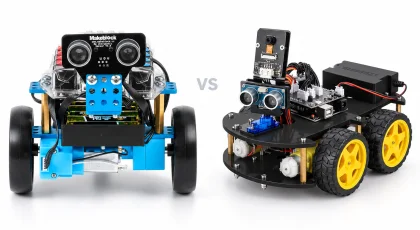
Makeblock mBot Robot Kit vs ACEBOTT 4WD ESP32 Robot Car Starter Kit
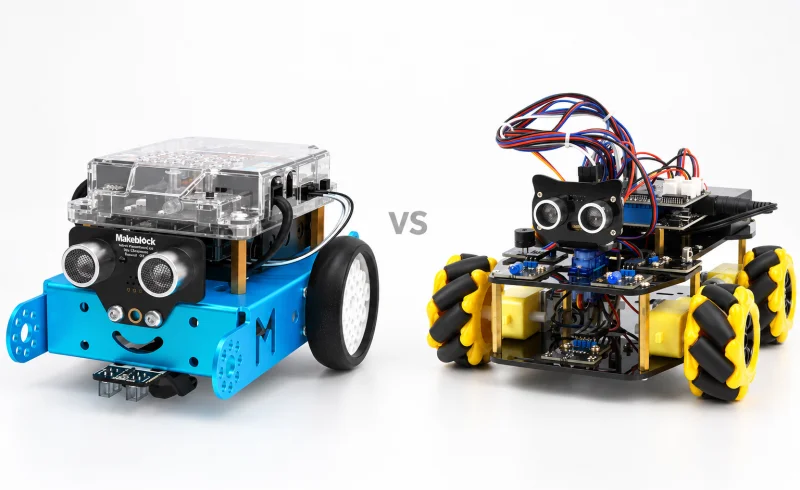
Choose mBot for drive-and-turn lessons and graphical-to-C/C++ coding, or ACEBOTT QD001 for Mecanum movement and Python; check mBot's version and QD001's board revision.
TL;DR
The biggest difference between these kits is not line following or obstacle avoidance—both can handle those introductory projects. It is the kind of robotics each platform makes easiest to explore next.
Makeblock mBot is the more straightforward starting point for conventional two-wheel robot motion, block-based programming and Arduino C. Its mCore controller, simple drivetrain and mature Makeblock ecosystem keep early projects relatively easy to understand. It also has broad compatibility with Makeblock mechanical and electronic parts and LEGO bricks.
ACEBOTT QD001 starts with a more capable mechanical platform: four independently driven Mecanum wheels and an ESP32 controller. ACEBOTT lists Arduino, ACECode and Python support, and the car can be controlled by IR, Wi-Fi/web and an app. Its expansion system is organized around larger themed projects such as cameras, AI vision, tracks, GPS and a robotic arm.
Connectivity deserves particular attention with mBot. The Bluetooth and 2.4GHz versions are not interchangeable in day-to-day use. Makeblock's mobile-app instructions use Bluetooth, while the 2.4GHz module is designed around a USB adapter connected to a computer. Makeblock also documents USB as necessary for firmware updates on the 2.4GHz model.
| Feature | Makeblock mBot Robot Kit | ACEBOTT 4WD ESP32 Robot Car Starter Kit |
|---|---|---|
| Programming and setup | ||
| Assembly guidance | Visual instructions; no soldering; included screwdriver is sufficient. [1] [2] [3]One reviewer found the instructions lacked detail for complete novices and used YouTube. | 16 step-by-step tutorials covering assembly, programming and control. [4] |
| Battery requirements | 4 AA batteries or a 3.7 V LiPo; battery not included. [5] [2]The IR remote also requires a CR2025 battery, not included. | 18650 batteries were not included in a builder's kit. [6]Reported for the author's April 2026 build. |
| Programming tools and workflow | mBlock block coding or Arduino IDE C/C++; USB and version-specific wireless connections. [3] [7] [1]mBlock 5: live programs need a connection; uploads run disconnected. Arduino IDE requires USB. Wireless options include Bluetooth or 2.4G; the 2.4GHz model uploads autonomous programs only via USB. | Arduino, ACECode and Python. [4] [6]A builder using ESP32 MAX V1.0 reported that uploads required a GPIO0-to-GND jumper, pressing reset and retaining the jumper until upload completed. |
| Movement and interaction | ||
| Expansion path | Compatible with 500+ Makeblock electronic and mechanical parts and LEGO bricks. [1] [2] | Optional expansion packs add cameras, tracks, AI vision or a robotic arm. [4] [8] [6]Expansion packs require the QD001 base; compatible packs can be combined. |
| Remote-control options | IR remote control; wireless computer control on the 2.4GHz version. [9] [10] [3]The 2.4GHz version does not support phones or tablets. Nearby mBots may respond to the same IR remote. | IR, Wi-Fi, web and app control. [4] [8] [6]A builder reported separate IR and Wi-Fi example programs, and loss of phone internet access while connected to the car's Wi-Fi. |
| Drive and autonomous activities | Two-wheel rover; manual driving, obstacle avoidance and line following. [9] [10] [3]Preset modes require factory firmware. Direction commands are available only in manual-control mode. | 4WD Mecanum car; multidirectional movement, line tracking and obstacle avoidance. [4] [6]A builder reported hit-and-miss obstacle avoidance in their build. |
📑 Table of Contents
Which movement model do you want to learn?
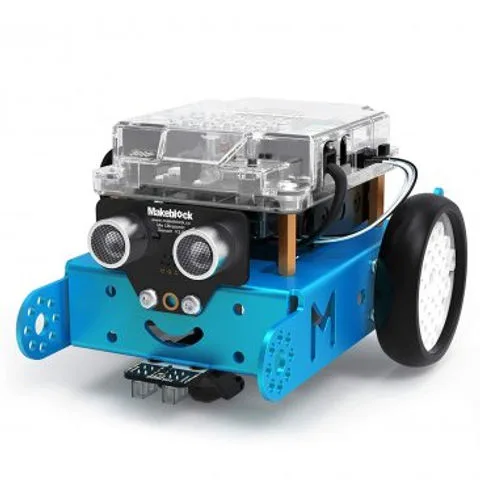
mBot uses the classic educational-robot layout: two powered wheels plus a small supporting wheel. To turn, the robot changes the relative speed or direction of its left and right motors. That makes concepts such as forward motion, turning radius, speed and differential steering easy to see in code.
Makeblock's mBot documentation includes forward, reverse, left and right movement as well as adjustable speed. For a first robotics course, that simplicity can be useful because the relationship between a command and the robot's physical response is usually easy to follow.
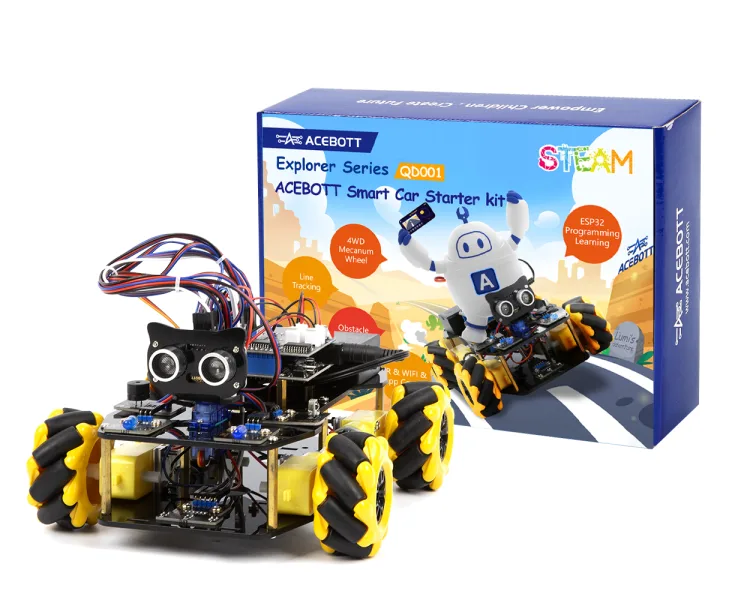
QD001 takes a different approach. Its four Mecanum wheels allow the software to control movement that a normal two-wheel rover cannot reproduce in the same way, including lateral motion and other multidirectional maneuvers.
That extra freedom also adds complexity. Instead of reasoning about only a left and right drive side, a learner can eventually work with the direction and speed of four motors. For projects centered on robot motion itself, that creates more room to experiment. For a first lesson in basic sequencing and steering, mBot's simpler drivetrain is easier to reason about.
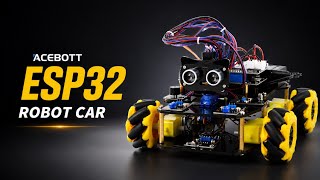
Both platforms support line-following and obstacle-avoidance projects. Those features are useful, but they should not be the main distinction between the two kits. The more consequential difference is whether the learning path should begin with conventional differential steering or a four-motor Mecanum platform.
Which coding environment fits the learning path?
mBot's software path is relatively clear. Makeblock's mBlock 5 documentation supports block-based programming and Arduino C. In Upload mode, mBlock can also show the Arduino C corresponding to a block program.
That progression is useful when the goal is to understand programming concepts visually first and then see how the same logic is represented as text. The mCore board is based on the ATmega328, so mBot also sits close to the traditional Arduino ecosystem rather than hiding the controller behind a completely proprietary architecture.
QD001 uses an ESP32 and offers a broader software mix. ACEBOTT lists Arduino, ACECode and Python for the kit and provides 16 story-based lessons covering assembly, programming and robot control.
ACECode itself is a graphical environment. ACEBOTT's ACECode documentation shows both online and upload modes and can display corresponding C and Python code. That makes QD001 particularly interesting when the lesson plan is expected to move beyond block programming while staying on the same ESP32-based platform.
The practical difference is therefore less about "blocks versus code"—both ecosystems cover that transition—and more about where the transition leads. mBot centers on blocks and Arduino C, while ACEBOTT explicitly includes Python alongside its Arduino and ACECode workflows.
How do connection and program uploads differ?
Both robots distinguish between code that runs while connected to a computer and code stored on the controller.
With mBot, mBlock 5 provides Live and Upload modes. Live mode requires the connection to remain active. Upload mode stores the program on mBot so it can continue running after disconnection.
QD001 has a similar concept in ACECode. Its online mode is intended for real-time debugging, while upload mode stores the program on the ESP32 so the controller can run independently once externally powered.
The larger difference is wireless control.
Makeblock has sold mBot with different communication modules. The 2.4GHz version uses a 2.4GHz module on the robot and a USB adapter on the computer. It requires no pairing, which is convenient when several computers and robots are being used together, but it is a computer-oriented connection.
Makeblock's mobile mBlock instructions instead connect to mBot over Bluetooth. Makeblock also states that mBot firmware cannot be updated through the 2.4GHz connection; USB is required for that step.
This makes the exact mBot communication module important. A kit intended primarily for tablets or phones should not be evaluated as though the Bluetooth and 2.4GHz configurations behave identically.
QD001 offers IR, web and app control in addition to programmable operation. That gives it more built-in control paths for projects where manually driving the robot is part of the exercise.
What can you do with the sensors?
For basic autonomous navigation, the two kits overlap considerably.
mBot has an ultrasonic distance sensor and a line-following sensor. Its factory firmware includes obstacle-avoidance and line-following modes, so those behaviors can be demonstrated even before a learner recreates them in code.
QD001 also supports line tracking and multidirectional obstacle avoidance. Combined with the Mecanum drivetrain, those sensors can become part of more elaborate movement exercises rather than only forward-driving navigation.
mBot has another advantage for small conditional-programming experiments: several useful inputs and outputs are already available around the mCore board. Makeblock documents an onboard light sensor, button, buzzer and RGB LEDs, while the robot also includes ultrasonic, line-following and infrared hardware.
That makes simple cause-and-effect exercises easy to construct: change the LEDs when the room gets darker, sound the buzzer below a certain measured distance, or make a button switch between behaviors.
QD001's stronger distinction is not one individual sensor but the combination of an ESP32 controller, four-motor chassis and modular expansion system. Its base projects cover the expected navigation tasks, while later expansions can substantially change what the robot is being used to study.
How far can each platform expand?
mBot has the more general-purpose mechanical ecosystem. Makeblock lists compatibility with 500+ Makeblock electronic and mechanical parts as well as LEGO bricks. The mCore board also exposes four RJ25 ports, allowing additional compatible modules to be connected.
That approach works well for open-ended projects where the next step may be a servo, another sensor, a display or a structural rebuild. The robot does not have to remain a car in the same configuration.
QD001's expansion strategy is more structured. ACEBOTT lists dedicated packs for a camera, AI vision, tracked movement, a robotic arm, solar power, GPS, a wireless controller and a motion-sensing glove, among others. These packs use the QD001 car as their foundation.
That creates two different styles of progression. mBot encourages assembling projects from a broad component ecosystem. QD001 provides a series of larger, defined upgrades that turn the same base vehicle into different kinds of robotics projects.
Neither approach is inherently more advanced. The useful question is whether the learner is more likely to enjoy inventing a custom mechanism from individual parts or following a defined path toward capabilities such as vision, GPS or a robotic arm.
What should you check before the first session?
mBot has a relatively simple mechanical build and includes the screwdriver required for assembly. Makeblock's current mBot specifications list either four AA batteries or a compatible 3.7V rechargeable LiPo as the robot's power source, with the battery not included.
Makeblock's assembly support page also says the infrared remote uses a CR2025 cell that is not included. Checking both power sources in advance avoids finishing the mechanical build with no way to run the robot.
There is another mBot detail worth knowing: the familiar infrared-control, obstacle-avoidance and line-following modes depend on the factory firmware. Makeblock notes that the preset modes can be restored by restoring the factory firmware. After experimenting with uploaded programs or firmware, a robot that no longer behaves like it did out of the box may simply be running different firmware.
QD001 requires more attention to hardware revision. ACEBOTT currently provides separate tutorial downloads for QD001 with ESP32 Car Shield V1.0 and V2.0. Before following wiring diagrams or code examples, identify which shield revision is actually installed and use the matching tutorial.
Power configuration should also be checked against the exact QD001 package. ACEBOTT distinguishes configurations that include 18650 cells from configurations that do not, so the presence of a battery holder does not by itself confirm that cells are in the box.
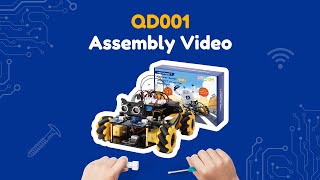
For a first session, mBot generally involves fewer platform-specific details. QD001 asks for a little more attention to its ESP32 environment, power setup and hardware revision, but that additional complexity is also part of what makes the platform more flexible for later projects.
Final Verdict
Makeblock mBot Robot Kit is the cleaner fit for a first robotics path centered on conventional steering, block-based programming, Arduino C and small experiments with sensors and outputs. Its two-wheel drivetrain makes movement code easy to understand, and the broader Makeblock/LEGO-compatible ecosystem leaves room for custom mechanical projects later.
ACEBOTT 4WD ESP32 Robot Car Starter Kit QD001 is the more appropriate platform when four-wheel Mecanum movement, ESP32 development, Python exposure or larger themed expansions are central to the plan. It starts with a mechanically and electronically more complex base, but that complexity creates additional directions for later projects.
Line following and obstacle avoidance should not decide the comparison because both kits already cover them. The more important questions are how the robot should move, which programming path matters, what devices will be used to connect to it, and whether future projects are likely to favor open-ended component building or QD001's dedicated expansion packs.
For mBot, confirm whether the kit uses Bluetooth or 2.4GHz communication before planning a phone-, tablet- or classroom-based workflow. For QD001, confirm the ESP32 Car Shield revision and power configuration so the first software and assembly instructions match the actual hardware.
FAQ
Can we use QD001 without a computer?
Can I reuse our LEGO motors and sensors with mBot?
Can I put several QD001 upgrade packs on the car at once?
📄 Sources & Documentation
Makeblock mBot Robot Kit
- community.robotshop.com community.robotshop.com
- [3] www.adafruit.com adafruit.com
- [9] Makeblock mBot Robot Kit manual qiniu.makeblock.com
- [2] www.makeblock.com makeblock.com
- support.makeblock.com support.makeblock.com
- [5] support.makeblock.com support.makeblock.com
- [10] support.makeblock.com support.makeblock.com
- [7] support.makeblock.com support.makeblock.com
- [1] www.makeblock.com makeblock.com
ACEBOTT 4WD ESP32 Robot Car Starter Kit
"Images are used for editorial and informational purposes only. All trademarks and images belong to their respective owners."