Flashforge Adventurer 5M vs 5M Pro: Enclosure, Filaments, and Monitoring Compared
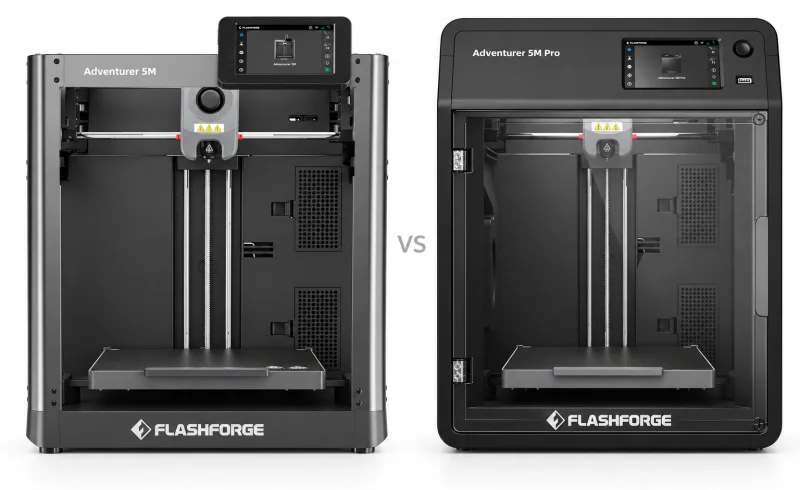
The Flashforge Adventurer 5M Pro offers an integrated enclosure, filtration and camera, while the Flashforge Adventurer 5M suits those comfortable with a separate enclosure project.
TL;DR
The Flashforge Adventurer 5M and 5M Pro have essentially the same printing hardware. Both use a CoreXY motion system, offer a 220 × 220 × 220 mm build volume, and support quick-change nozzles. The Pro isn't a larger, faster, or inherently more precise version of the 5M.
The difference is what surrounds that hardware.
The Adventurer 5M has an open frame that makes the print bed and toolhead easy to reach. It makes sense for everyday PLA and PETG projects, from household organizers to replacement brackets and prototypes.
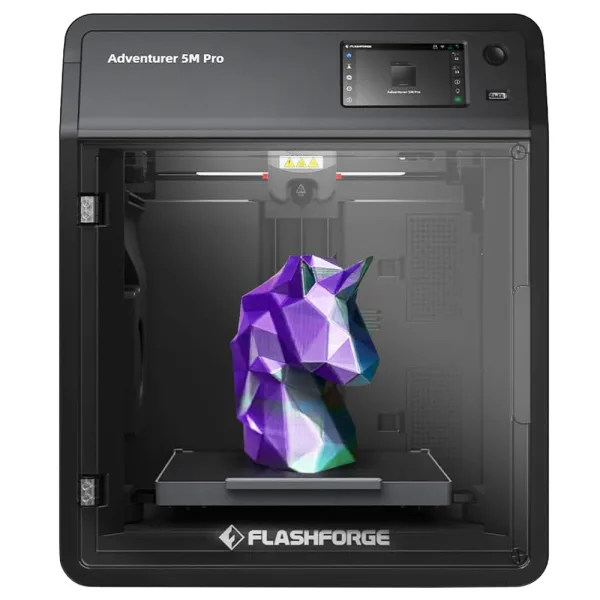
The Adventurer 5M Pro adds a factory-installed enclosure, HEPA and activated carbon filtration, and a built-in camera. Its enclosed chamber is particularly useful with ABS and ASA, which are more sensitive to drafts and temperature changes.
The regular 5M can be upgraded with an official enclosure kit and a separate camera. Those additions narrow the convenience gap, although the enclosure kit does not replicate the Pro's integrated filtration.
One important limitation applies to both machines: an enclosure and filters do not eliminate the need to manage 3D-printing emissions. The Pro is better equipped for containing and filtering them, but it is not a substitute for appropriate ventilation.
| Feature | Flashforge Adventurer 5M | Flashforge Adventurer 5M Pro |
|---|---|---|
| Print results | ||
| Print quality in separate reviews | Average overall; good fit and clearances, but corner, surface and overhang flaws. [1]GearLab, December 2024; standard out-of-box settings. | Good quality reported; a separate 0.4 mm TPU trial showed surface and retraction defects. [2] [3]3Dnatives, June 2024: several materials and 0.4/0.6 mm nozzles. TPU result: Tom's Hardware, October 2023. Different test conditions do not establish a quality ranking. |
| Practical differences | ||
| Print-file transfer | Wi-Fi, Ethernet and USB; FAT32 USB drives supported. [4] [1] [5]GearLab's December 2024 review reported occasional connection losses with the included FlashForge software. | Wi-Fi, Ethernet and USB; FAT32 USB drives supported. [6] [7] |
| Enclosure and ABS use | ABS supported; optional enclosure kit needs self-printed parts and does not add Pro filtration. [8] [9] [5]Manufacturer advises a well-ventilated area for ABS because heating it can release toxic gases. | ABS supported; enclosed shell with HEPA and activated-carbon filtration. [6] [7]Manufacturer still advises a well-ventilated area for ABS because heating it can release toxic gases. |
| Built-in print monitoring | No built-in monitoring; adding the enclosure kit does not provide it. [9] | Built-in camera for live print monitoring. [3] [6] |
📑 Table of Contents
- The enclosure changes more than the printer's appearance
- Filament compatibility: ABS and ASA are the important dividing line
- Filtration helps, but it does not make indoor emissions disappear
- Does the 5M Pro print faster or produce better-looking parts?
- Camera monitoring: built in on one, optional on the other
- Setup, maintenance, and noise in everyday use
- Final Verdict
- FAQ
The enclosure changes more than the printer's appearance
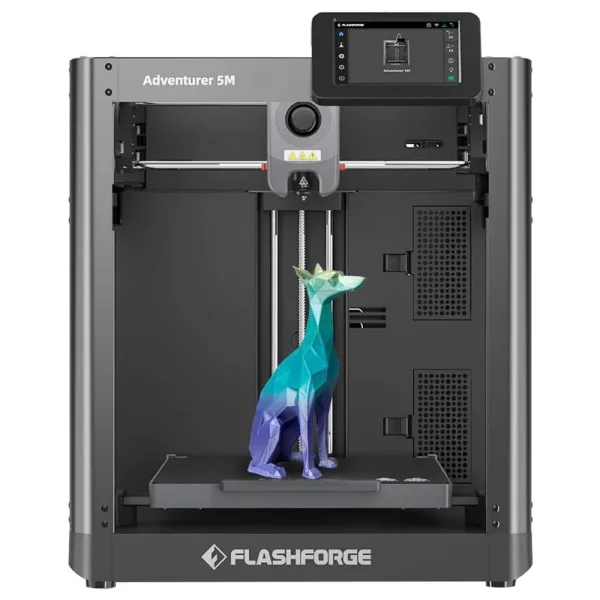
An open printer is convenient when you're running a succession of small jobs. With the 5M, you can reach the build plate, remove a finished part, inspect the nozzle, or clear a failed print without opening a door or lifting a cover.
That accessibility is useful for someone experimenting with different designs throughout the day. PLA and PETG generally do not require the same warm, draft-resistant environment as ABS and ASA, so the lack of an enclosure is less consequential for those materials.
The 5M Pro trades some of that immediate access for a more controlled printing environment. Its enclosed body helps reduce the effect of room drafts and temperature fluctuations on the developing part.
That matters when printing an ABS electronics housing, for example. As the plastic cools, it contracts. Uneven cooling can cause the corners to lift off the build plate or introduce cracks between layers. An enclosure helps moderate those temperature differences, although it cannot guarantee a warp-free result.
The Pro's enclosure is also useful for keeping the moving printhead and heated components less exposed during operation. Its transparent front door allows a visual check without opening the chamber.
Can the regular 5M be enclosed later?
Yes. Flashforge offers an Adventurer 5M enclosure kit, but it is a DIY conversion rather than a ready-to-install replacement shell.
The kit supplies the non-printed components. You must produce the remaining structural pieces yourself using Flashforge's provided model files, then assemble the enclosure.
Flashforge claims the conversion improves temperature stability and reduces printing noise. It also makes the 5M more practical for experimenting with materials sensitive to drafts.
The compromise is the additional printing and assembly work. The finished conversion still does not include the Pro's integrated air-filtration system.
For someone who expects to print mostly PLA now but may occasionally need an enclosure later, that flexibility is useful. If ABS or ASA will be a regular material from the beginning, the Pro's factory enclosure removes a separate construction project.
Filament compatibility: ABS and ASA are the important dividing line
Both printers have a maximum nozzle temperature of 280°C and a specified maximum bed temperature of 100°C. Both also accept third-party 1.75 mm filament.
For common materials, their capabilities overlap considerably.
PLA is a straightforward material for decorative objects, prototypes, organizers, and models that do not need substantial heat resistance. PETG is often more appropriate for functional household parts that need greater toughness or flexibility than typical PLA.
The 5M and 5M Pro both support these materials, so the Pro's enclosure provides no automatic advantage for a basic PLA project.
The difference becomes more meaningful with materials that are difficult to print in an open environment.
ABS is useful for functional components where toughness and heat resistance matter, but it is prone to warping as it cools. ASA offers similar engineering characteristics along with better resistance to UV exposure, making it relevant for some outdoor components.
Flashforge explicitly lists ABS and ASA among the 5M Pro's supported materials. Its 5M documentation also addresses ABS printing, but the open-frame model does not provide the controlled environment that makes these materials easier to handle.
An enclosed 5M can improve the situation. The Pro simply integrates that capability from the start.
Carbon-fiber filament does not require the Pro
An important distinction is that both printers support PLA-CF and PETG-CF according to Flashforge's published specifications.
These carbon-fiber-filled filaments can provide a different surface finish and increased stiffness, depending on the formulation. They also contain abrasive particles that place greater demands on nozzle selection.
Flashforge lists a 0.6 mm nozzle for these materials on the 5M and 0.6 or 0.8 mm nozzles on the Pro. The larger openings help accommodate filled materials and reduce the risk of clogging. Nozzle wear resistance also matters with abrasive filaments.
TPU, another material supported by both machines, benefits from appropriate nozzle and extrusion settings rather than the presence of an enclosure.
The practical distinction is therefore not ordinary materials versus engineering materials. Both printers handle more than basic PLA. The Pro's clearest material advantage is its enclosed environment for ABS and ASA.
Filtration helps, but it does not make indoor emissions disappear
The 5M Pro includes two air-circulation arrangements using HEPA and activated carbon filtration.
According to Flashforge's explanation of the filtration system, the printer uses different airflow strategies depending on the filament:
- Internal circulation, intended for materials such as ABS and ASA, filters and recirculates air within the enclosure while helping retain heat.
- External circulation, intended for PLA and PETG, allows greater air exchange to help manage chamber temperature while filtering the airflow.
These two modes address different printing requirements. ABS benefits from a warmer, more stable chamber; PLA generally needs effective part cooling and can suffer when excessive heat builds up around the printhead.
HEPA filtration is designed to capture airborne particles, while activated carbon can adsorb some gaseous compounds. Neither technology should be assumed to remove every chemical emitted during printing.
This distinction matters because heated filaments can release both ultrafine particles and volatile organic compounds.
The U.S. Environmental Protection Agency's research on 3D-printer emissions found that both PLA and ABS can produce ultrafine particles, with ABS generally associated with higher particle emissions in the studies examined.
Even Flashforge's own 5M Pro guidance recommends a well-ventilated area for ABS printing.
For a printer operating regularly in a bedroom, home office, or shared living space, filtration should be treated as one layer of exposure control rather than a guarantee of clean air. A separate, appropriately ventilated workspace is preferable, particularly for ABS and ASA.
The Pro provides more built-in emission-management equipment than the regular 5M, but neither model makes ventilation irrelevant.
Does the 5M Pro print faster or produce better-looking parts?
There is no substantial specification advantage in the Pro's basic motion system.
Both printers share Flashforge's advertised maximum travel speed of 600 mm/s and maximum acceleration of 20,000 mm/s². Those are hardware limits, not promises that every model will print at that speed.
A tall decorative model with thin walls, a small mechanical component with sharp corners, and a large solid housing place very different demands on the printer. Actual completion time depends on geometry, material flow, acceleration, layer height, and the slicer profile.
Independent testing also shows why headline speed should not be confused with finished-part quality.
In GearLab's December 2024 Adventurer 5M review, a Benchy completed in 26.8 minutes. The reviewers found the printer fast and relatively easy to operate, but its default settings produced inconsistent corners, visible surface waves, and problems with certain overhangs.
The same testing found better results for dimensional fit and support removal. A nickel calibration model fitted closely, and the moving sections of a printed fidget spinner separated relatively easily.
Those results suggest that the 5M can produce useful mechanical parts without necessarily producing flawless cosmetic surfaces at its default settings.

The Pro has also performed well in independent reviews. 3Dnatives' June 2024 testing reported dimensional tolerances down to 0.1 mm in its test prints, while Tom's Hardware reported successful snap-fit parts and clean support removal.
These are separate tests conducted with different models and settings, not a controlled head-to-head comparison. They do not establish that the Pro consistently produces more accurate or better-looking PLA prints than the 5M.
Nozzle size can matter more than the model name
Both printers support quick-release nozzle assemblies in 0.25, 0.4, 0.6, and 0.8 mm sizes.
A smaller nozzle is useful when fine details matter. A larger nozzle can move more material per pass, reducing the time needed for certain functional or decorative models, at the expense of fine detail.
Tom's Hardware demonstrated the trade-off on the 5M Pro using a frog model scaled to 250%:
- A 0.4 mm nozzle with 0.2 mm layers took 6 hours 52 minutes.
- A 0.6 mm nozzle with 0.3 mm layers finished in just over 4 hours.
That time saving came from changing the nozzle and print profile, not from a capability unavailable on the regular 5M.
For an object where surface detail matters, a finer profile may be appropriate. For a large utility bracket or prototype, a coarser profile may reduce the wait considerably.
The choice of printer should not be based on an assumption that the Pro has a fundamentally faster extrusion system.
Build volume is identical, including its practical limits
Each model has a nominal 220 × 220 × 220 mm printing area. The enclosure does not provide additional room for larger objects.
A model approaching those dimensions still needs to fit within the slicer's permitted printable area.
GearLab, for example, reported a usable area of approximately 217 × 217 mm on the 5M with its tested slicing setup, slightly smaller than the advertised dimensions.
For a part close to the machine's limits, checking the actual sliced footprint is more reliable than using the nominal bed dimensions alone. Large objects may require reorientation or division into smaller pieces regardless of which Adventurer model is used.
Camera monitoring: built in on one, optional on the other
One of the clearest everyday differences is what happens when a print runs for several hours and you are not standing beside the machine.
The 5M Pro includes a camera for viewing print progress remotely and creating time-lapse recordings. It lets you look at the build area through compatible software rather than repeatedly returning to the printer.
That can be useful when a print is running in a separate workshop or utility room. A camera view may reveal an obvious failure, such as a part detaching from the build plate or filament accumulating around the nozzle.
The standard 5M does not include a camera, but monitoring is not exclusive to the Pro.
Flashforge offers an official camera kit compatible with the Adventurer 5M. After installation, the regular model can also provide a live view of printing progress.
The meaningful distinction is convenience: the Pro has the camera installed as part of its original configuration, while the 5M requires additional hardware and installation.
Neither camera is a guarantee against print failure, and remote viewing should not be treated as a replacement for appropriate supervision and printer safety precautions.
File transfer and software are largely shared
Both printers provide Wi-Fi, Ethernet, and USB connectivity, along with a 4.3-inch touchscreen.
They also support Flashforge's current software ecosystem. Flash Studio Desktop, based on OrcaSlicer, supports preparing models, generating print files, and sending jobs to compatible machines.
Its documented network options include an internet-connected mode and a local-network mode that sends files without routing them through a cloud server. That distinction may matter when keeping printer control within a home or workshop network.
For USB-based printing, Flashforge specifies FAT32-formatted drives in the documentation for both models.
The Pro therefore does not provide a different class of file-transfer connection. Its advantage is the integrated camera hardware, not exclusive access to network printing.
Setup, maintenance, and noise in everyday use
Neither Adventurer is a printer that requires assembling the motion system from individual components.
Both arrive largely assembled and use touchscreen-guided calibration.
In GearLab's testing, preparing the 5M took around 12 minutes, including installing the screen and filament holder, removing shipping restraints, and following the initial setup prompts.
The Pro requires comparable preparation, including removing the build plate's transport screws and connecting the filament guide and rear spool holder. In 3Dnatives' setup test, its automatic calibration routine took approximately 15 minutes after assembly.
Those figures measure different portions of the setup process, so they should not be treated as evidence that either printer is faster to prepare.
Nozzle changes still require calibration
The quick-release nozzle arrangement is shared by both models. It makes changing nozzle sizes less involved than disassembling a conventional hotend.
Physical replacement, however, is only part of the procedure.
Flashforge recommends automatic bed leveling after changing the nozzle on either printer. Its 5M Pro maintenance guidance additionally specifies 25-point leveling, a vibration calibration test, and PID temperature calibration following nozzle replacement.
Those steps matter because a small change in nozzle position or heating behavior can affect the first layer and subsequent extrusion.
Both machines use removable flexible PEI build plates. If switching from textured to smooth PEI, Flashforge's instructions for both models recommend automatic leveling followed by a 0.1 mm Z-offset adjustment to address excessive first-layer compression.
These are ordinary calibration considerations rather than compelling reasons to favor one model.
An enclosed printer is not necessarily a quiet printer
The 5M Pro's enclosure can help contain some operating noise, and Flashforge specifies 50 dB in low-noise mode and 55 dB in standard mode.
Those are manufacturer figures rather than directly comparable independent measurements of both machines.
In its review, Tom's Hardware noted that the Pro's multiple cooling and filtration fans were clearly audible during operation, despite the enclosed design.
Flashforge also claims that its DIY enclosure kit reduces noise from the regular 5M. However, there is insufficient directly comparable testing here to assign a dependable noise advantage under identical printing conditions.
In a quiet room, fan noise, rapid toolhead movement, and vibration transmitted through the supporting furniture may all remain noticeable. The enclosure changes the acoustic environment, but it should not be mistaken for soundproofing.
Final Verdict
For PLA, PETG, everyday prototypes, organizers, and general hobby printing, the Flashforge Adventurer 5M provides the same fundamental build volume, CoreXY motion platform, and nozzle options as the Pro. Its open frame is convenient for frequent access, and official enclosure and camera upgrades offer room for later customization.
The Flashforge Adventurer 5M Pro is more appropriate when ABS or ASA printing is expected to be a regular activity, or when having a factory enclosure, integrated filtration, and camera monitoring is important from the outset. Its advantages concern the printing environment and included equipment rather than a proven improvement in baseline speed or precision.
Neither machine eliminates filament-related emissions, and the Pro's filters should not be treated as a replacement for proper ventilation.
The deciding question is less about which printer makes a better PLA object and more about which printing environment your materials and workspace require. For common filaments, the differences may be modest. For repeated ABS or ASA work, the enclosure becomes a much more consequential part of the machine.
FAQ
Does the 5M Pro come with the nozzle I need for flexible or carbon-fiber-filled filament?
Can I check the Pro’s camera when I’m away from home?
Will either printer fit inside my existing cabinet?
📄 Sources & Documentation
Flashforge Adventurer 5M
Images are used for editorial and informational purposes only. All trademarks and images belong to their respective owners.