
Sonos Era 100 vs JBL Authentics 200: which fits your room and setup?
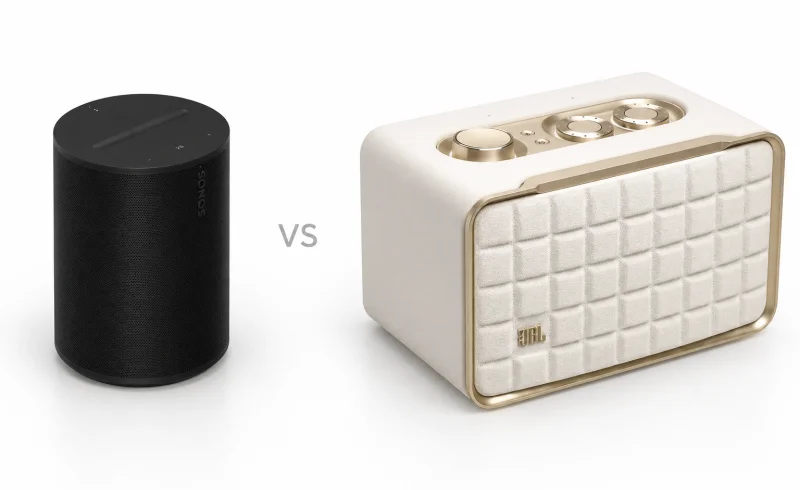
The JBL Authentics 200 suits larger rooms and wired sources, while the Sonos Era 100 fits smaller shelves, existing Sonos systems and stereo pairs with two units.
TL;DR
The JBL Authentics 200 makes more sense when you want fuller sound from a single speaker, enough volume for a larger living room, and straightforward connections for older audio equipment. Its stronger bass and weightier midrange give music more presence, while physical bass and treble knobs make quick adjustments easy. It also supports both Google Assistant and Alexa, along with Chromecast, AirPlay, and Spotify Connect.
The Sonos Era 100 is the more compact option, with a balanced sound that benefits from room tuning and bass that can feel quicker and more controlled. Its bigger advantage is flexibility within the Sonos system: two units can form a genuine left/right stereo pair, extend music into other rooms, or serve as surround speakers with a compatible Sonos soundbar.
Neither is battery-powered. Both support Wi-Fi and Bluetooth, but Sonos requires an initial Wi-Fi setup before Bluetooth playback works. And although the JBL produces more bass weight, neither speaker replaces a dedicated subwoofer for deep, room-shaking lows.
| Feature | Sonos Era 100 | JBL Authentics 200 |
|---|---|---|
| Sound and listening | ||
| Sound character | WIRED heard neutral, flat sound after room tuning; DXOMARK reported reduced clarity. [1] [2]Separate 2023 tests: WIRED used its tuned listening room; DXOMARK used AirPlay 2 through the Sonos app. | Full, rich sound with limited stereo separation; heftier bass than Era 100, but it could drag. [3]WIRED reviewer’s listening impressions and Era 100 comparison (November 2023). |
| Output and deep-bass limits | Limited deep bass; not loud enough for larger rooms in RTINGS’ assessment. [4]RTINGS review updated April 2024. | Can fill larger rooms, with compression at maximum volume; deep, rumbling bass remains limited. [5]RTINGS review updated November 2023; tonal assessment used Self-Tuning. |
| Everyday use and setup | ||
| Audio connections | Wi-Fi, Bluetooth 5.3 and AirPlay 2; AUX and Ethernet require separately sold Sonos adapters. [6] [7]Initial Sonos-app Wi-Fi setup is required before Bluetooth. Line-in is not intended for TV. AirPlay 2 requires iOS 11.4+. | Wi-Fi, Bluetooth 5.3 multipoint and AirPlay; built-in AUX/Ethernet; USB playback on US versions. [8]AUX and Ethernet cables are separate. USB is service-only outside the US. |
| Multiroom and stereo pairing | Sonos whole-home grouping; two Era 100 speakers can form a separate left/right stereo pair. [7] [4] [9]Stereo pairing uses Wi-Fi; RTINGS describes whole-home grouping through the Sonos S2 app. | Chromecast, AirPlay or Alexa multiroom; Frandroid reported no separate left/right pairing. [8] [10]Pairing limitation reported in the review updated February 2024. Chromecast groups: up to six speakers, network permitting. Chromecast/Alexa multiroom require respective assistant registration. |
📑 Table of Contents
- How different do they actually sound?
- Which speaker handles a larger room?
- Will they fit where you want them?
- What happens when you connect your phone?
- What if you have a CD player, turntable, or Ethernet connection?
- Which is easier to control without a phone?
- Room tuning: automatic on JBL, app-guided on Sonos
- Voice assistants and microphone privacy
- Can you add a second speaker later?
- Final Verdict
- FAQ
How different do they actually sound?
The most noticeable difference is not simply how much bass each speaker produces. It's how that bass interacts with the rest of the music.
In WIRED's direct comparison, the Authentics 200 sounded fuller than the Era 100, with more weight through the bass, midrange, and lower treble. That matters for music built around electric guitars, prominent vocals, and strong rhythm sections. A bass guitar has more body, while the lower registers of voices and instruments feel more substantial.
The JBL uses a 5-inch woofer, two 25 mm tweeters, and a downward-firing 6-inch passive radiator. The passive radiator helps reinforce bass without requiring a larger enclosure. It contributes to the speaker's substantial low-end character, though the resulting sound depends on placement and the acoustics of the room.
The Era 100 takes a different approach. Its single midwoofer and two angled tweeters work with digital processing to produce a balanced presentation from a narrower enclosure. After room tuning, WIRED found its sound notably neutral, with less of the exaggerated bass that can develop when a speaker sits near a wall.
There is an important distinction between more bass and better-controlled bass. WIRED praised the Era 100's quicker bass response, while noting that the JBL could become a little sluggish during demanding passages. On a recording with a fast, busy bass line, that difference can affect how clearly individual notes remain separated.
The Authentics 200 has the advantage when you want music to sound bigger and richer from one enclosure. The Era 100 is appealing when you prefer a more restrained presentation, especially after tuning. Neither character is universally preferable, and both can be adjusted through their respective apps.
What about stereo separation?
Both speakers use two tweeters and can reproduce stereo content, but their compact, single-enclosure designs limit how far apart the left and right channels can appear.
WIRED heard a somewhat broader soundstage from the JBL, with convincing separation between instruments, but also found that its stereo spread remained limited. The Era 100's angled tweeters create separation too, though it cannot reproduce the physical width of two speakers placed several feet apart.
For background music while cooking, reading, or moving around the room, this limitation may matter very little. When you sit in one place and want guitars, keyboards, and other instruments to occupy distinct positions across a soundstage, a proper two-speaker arrangement makes a more fundamental difference than either model's internal stereo design.
Which speaker handles a larger room?
The JBL has more output to work with.
In RTINGS' evaluation of the Authentics 200, it reached levels suitable for filling larger rooms. That gives it an advantage in an open living area or when music needs to remain audible beyond the immediate listening position.
There is a limit, however. RTINGS observed compression at maximum volume, meaning the speaker reduces some of the differences between quiet and loud musical passages as it approaches its output ceiling. It can play loudly, but driving it to its limit is not necessarily the most natural way to hear a recording.
The Era 100's RTINGS review found its maximum output less suitable for larger spaces. That doesn't make it confined to a tiny room. It simply offers less headroom when listening distances increase or when music competes with conversation and other household noise.
Deep bass is a separate limitation. RTINGS found that both speakers lack substantial low-bass rumble, even though the JBL sounds fuller through more of the audible bass range. A pronounced kick drum and a deep electronic bass effect are not the same acoustic challenge.
For everyday listening at moderate volume, the difference in maximum output may be unimportant. In an open-plan space, particularly with people talking or moving between rooms, the JBL's additional output becomes more relevant.
Will they fit where you want them?
The Era 100 is considerably easier to accommodate on a narrow shelf.
Its footprint measures approximately 4.7 inches wide by 5.1 inches deep (120 × 130.5 mm). The JBL is 10.5 inches wide by 6.6 inches deep (266.3 × 167.4 mm), occupying more than twice the shelf width.
That is a substantial difference on a crowded desk, kitchen counter, or bedside cabinet. The Sonos can fit beside a monitor or among books where the JBL would dominate the available surface.
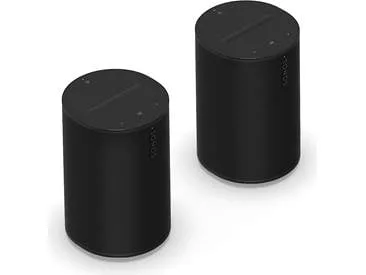
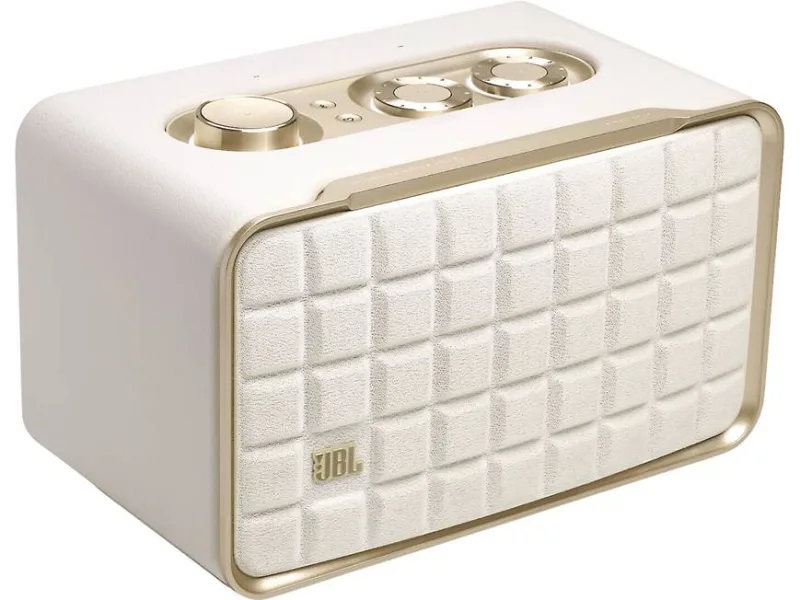
The Era 100 is slightly taller, at 7.2 inches versus the JBL's 6.8 inches. Sonos also recommends leaving at least one inch of clearance behind the Era 100 when positioning it near a wall or on a shelf. A space that accommodates the speaker's dimensions exactly may therefore still be too restrictive.
The JBL's wider, retro-inspired enclosure is more visually prominent. Its grille, gold-colored accents, and top-mounted controls give it the appearance of traditional audio equipment. Sonos uses a simpler, more understated design.
The JBL also weighs approximately 6.9 pounds, compared with 4.5 pounds for the Era 100. Both are intended to remain in one place, and both require an electrical outlet. Bluetooth connectivity does not make either one portable in the way a rechargeable outdoor speaker is.
What happens when you connect your phone?
Both speakers support Bluetooth, Wi-Fi, Apple AirPlay 2, and Spotify Connect, but their setup requirements and streaming ecosystems differ.
Bluetooth: JBL requires less initial setup
The JBL can enter Bluetooth pairing mode directly from its physical button. It also supports multipoint connections, allowing a second Bluetooth device to connect without disconnecting the first.
That is convenient in a shared household. Someone can connect a second phone and take over playback without first removing the other device from the speaker's paired devices. It does not mean both phones' audio plays simultaneously.
The Sonos behaves differently. According to Sonos' setup instructions, the Era 100 must first be configured on a Wi-Fi network using the Sonos app. Only after that initial setup can it function as a Bluetooth speaker.
Once configured, Bluetooth playback is straightforward. But if you intend to use a speaker somewhere without an available network during its initial setup, the JBL offers a simpler route.
Wi-Fi: the streaming service matters
An iPhone or other compatible Apple device can stream to either speaker through AirPlay 2. Spotify users can also control playback from the Spotify app through Spotify Connect.
The JBL additionally supports Chromecast built-in, making it more convenient for households that already use Google Cast speakers, compatible Android apps, or Google Home speaker groups.
The Era 100 does not support Chromecast. Instead, the Sonos app provides access to supported streaming services and lets you manage compatible Sonos speakers as a coordinated system. This is particularly useful when a household already has Sonos equipment in several rooms.
Wi-Fi streaming also changes how a phone participates in playback. With supported network-based streaming methods, music can continue playing while the phone handles other tasks, rather than depending on a continuous Bluetooth audio connection.
The practical question is therefore not whether one speaker has Wi-Fi and the other doesn't. Both do. It's whether your preferred music services and other speakers work naturally within the ecosystem each supports.
What if you have a CD player, turntable, or Ethernet connection?
This is one of the JBL's clearest convenience advantages.
The Authentics 200 has a conventional 3.5 mm AUX input on the back. A CD player with a compatible analog output can connect using the appropriate cable, without a proprietary adapter.
The same applies to a turntable with a line-level output. A turntable that lacks a built-in phono preamplifier still needs a suitable phono preamp; the JBL's AUX connector does not perform that function.
One operational detail matters: while AUX is in use, the JBL's playback buttons do not control the connected source. You control tracks and playback from the source device, although the speaker's volume knob remains usable.
The Era 100 has no conventional AUX socket. Its USB-C port accepts audio through a Sonos Line-In Adapter, with a separate 3.5 mm or RCA-to-3.5 mm cable appropriate to the source.
Sonos also offers a Combo Adapter that combines line-in and Ethernet connectivity. The JBL already has a dedicated Ethernet port, so connecting it directly to a wired home network requires only an Ethernet cable.
There is one additional regional distinction: JBL's specifications list USB playback of MP3 and WAV files for the US version. On other regional versions, the USB port is designated for service rather than music-file playback. The USB connector alone is not proof that a particular unit supports storage-device playback.
Can either speaker replace a TV soundbar?
Neither model has HDMI ARC/eARC or an optical TV input.
The JBL's AUX connection may accommodate a television with a compatible analog audio output, but that does not establish that every TV configuration will maintain satisfactory audio-video synchronization.
Sonos explicitly states that the Era 100's line-in connection is not intended for television use. Its audio processing and buffering can introduce a noticeable delay relative to the picture.
For a setup centered on television audio, a dedicated TV audio system with an appropriate digital connection avoids these compromises. The Era 100 can instead participate in a supported Sonos home theater system as a surround speaker, which is a different use from connecting it directly to a television.
Which is easier to control without a phone?
The JBL provides more direct control over the character of the sound.
Its top panel includes separate bass and treble knobs, a volume control, playback controls, and a programmable Moment button. Moment can recall a compatible music playlist and personalized speaker settings configured through the JBL One app.
The physical tone knobs are useful when the music sounds too heavy late at night or when a recording needs a little more treble. You can make the adjustment immediately instead of opening an app.
The JBL One app adds a three-band equalizer, including midrange adjustment. It also handles network setup, supported music services, and voice-assistant configuration.
The Era 100 has touch controls for volume, playback, and track skipping. Basic listening therefore does not require a phone either. But its bass, treble, and loudness settings are adjusted in the Sonos app rather than with dedicated physical tone knobs.
The difference is less about whether one speaker needs an app and more about how frequently you expect to interact with its sound settings.
Room tuning: automatic on JBL, app-guided on Sonos
Both manufacturers offer processing intended to compensate for the acoustics around the speaker. Their approaches are different.
JBL Self-Tuning starts automatically after the speaker is connected to power and music playback begins. According to JBL's owner's manual, the process takes approximately three minutes. It uses the built-in microphones and is disabled when the microphone is switched off.
This reduces the need to perform a separate calibration procedure. It does not guarantee that the speaker will sound identical in every room or overcome the limitations of its physical placement.
Sonos Trueplay is initiated through the Sonos app. The Era 100 supports two approaches:
- Quick Tuning uses the speaker's built-in microphones and works with compatible iOS and Android devices.
- Advanced Tuning uses a compatible iOS device's microphone while the user moves around the listening area, allowing a more detailed measurement of the room.
Sonos recommends tuning again after relocating a speaker or changing its configuration. This matters if the Era 100 moves from an open countertop to a shelf near a wall, where reflected bass can change substantially.
Room correction can help compensate for these differences, but neither system can create the deep bass extension or stereo width that the hardware itself cannot produce.
Voice assistants and microphone privacy
The JBL supports both Google Assistant and Amazon Alexa on the same speaker. Either assistant can be configured individually, or both can be enabled simultaneously.
That is useful when different members of a household rely on different services or smart-home devices. A Google-based thermostat and Alexa-based routines, for example, need not force the entire household toward one voice assistant.
There are limitations. Voice-assistant availability depends on country and language, and the speaker requires a home-network connection for these services. In WIRED's testing, the two assistants generally worked alongside each other, but commands passed between them were not always handled consistently.
The Era 100 supports Amazon Alexa and Sonos Voice Control, but not Google Assistant directly. Sonos Voice Control focuses on music and compatible Sonos system functions, rather than replacing a general-purpose smart-home assistant.
Both speakers provide a physical way to disable their microphones.
Sonos offers an additional distinction worth understanding: the rear switch disconnects the microphones, while the touch control on top can disable voice services without disabling the microphones needed for Trueplay.
That allows Trueplay functionality to remain available without an active voice assistant. On the JBL, turning off the microphones also prevents automatic self-tuning.
Can you add a second speaker later?
This is where the Sonos system has a particularly important advantage.
Two Era 100 speakers can form a genuine left/right stereo pair over Wi-Fi. One handles the left channel and the other handles the right, creating a soundstage that spans the physical distance between them.
Sonos recommends positioning stereo-paired speakers approximately 8–10 feet apart, with the main listening position roughly 8–12 feet away. Smaller rooms can still accommodate a pair, but the ideal separation depends on their layout.
The JBL Authentics 200 supports synchronized multiroom playback through AirPlay, Chromecast, and Alexa Multi-Room Music. Two units can therefore reproduce music together within compatible groups.
But synchronized playback is not equivalent to assigning one speaker the left channel and the other the right. As Frandroid's testing documented, the Authentics 200 does not offer the dedicated two-unit left/right stereo pairing available on Sonos.
For music playing in the kitchen and living room simultaneously, this distinction may not matter. For a seated listening position where stereo imaging is the goal, it matters considerably.
What about surround sound?
A pair of Era 100 speakers can also serve as rear surrounds with compatible Sonos home theater products.
That gives the Era 100 another potential role beyond standalone music playback. There is a trade-off: when configured as surrounds, its Bluetooth and line-in functions are disabled.
The JBL offers broader compatibility with several network-streaming ecosystems, but it does not provide an equivalent integrated surround-speaker role within a dedicated JBL Authentics home theater system.
Final Verdict
The JBL Authentics 200 is better aligned with a household that wants substantial sound from one enclosure. Its fuller bass and midrange, greater room-filling output, direct AUX and Ethernet connections, and physical tone controls are meaningful everyday advantages. Google Assistant, Alexa, and Chromecast support also make it versatile across different smart-home and streaming environments. The compromises are its larger footprint, limited stereo spread, and some loss of dynamic freedom at maximum volume.
The Sonos Era 100 fits a smaller space or an existing Sonos household particularly well. Its tuned sound can be more neutral, its bass response can feel more agile, and its compact shape is easier to accommodate. More importantly, it offers a clear path to a genuine stereo pair or a compatible Sonos surround setup. The trade-offs are lower maximum output, reliance on adapters for wired connections, and an initial Wi-Fi setup even when Bluetooth is the intended source.
For a single speaker in an open living room, the JBL's fuller presentation and output give it the advantage. For compact placement, controlled listening, or a system intended to grow into separate stereo channels and coordinated Sonos rooms, the Era 100 offers a different kind of flexibility.