
GoveeLife 42" Smart Tower Fan vs. HOLMES 36" Smart Wi-Fi Connected Tower Fan: App-Driven Automation vs. Remote-Ready Simplicity
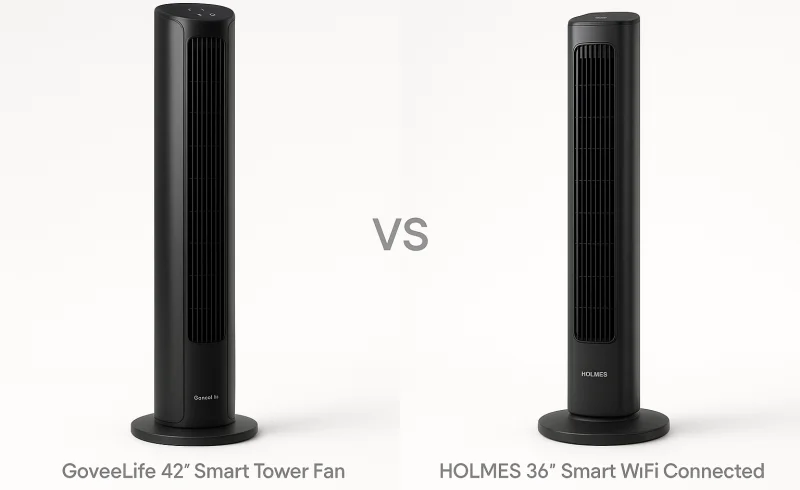
Discover the features and differences between the GoveeLife 42" Smart Tower Fan, offering in-depth smart-home automation and app-driven routines, and the HOLMES 36" Smart Wi-Fi Connected Tower Fan, known for its simplicity and physical remote control. Ideal op...
TL;DR
- If you want deep smart-home automation, fine-tuned airflow, and app-driven routines → choose GoveeLife 42" Smart Tower Fan.
- If you care about instant, phone-free control, a physical remote, and a fuss-free experience in shared rooms → choose HOLMES 36" Smart Wi-Fi Connected Tower Fan.
- If quiet overnight cooling with minimal fuss is your only priority → either fan works, but you’ll pick based on whether you’d rather fine-tune speeds in an app or just tap a remote.
GoveeLife delivers 12 speeds, a 24-hour timer, and adjustable oscillation from 30° to 150°, plus multiple smart modes for tailored room coverage—but it leans heavily on the app and can feel like maintenance-heavy complexity if you don’t actually use routines. HOLMES keeps things simple with an included remote, just 3 speeds, and no-excess app features, making it easier to grab and go, though you trade away the ability to script cooling around your day. Both rely on 2.4 GHz Wi‑Fi, but GoveeLife’s smart depth amplifies network instability, while HOLMES’ remote provides a reliable fallback if the connection drops.
If you want a fan that works entirely without an app, a remote, or any Wi‑Fi setup, skip both and grab a basic tower fan with physical controls—these smart models are for people who want some level of connected convenience, not an untethered appliance.
| Feature | GoveeLife 42" Smart Tower Fan | HOLMES 36" Smart Wi-Fi Connected Tower Fan |
|---|---|---|
| Controls | ||
| On-Device Controls | Touchpad | Control panel |
| Remote Control Included | No | Yes |
| Dimensions | ||
| Height | 42 in | 36 in |
| Convenience | ||
| Timer | Up to 24 hours | 1-15 hours |
| Performance | ||
| Modes | 5 (Normal, Sleep, Natural, DIY, Auto) | 3 (Normal, Breeze, Sleep) |
| Oscillation | 30°-150° adjustable | Yes |
| Speed Settings | 12 | 3 |
| Connectivity | ||
| Bluetooth | Yes | Yes |
| Wi-Fi Band | 2.4 GHz Wi-Fi | 2.4 GHz Wi-Fi |
| App Control | Govee Home App | Holmes App |
| Voice Assistant Support | Alexa, Google Assistant, Siri | Amazon Alexa, Google voice-enabled devices |
📑 Table of Contents
Smart Features & Ecosystem
Automation depth & app-driven control
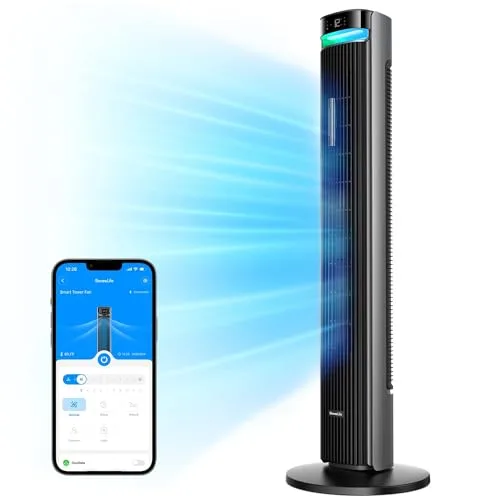
GoveeLife 42" Smart Tower Fan is built around the Govee Home app, with more granular behavior to automate and tune—reflected in its 5 modes (including DIY and Auto) and 12 speed settings. It also supports a longer app-configurable timer at up to 24 hours, which better fits «set-and-forget» routines that change by time of day or conditions. Both Wi‑Fi and Bluetooth are supported, but Wi‑Fi is 2.4 GHz only.
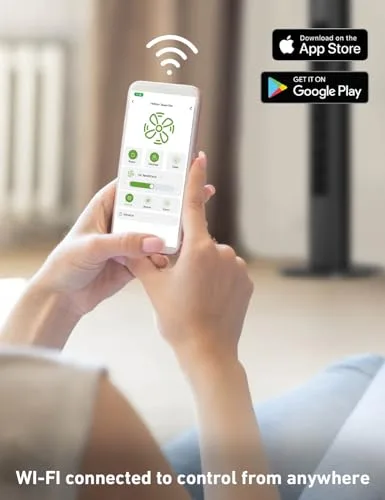
HOLMES 36" Smart Wi‑Fi Connected Tower Fan uses the Holmes app for core connected control (on/off, speeds, modes, timer), and its simpler operating model shows in 3 modes and 3 speed settings. Its timer is shorter on paper at 1–15 hours (and is also described as an 8-hour auto shut-off in some listings), which is usually enough for overnight use but offers less scheduling flexibility. It’s also 2.4 GHz Wi‑Fi and Bluetooth, keeping setup requirements similar.
Conclusion: For users who want real automation headroom—more speeds/modes to script plus longer scheduling—GoveeLife has the clearer smart-feature advantage.
Voice assistants & ecosystem reach
GoveeLife 42" Smart Tower Fan supports Alexa, Google Assistant, and Siri, giving it the broadest mainstream voice coverage in this matchup. That matters if your household mixes ecosystems (e.g., HomePod in a bedroom, Alexa elsewhere) or you want flexibility if you change platforms later. The smart value is highest if you’re already running other Govee devices inside the same app ecosystem.
HOLMES 36" Smart Wi‑Fi Connected Tower Fan supports Amazon Alexa and Google voice-enabled devices, but not Siri in the provided specs. That’s still sufficient for common «turn on/off» and basic adjustment commands, but it narrows ecosystem fit for Apple-first homes. Overall, it reads as a traditional fan with added Wi‑Fi rather than a platform-centric smart device.
Conclusion: On assistant compatibility and ecosystem flexibility, GoveeLife wins with 3 assistants vs 2.
Complexity vs reliability of daily control paths
GoveeLife 42" Smart Tower Fan is more «app-first,» which is great when you actually use routines—but it can create upkeep if your network changes, since it’s 2.4 GHz-only Wi‑Fi. Multiple reviewers report Wi‑Fi connectivity issues, which can be more disruptive on a fan you expect to behave automatically. If you mostly operate it like a normal fan, the extra options can become «maintenance» rather than value.
HOLMES 36" Smart Wi‑Fi Connected Tower Fan stays usable even if you disengage from the app because it includes a remote control (GoveeLife: No remote). That physical fallback is a practical reliability advantage in shared spaces and for guests—control doesn’t depend on phone access, logins, or a stable connection. The trade-off is that you may hit «ceiling effects» sooner if you want deeper automation behavior than the Holmes app is designed to deliver.
Conclusion: HOLMES has the edge for low-friction, always-available control, while GoveeLife is stronger when you actively want app-driven automations.
Winner: GoveeLife 42" Smart Tower Fan — It has the more capable smart ecosystem overall (deeper app control and broader voice support), even though HOLMES is easier to live with day-to-day thanks to its included remote and simpler control model.
Airflow Performance & Customization

Speed range & fine-tuning
The GoveeLife 42" Smart Tower Fan offers 12 speed settings, which makes it easier to dial in airflow for different moments (e.g., a low steady breeze vs. a quick cooldown) rather than hopping between a few big steps. It also lists a maximum airflow of 26 ft/s, giving it a concrete performance ceiling alongside its granular control.
The HOLMES 36" Smart Wi‑Fi Connected Tower Fan provides 3 speed settings, which is simpler but inherently less precise when you’re trying to land on a «just right» airflow level. While it’s positioned as quiet in brand materials, there’s no provided max-airflow figure here to benchmark output the way GoveeLife does.
Conclusion: On raw airflow control and measurable performance, GoveeLife is the clear winner thanks to 12 speeds vs. 3 and a stated 26 ft/s max airflow.
Modes, automation-style behavior, and oscillation control
The GoveeLife 42" Smart Tower Fan includes 5 modes—Normal, Sleep, Natural, DIY, and Auto—and its Auto plus DIY modes enable more adaptive and personalized behavior than a typical «set one speed» fan. It also has adjustable oscillation from 30° to 150°, which matters in real rooms because you can concentrate airflow on a desk/bed area or spread it wide across multiple seating positions.
The HOLMES 36" Smart Wi‑Fi Connected Tower Fan has 3 modes (Normal, Breeze, Sleep) and supports oscillation, but the oscillation is listed as Yes without an angle range, suggesting you’re choosing between oscillation on/off rather than tuning coverage. That aligns with its overall «traditional fan, now with Wi‑Fi» positioning: straightforward cooling, but fewer ways to shape airflow behavior around a specific room layout.
Conclusion: For customization breadth and room-coverage control, GoveeLife wins with 5 modes vs. 3 and 30°–150° adjustable oscillation versus unspecified oscillation control on HOLMES.
Winner: GoveeLife 42" Smart Tower Fan
Noise Levels & Sleep Comfort
The GoveeLife 42" Smart Tower Fan publishes a low-noise spec of 27 dB, which is unusually quiet on paper for overnight use—especially in bedrooms, nurseries, or for light sleepers. It also pairs that with a dedicated Sleep mode and finer airflow tuning via 12 speeds and 5 modes (including DIY and Auto) to help you find a «just enough air» setting without ramping noise.
The HOLMES 36" Smart Wi‑Fi Connected Tower Fan is described as one that «works quietly» in listings and reviews, but it doesn’t provide a decibel rating, so its sleep friendliness is harder to verify objectively. It does include a Sleep mode, yet its control granularity is more limited at 3 speeds and 3 modes (Normal, Breeze, Sleep), which can make it tougher to dial in minimal airflow without stepping up to a louder setting.
Conclusion: For noise-sensitive sleep comfort, the measurable 27 dB claim plus more precise low-speed control gives the GoveeLife a clearer, more defensible advantage than the HOLMES’ subjective «quiet» positioning. Winner: GoveeLife 42" Smart Tower Fan
Design & Physical Controls
The GoveeLife 42" Smart Tower Fan stands taller at 42 in and uses touchpad on-device controls, with no remote included. That design pushes you toward an app-first workflow, which can be great if you’re already living in the Govee Home app and want granular settings without getting up.
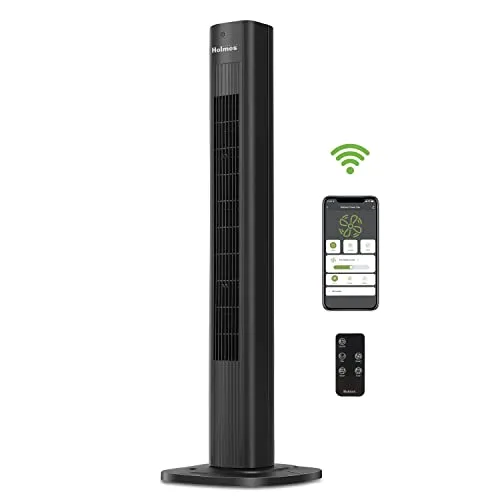
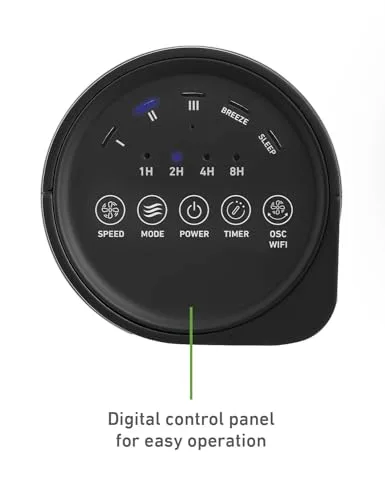
The HOLMES 36" Smart Wi‑Fi Connected Tower Fan is shorter at 36 in and pairs an on-unit control panel with a remote included. In practice, that makes quick changes (mode/speed/timer) easier from bed or across a room, and it’s more accessible in shared spaces where not everyone wants the app.
Conclusion: For physical, immediate control—especially in guest-friendly or shared rooms—the HOLMES approach is more practical because the remote provides a true fallback control path that doesn’t depend on Wi‑Fi, accounts, or app availability.
Winner: HOLMES 36" Smart Wi‑Fi Connected Tower Fan
Convenience & Flexibility
GoveeLife 42" Smart Tower Fan is built for longer, hands-off scheduling with a timer up to 24 hours, which better fits overnight use and day-long routines. It also offers 30°–150° adjustable oscillation, letting you narrow airflow to a desk/bed or widen it to cover more of the room.
HOLMES 36" Smart Wi‑Fi Connected Tower Fan caps scheduling at a 1–15 hour timer, which is usually enough for sleep but is less flexible for full-day automation. Its oscillation is essentially on/off (no angle range specified), so you get fewer ways to tailor coverage to room shape or where people are sitting.
Conclusion: For schedule control and room-layout tuning, GoveeLife clearly offers more flexibility thanks to its 24-hour timer and adjustable 30°–150° oscillation.
GoveeLife 42" Smart Tower Fan relies on touchpad + app + voice control (Alexa/Google Assistant/Siri), but it does not include a remote. In real use, that can mean more «app-first» operation, and some users note Wi‑Fi friction on 2.4 GHz networks (it also doesn’t support 5 GHz), which can undercut convenience if your router setup is finicky.
HOLMES 36" Smart Wi‑Fi Connected Tower Fan includes a remote control, which is often the fastest way to make quick adjustments from bed or the couch without grabbing a phone. It also supports voice control (Alexa/Google voice-enabled devices), but its overall smart feature set is positioned more like «traditional fan + Wi‑Fi» than a deeply programmable device.
Conclusion: HOLMES is more convenient for shared spaces and quick manual changes because the included remote provides a reliable, low-effort control path, while GoveeLife leans more app-centric.
Winner: GoveeLife 42" Smart Tower Fan
The Bottom Line
Now that the feature-by-feature breakdown is complete, the decision comes down to whether you value app-driven customization and quiet performance or simple, always-available manual control.
For Smart Home Enthusiasts: The GoveeLife 42" Smart Tower Fan is the clear pick thanks to deeper in-app automation (12 speeds, 5 modes, 24-hour timer) and broader voice assistant support.
For Budget-Conscious Buyers: Choose the HOLMES 36" Smart Wi‑Fi Connected Tower Fan because it delivers the core smart basics and everyday usability at a much lower price, with the added convenience of a remote.
For Bedroom or Nursery Use: The GoveeLife 42" Smart Tower Fan wins on sleep comfort, pairing a published 27 dB rating with Sleep mode and finer low-speed control for dialing in «just enough air» without excess noise.
For Shared Living Spaces: Go with the HOLMES 36" Smart Wi‑Fi Connected Tower Fan since the included remote is a practical, guest-friendly control path that doesn’t depend on phones, apps, or Wi‑Fi behaving perfectly.
Overall, —it leads on the technical merits that show up every day: markedly better airflow customization (12 speeds, 5 modes), more flexible oscillation control, a longer 24-hour timer, and wider voice assistant coverage. The main trade-off is that HOLMES is easier to live with for quick manual tweaks thanks to its remote and simpler, less app-dependent approach.
If you’ll actually use routines, voice control, and fine-tuned settings, buy the GoveeLife and lean into its strengths; if you just want straightforward cooling with a convenient remote (and a lower bill), the HOLMES is the smarter spend.
FAQ
Which fan is quieter?
Can I control both fans with Alexa?
Do they come with a remote?
Which is better for a large room?
Does the GoveeLife 42" Smart Tower Fan have any Wi‑Fi connectivity limitations?
How does the timer on the GoveeLife fan compare to the HOLMES fan?
"Images are used for editorial and informational purposes only. All trademarks and images belong to their respective owners."