
Sensibo Air vs Cielo Breez Lite: Automation Hub or Simple AC Controller?
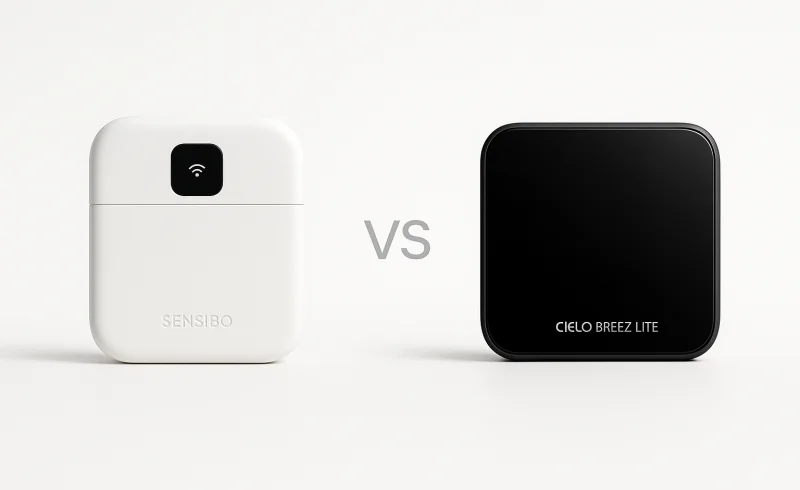
Discover the differences between Sensibo Air and Cielo Breez Lite in smart home integration, automation, and compatibility. Learn which device is ideal for your needs, whether you seek extensive automations or straightforward AC control.
TL;DR
Quick Decision
- If you want deep smart‑home integrations, Apple HomeKit, and a public API for custom automations → choose Sensibo Air
- If you care about straightforward, hands‑on control with sensor calibration and fewer logic headaches → choose Cielo Breez Lite
- If your only goal is basic scheduling and remote access for a single mini‑split → either works well, but Breez Lite typically feels simpler out of the box
Key Differentiators
Sensibo Air is an automation‑first hub with broader ecosystem reach (HomeKit, API, and web access), rewarding users who invest upfront in rules and then leave it alone. Cielo Breez Lite behaves more like an upgraded remote with comfort tools, but it lacks HomeKit and an API — a trade‑off that limits extensibility while keeping daily use more direct. A practical point: only Breez Lite lets you calibrate its temperature sensor to offset placement bias, whereas Sensibo relies entirely on repositioning.
Who Should Skip Both
If you need a thermostat that truly reads your AC’s internal state or works without IR line‑of‑sight, look elsewhere — neither device escapes the limits of infrared control, so consider a wired communicating thermostat or a manufacturer‑specific Wi‑Fi module instead.
| Feature | Sensibo Air | Cielo Breez Lite |
|---|---|---|
| Connectivity | ||
| App platforms | iOS, Android, Web (HTML5) ( [1]) | iOS, Android, Web ( [2]) |
| 5GHz Wi-Fi support | Not supported ( [3]) | Not supported ( [4]) |
| Network connection | Wi-Fi 802.11 b/g/n @ 2.4GHz ( [1]) | Wi-Fi ( [2]) |
| Wi-Fi band support | 2.4GHz only (802.11 b/g/n) ( [3]) | 2.4GHz only ( [4]) |
| Smart home integrations | Amazon Alexa, Google Home, Apple Siri, SmartThings, IFTTT, API; Apple HomeKit certified ( [5]) | Amazon Alexa, Google Assistant, Siri Shortcuts, SmartThings, IFTTT ( [2]) |
| Compatibility | ||
| Supported HVAC types | Air conditioners and heat pumps with a remote control; supported types: Window, Split, Cassette, Portable, Central ( [1]) | Mini-split, window, and portable air conditioners and heat pumps with an IR remote ( [2]) |
| AC remote requirement | Requires a remote-controlled AC or heat pump ( [5]) | Requires an AC with an IR remote control ( [2]) |
| Stated compatibility coverage | Works with 10,000+ models ( [6]) | Supports 300+ AC brands and 20,000+ remote control models ( [7]) |
| Installation & Power | ||
| Warranty | 1 year limited warranty ( [5]) | 1 year limited warranty ( [8]) |
| Power input | 5V⎓1A micro USB adapter; operating voltage 110-240V ( [1]) | 5V DC USB adapter with USB cable ( [2]) |
| In-box accessories | Sensibo Air device, micro USB cable, power adapter, mounting kit ( [1]) | Cielo Breez Lite, 5V DC USB adapter, USB cable, wall mounting kit, user manual ( [2]) |
| Placement requirement | Line of sight to AC unit; up to 6 m / 20 ft ( [1]) | Line of sight to AC unit; place within 6-12 ft ( [9]) |
| Sensors & Automation | ||
| Geofencing | Supported ( [5]) | Supported ( [10]) |
| Built-in sensors | Temperature and humidity sensor ( [1]) | Temperature and humidity sensors ( [11]) |
| Weekly scheduling | 7-day schedules and timers ( [5]) | Weekly schedules ( [10]) |
| Sensor-based automation | Climate React; temperature and humidity triggers ( [5]) | Comfy Mode; temperature and humidity-based triggers ( [10]) |
📑 Table of Contents
Smart Home Integration & Ecosystem

Sensibo Air is built for broad, native smart-home connectivity: it supports Amazon Alexa, Google Home, Apple Siri (Apple HomeKit certified), SmartThings, IFTTT, and a public API. That HomeKit certification matters because it enables Apple Home app scenes and automations without relying on workarounds like Shortcuts. For advanced setups, the API is a concrete differentiator—it opens the door to custom dashboards, scripts, and deeper smart-home «glue» beyond what the standard app offers.
Cielo Breez Lite also covers the mainstream assistants—Amazon Alexa, Google Assistant, SmartThings, and IFTTT—but its Apple support is Siri Shortcuts (not HomeKit). In practice, that typically means more manual «shortcut-style» actions rather than a first-class HomeKit accessory inside Apple’s Home ecosystem. A review notes Cielo Breez Lite is entirely reliant on the Cielo app for controls, which can be limiting if your goal is to build custom or locally orchestrated workflows outside the vendor’s interface.
Conclusion: Sensibo Air wins on ecosystem depth because HomeKit certification + a public API are meaningful advantages for multi-platform homes and power users, while Breez Lite’s Siri Shortcuts support is less native and offers less extensibility.
Winner: Sensibo Air
Automation & Control Logic
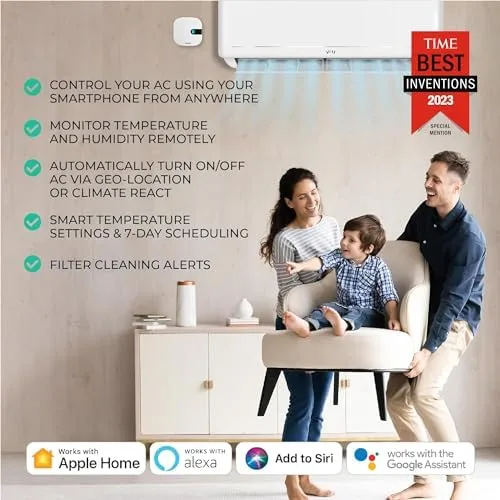
Sensibo Air leans into sensor-driven automation with Climate React, using its built-in temperature + humidity sensor to trigger actions when conditions cross thresholds (rather than only at set times). It also supports geofencing and 7-day schedules/timers, so you can combine «who’s home» with rule-based climate behavior. In practice, it’s strongest when you’re willing to tune rules early and then rely on automations day-to-day.
Cielo Breez Lite also includes temperature + humidity sensors and offers sensor-based logic via Comfy Mode, alongside geofencing and weekly schedules. Its automation approach is typically more «comfort utility» than rule-building: set a target behavior and let it make incremental adjustments without expecting you to design multi-step workflows. A notable constraint is that the Breez Lite is described as entirely reliant on the Cielo app for controls (per a review), which can matter if you prefer broader control surfaces.
Conclusion: Both can automate around temperature/humidity + presence + schedules, but Sensibo Air has the edge for users who want more granular, automation-first control, while Breez Lite’s strength is keeping the comfort logic simpler and more «remote replacement» in feel.
Sensibo Air tends to scale better for complex households because it supports a broader set of automation pathways through integrations like IFTTT and an API, in addition to Alexa/Google/Siri/SmartThings (per its listed integrations). That matters when you want to chain triggers (time + conditions + occupancy) across multiple rooms or platforms, treating AC control like part of a larger home-automation system. The trade-off is that, because these devices infer AC state from commands, some users note Sensibo can miss its signal and fail to change the AC as intended—issues that become more visible the more you «set and forget.»
Cielo Breez Lite supports a similar baseline of third-party hooks—Alexa, Google Assistant, Siri Shortcuts, SmartThings, and IFTTT—but its positioning is more self-contained, with the app as the primary operating layer. It may be easier to live with if your goal is repeatable, lightweight routines (schedule + geofence + comfort mode) rather than building elaborate rule sets. It also supports temperature sensor calibration (noted in community discussion), which can help stabilize comfort automations when placement bias throws readings off.
Conclusion: Sensibo Air wins on automation depth and extensibility, while Cielo Breez Lite prioritizes simpler comfort routines and may feel less «automation-engine heavy» if that’s not what you want.
Winner: Sensibo Air
Compatibility & AC Model Support
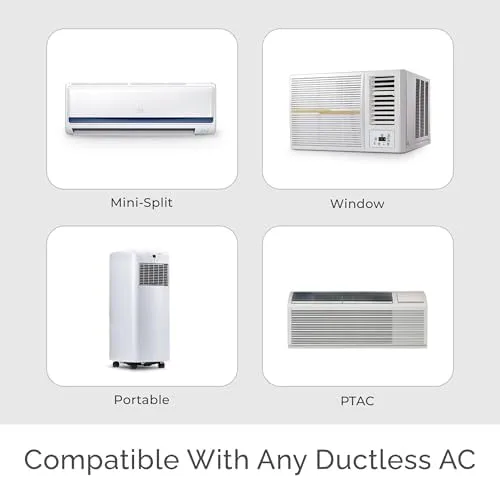
Sensibo Air is explicitly positioned as a broad-coverage IR controller for air conditioners and heat pumps with a remote, including Window, Split, Cassette, Portable, and Central systems. Sensibo also states it works with 10,000+ models, which suggests a sizable IR code library alongside that wider «AC type» coverage. In mixed HVAC households, that central-AC support is the standout differentiator because it expands where you can even attempt to use the device.
Cielo Breez Lite targets IR-controlled mini-split, window, and portable air conditioners and heat pumps, and does not list cassette or central systems in its supported HVAC types. On paper it claims broader IR coverage by count—300+ brands and 20,000+ remote control models—but that’s within a narrower device category focused on ductless/window/portable units. In practice, it can be highly compatible for those form factors, but it’s not positioned as a solution for central AC control.
Conclusion: Sensibo Air has the clearer compatibility advantage because it officially covers more AC system types (including central and cassette), which is a meaningful, real-world limitation if your home isn’t exclusively mini-splits/window/portable units.
Sensibo Air also makes the limitations more implicit: it requires a remote-controlled AC/heat pump and needs clear line-of-sight IR control (Sensibo cites up to 6 m / 20 ft). That aligns with the broader reality that IR controllers infer state rather than reading it, so if someone uses the OEM remote, the app can drift from the AC’s actual mode/temperature. The practical upside is that if your system is compatible, Sensibo’s wider HVAC-type scope gives you more chances to make it work.
Cielo Breez Lite is similarly strict about the basics: it requires an AC with an IR remote, and recommends placement within roughly 6–12 ft (with one manual citing 6.5–13 ft / 2–4 m for optimal performance). If your setup uses proprietary wired wall controllers rather than IR, Breez Lite isn’t designed for that use case. That «IR-only» boundary is often the deciding factor more than brand/model counts.
Conclusion: Both are equally constrained by IR reality (line-of-sight placement and no true feedback from the AC), but Sensibo Air remains the safer pick for unusual installs—especially if «central AC» or «cassette» is anywhere in the requirements.
Winner: Sensibo Air
Hardware & Installation
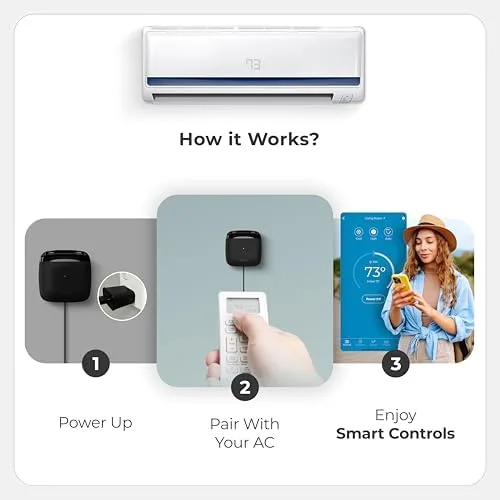
Sensibo Air is a compact, plug-in IR controller powered by a 5V⎓1A micro‑USB adapter (110–240V) and ships with a micro USB cable, power adapter, and mounting kit. Placement is non-negotiable: Sensibo specifies clear line-of-sight to the AC with a range of up to 6 m / 20 ft, and the company claims an average installation time of ~1 minute once you pick the right remote profile.
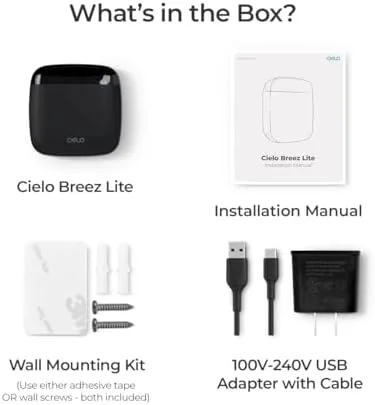
Cielo Breez Lite is likewise a non-battery, plug-in controller powered by a 5V DC USB adapter with USB cable, and it also includes a wall mounting kit in the box. Its IR placement guidance is slightly tighter in practice—Cielo documentation calls for line-of-sight within about 6–12 ft (also cited as 6½–13 ft / 2–4 m for optimal placement)—so you may have a bit less freedom in where you mount it.
Conclusion: On pure hardware and install basics, it’s essentially a tie—both are USB-powered, include mounting hardware, and depend heavily on IR line-of-sight. Sensibo’s up to 20 ft guidance and explicit ~1-minute install claim suggest a marginal simplicity advantage on paper, but real-world success for both still hinges on correct IR profile selection and careful placement.
Winner: Tie
Sensor Accuracy & Placement
Sensibo Air includes built-in temperature and humidity sensing, which it uses for sensor-driven logic like Climate React. However, in the provided documentation/specs there’s no documented temperature-sensor calibration, so if the reading is biased by where it’s mounted, your main recourse is repositioning rather than offsetting the measurement. It also needs clear line of sight to the AC and is rated for placement up to 6 m / 20 ft, which can constrain where you can put it versus where you’d ideally measure room temperature.
Cielo Breez Lite also includes temperature and humidity sensors, and it supports sensor-triggered control via Comfy Mode. Unlike Sensibo, Breez Lite allows temperature sensor calibration in-app (a user-shared instruction notes this capability), which can help correct small systematic offsets caused by wall warmth or device placement. Cielo is also more explicit about placement pitfalls: it warns that drafts from windows, doors, or vents can cause inaccurate room temperature readings, underscoring how much the sensor depends on its micro-location.
Conclusion: Cielo Breez Lite has the edge on sensor accuracy in practice because temperature calibration gives you a concrete tool to correct reading bias, while both devices remain equally vulnerable to bad placement (sunlight, drafts, heat sources) and neither offers an external room sensor option to bypass that limitation.
Winner: Cielo Breez Lite
App Experience & Daily Use
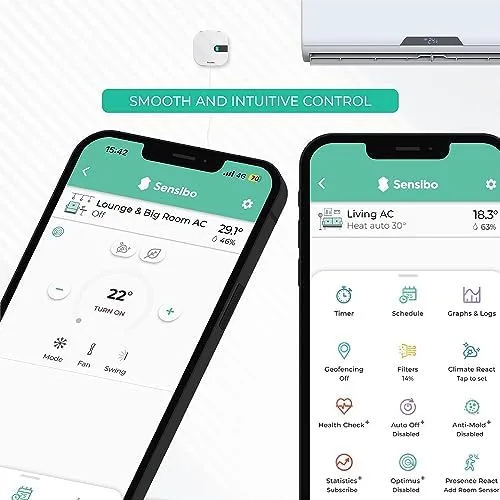
Sensibo Air is built around app-led control that nudges you toward rules and routines rather than constant manual tweaks. It supports 7-day schedules and timers, geofencing, and sensor-triggered automation via Climate React (temperature and humidity triggers). In practice, this lines up with an «automation-first» workflow where, once tuned, the app becomes something you check occasionally rather than a remote you tap all day.
Cielo Breez Lite feels more like a utility-style smart remote you interact with directly, with weekly schedules, geofencing, and Comfy Mode for temperature/humidity-based comfort logic. A key day-to-day constraint is that it’s entirely reliant on the Cielo app for controls (per a TechHive review), so your «remote replacement» experience is only as smooth as the app session and your current connectivity. It also includes practical touches like a front LED status indicator, which can reduce guesswork when you’re troubleshooting whether it’s powered/connected.
Conclusion: Sensibo Air has the edge for «set-and-forget» daily use because its feature set is explicitly oriented around automation (Climate React + schedules + geofencing), while Breez Lite is better if you prefer hands-on, remote-like interaction with comfort features layered on.
Sensibo Air can be a little more demanding when something goes wrong because it’s easy for issues to hide inside the logic stack (rule conditions, state assumptions, and sensor readings). Since it controls via IR and infers state, the system can get out of sync—some users note Sensibo «misses its signal and does not change the AC as intended» (forum). Sensibo also requires clear line of sight for IR reliability, so placement and room changes can directly affect «did it actually do it?» confidence.
Cielo Breez Lite runs into similar real-world limits—IR is still IR, and like any controller in this category, it can’t truly read the AC’s internal state, so state drift is still possible if someone uses the OEM remote. Where it may be simpler to live with is the «single interface» model: you mainly validate the IR profile and then operate it like a controller, not an automation system. Cielo also explicitly supports temperature sensor calibration (noted in community guidance), which can help when placement bias makes readings feel «off,» though it doesn’t eliminate the core limitation that the device measures temperature where it sits.
Conclusion: Breez Lite can be easier to troubleshoot in the moment because the mental model is closer to «smart remote,» while Sensibo’s automation-centric approach can add complexity when diagnosing misses or state mismatch—even if it reduces day-to-day interaction when everything is dialed in.
Sensibo Air is the stronger long-term «grow with your smart home» option because it lists broader integration depth including Apple HomeKit certification and an API alongside Alexa, Google Home, SmartThings, and IFTTT. It also offers a web (HTML5) interface in addition to iOS/Android, which can be useful for desktop control or shared household access. That combination tends to reward users who want to evolve from basic control into more advanced automations across platforms.
Cielo Breez Lite covers the mainstream assistants and platforms—Alexa, Google Assistant, Siri Shortcuts, SmartThings, and IFTTT—and it also offers iOS/Android plus web control. The key difference is that it does not list a public API or HomeKit certification in the provided specs, which can cap how far you can extend it beyond the vendor app and supported integrations. For many households, that’s perfectly fine, but it’s a real ceiling if you like building custom workflows.
Conclusion: Sensibo Air wins on ecosystem headroom thanks to HomeKit + API support, while Breez Lite stays more «standard integration» focused.
Winner: Sensibo Air — its automation-forward app experience and clearly stronger ecosystem depth (HomeKit + API) make it the better fit for long-term, low-touch daily operation once configured, even though Breez Lite can feel simpler for quick manual control.
The Bottom Line
After breaking down integrations, automation, compatibility, and daily usability, the choice comes down to whether you want maximum smart-home headroom or a simpler, lower-cost smart-remote upgrade.
For Apple HomeKit Users: Choose the Sensibo Air, since it’s the only one that’s HomeKit certified for truly native Apple Home app automations and Siri control.
For Budget‑Conscious Shoppers: Choose the Cielo Breez Lite, because it delivers the core smart-AC essentials—scheduling and comfort features—at less than half the price.
For Multi‑Platform Automation Enthusiasts: Choose the Sensibo Air, thanks to its broader integration list plus a public API and IFTTT support that better fits complex routines.
For Simple, No‑Fuss Remote Control: Choose the Cielo Breez Lite, as its comfort-first approach and straightforward app experience are closer to a plug-in «remote replacement.»
Overall,
—it wins on the factors that matter most long-term: superior smart-home integration (notably HomeKit), wider stated AC system compatibility, and deeper automation flexibility. The trade-off is that Cielo Breez Lite remains the better value pick and has an edge in practical sensor tuning with temperature calibration.If you’re building toward a more automated, platform-spanning smart home, go with Sensibo Air; if you mainly want reliable app control and scheduling for the least money, Cielo Breez Lite is the smarter spend.
FAQ
Do Sensibo Air and Cielo Breez Lite require a hub?
Can Cielo Breez Lite control a central air conditioner?
Does Sensibo Air work with Apple HomeKit?
Can I use the original remote after installing these devices?
Does Cielo Breez Lite support Apple HomeKit?
Does Sensibo Air have a public API for custom integrations?
Which device offers better sensor accuracy, Sensibo Air or Cielo Breez Lite?
Which smart AC controller offers better smart home integrations?
Sources for this table
- [1] Sensibo Air — support.sensibo.com support.sensibo.com
- [2] Cielo Breez Lite — cielowigle.com cielowigle.com
- [3] Sensibo Air — support.sensibo.com support.sensibo.com
- [4] Cielo Breez Lite — support.cielowigle.com support.cielowigle.com
- [5] Sensibo Air — sensibo.com sensibo.com
- [6] Sensibo Air — sensibo.com sensibo.com
- [7] Cielo Breez Lite — support.cielowigle.com support.cielowigle.com
- [8] Cielo Breez Lite — support.cielowigle.com support.cielowigle.com
- [9] Cielo Breez Lite — support.cielowigle.com support.cielowigle.com
- [10] Cielo Breez Lite — support.cielowigle.com support.cielowigle.com
- [11] Cielo Breez Lite — support.cielowigle.com support.cielowigle.com
"Images are used for editorial and informational purposes only. All trademarks and images belong to their respective owners."