
Midea Cube 20 Pint vs hOmeLabs 3,500 Sq Ft Wi-Fi Dehumidifier: Portable Room Solution or Big-Basement Workhorse?
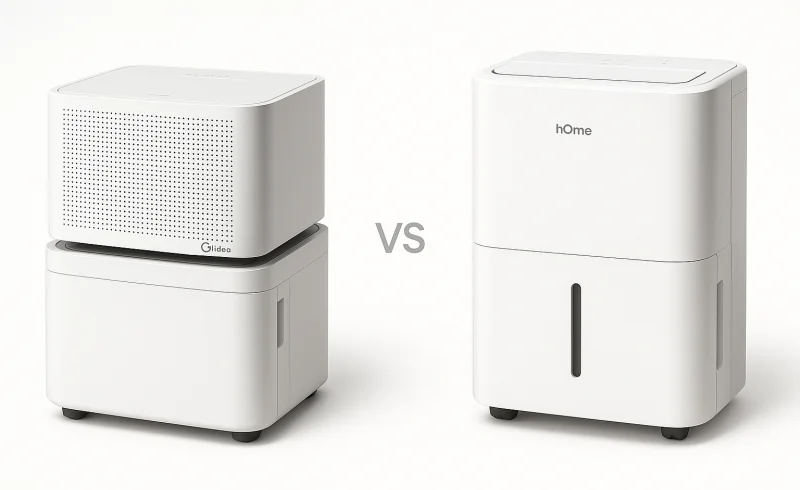
Compare the Midea Cube 20 Pint and hOmeLabs 3,500 Sq Ft Wi-Fi dehumidifiers to find out which is better for portable room applications or larger basement areas. Discover key differences in design, capacity, smart features, and noise levels to make an informed...
TL;DR
Quick Decision
- If you want a hideaway dehumidifier that’s easy to move between rooms and store off-season → choose Midea Cube 20 Pint
- If you care about maximum coverage and extraction muscle for a large, damp basement you can leave it in → choose hOmeLabs 3,500 Sq Ft Wi-Fi
Key Differentiators
The Midea leans hard into everyday convenience with its cube footprint and a generous 12‑liter tank that stretches time between empties; the trade‑off is it’s a targeted, move‑it‑where‑you‑need‑it appliance that demands more thought about airflow and placement. The hOmeLabs counters with substantially stronger moisture removal (25 pints/day) and a 3,500 sq ft rating, but its single on‑board sensor can let distant corners stay damp unless you nail the location, and its smaller 1‑gallon bucket will force more frequent trips to the drain if you skip the hose. You’re essentially picking between a stowable room‑by‑room approach and a semi‑permanent basement install.
Who Should Skip Both
If you want a dehumidifier that’s fully functional without any app or cloud account, neither of these Wi‑Fi‑dependent models is a clean fit—consider a straightforward non‑smart unit with a mechanical humidistat instead.
| Feature | Midea Cube 20 Pint Dehumidifier | hOmeLabs Dehumidifier 3,500 Sq Ft Wi-Fi |
|---|---|---|
| General | ||
| Model Number | MAD20S1QWT | HME010088N |
| Performance | ||
| Noise Level | 45 dBA | 47 dB |
| Connectivity | ||
| App Control | Smartphone app | Smartphone app control |
| Wi-Fi Connectivity | Wi-Fi Ready | Wi-Fi enabled |
| Voice Assistant Compatibility | Amazon Alexa and Google Assistant | Alexa and Google Assistant |
| Mobility & Design | ||
| Wheels | Yes | Yes |
| Built-in Handle | Yes | Yes |
| Product Dimensions | 13.50 x 13.39 x 13.50 in | 19.6 x 12.2 x 8.2 inches |
| Capacity & Coverage | ||
| Coverage Area | Up to 1,500 sq. ft. | Up to 3,500 sq. ft. |
| Water Tank Capacity | 12 L | 1 gallon |
| Moisture Removal Capacity | 20 pints/day | 25 pints/day at 80°F, 60%RH (64 pints max at 95°F, 90%RH) |
| Drainage & Maintenance | ||
| Drain Hose Included | Included | Included |
| Washable Air Filter | Yes | Yes |
| Auto Shut-Off When Full | Yes | Yes |
| Continuous Drain Option | Supported | Supported |
| Removable Water Tank/Bucket | Yes | Yes |
| Certifications & Warranty | ||
| Warranty | 1 Year Limited Warranty | 1-Year Warranty |
| ENERGY STAR Certified | Yes | Yes |
📑 Table of Contents
Coverage & Dehumidification Power
Rated coverage (how much space each is designed to handle)
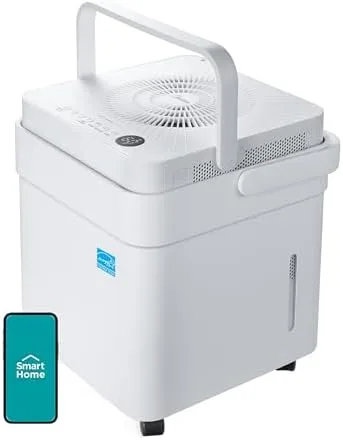
Midea Cube 20 Pint Dehumidifier is rated for up to 1,500 sq. ft. coverage, positioning it for smaller basements, bedrooms, or problem rooms rather than whole-lower-level control. That lines up with the Cube’s «move it where you need it» intent: it’s designed to be a targeted solution you can relocate as conditions change.
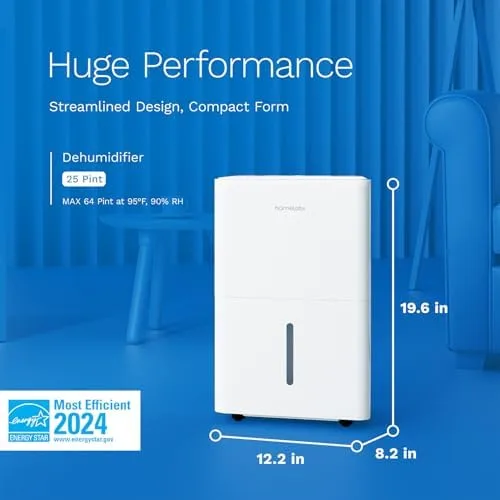
hOmeLabs Dehumidifier 3,500 Sq Ft Wi‑Fi is rated for up to 3,500 sq. ft., more than double Midea’s stated coverage. Editorially, this matches the «set it in the problem area and leave it there» use case—larger, open basements or a single damp zone that needs steady control over time.
Conclusion: hOmeLabs wins on coverage with a 3,500 sq. ft. vs 1,500 sq. ft. manufacturer rating, a meaningful gap if you’re trying to control humidity across a large, open area.
Moisture removal rate (how fast each can pull water from the air)
Midea Cube 20 Pint Dehumidifier is rated to remove 20 pints/day, which is typically sufficient for maintaining comfort in smaller-to-medium spaces when humidity isn’t extreme. In practice, it’s best viewed as «right-sized» dehumidification power for localized dampness rather than rapid whole-basement drying.
hOmeLabs Dehumidifier 3,500 Sq Ft Wi‑Fi is rated at 25 pints/day at 80°F, 60% RH, and the spec sheet also cites a 64 pints max at 95°F, 90% RH peak capability. That higher standard-condition rate plus the high-humidity headroom suggests it’s better suited to heavy-load environments (very damp basements, wetter seasons, or faster pull-down after water events).
Conclusion: hOmeLabs wins on raw extraction power with 25 vs 20 pints/day under standard conditions and the stated ability to reach 64 pints in extreme humidity/heat.
«Whole-area» control in real rooms (the sensor/placement trade-off)
Midea Cube 20 Pint Dehumidifier is less likely to be asked to manage an entire large floor, so its control loop is usually applied to a smaller, more representative air volume. The practical upside is that you can place it closer to the trouble spot, which often reduces the «one sensor can’t represent the whole basement» problem.
hOmeLabs Dehumidifier 3,500 Sq Ft Wi‑Fi can be rated for 3,500 sq. ft., but the real-world limitation in big spaces is measurement representativeness: a single onboard sensor may over-dry near the unit while leaving distant corners damp, or the reverse, depending on airflow and layout. That means placement matters more than the headline coverage number implies, even if the unit has the capacity to keep up.
Conclusion: Midea has the edge on predictability in small-to-mid rooms, while hOmeLabs can cover more space but may require more strategic placement to avoid uneven humidity across a large area.
Winner: hOmeLabs Dehumidifier 3,500 Sq Ft Wi-Fi — it has two clear, spec-backed advantages (rated 3,500 sq. ft. vs 1,500 sq. ft. coverage and 25 vs 20 pints/day standard removal, plus 64 pints max headroom) that matter most when you need broad, high-load dehumidification.
Design & Portability
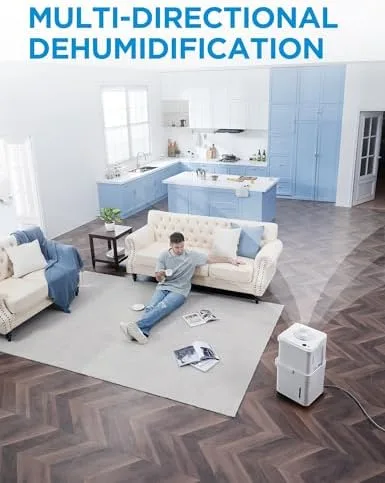
Footprint & «where it fits»
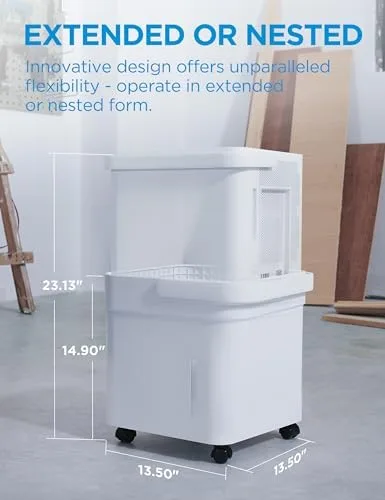
The Midea Cube 20 Pint Dehumidifier uses a cube footprint at 13.50 × 13.39 × 13.50 in, which makes it easier to slot into closets, laundry nooks, and tight basement corners where floor-plan flexibility matters. That geometry also supports the editor’s use-case note: it’s especially practical when you need to move and store the unit rather than keep it permanently in one spot.
The hOmeLabs Dehumidifier 3,500 Sq Ft Wi‑Fi is more tower-like at 19.6 × 12.2 × 8.2 in, with a longer max dimension that tends to feel more «appliance-forward» in a room. Its form aligns with the «set it and leave it» pattern—more like infrastructure for a single problem zone than a unit you constantly tuck away.
Conclusion: For fitting into tight spaces and being easy to stow, Midea has the clearer design advantage; hOmeLabs looks and behaves more like a permanent placement unit.
Moving it around (wheels, handle, and stability)
The Midea Cube includes wheels and a built-in handle, and its squat cube stance naturally lowers the center of gravity versus a taller silhouette. In real use, that supports frequent repositioning—consistent with the «portable-appliance-like» experience highlighted in the additional context.
The hOmeLabs also includes wheels and a built-in handle, so it’s mobile in the basic, expected sense. But paired with its more elongated body, it’s typically treated as a «utility appliance» that you roll occasionally rather than relocate day-to-day.
Conclusion: With equivalent mobility features on paper, Midea’s shape is better optimized for frequent moves, while hOmeLabs is mobile but more «stay-put» by design.
Placement sensitivity (airflow and clearances)
The Midea Cube’s unconventional cube design can make airflow direction and clearance more consequential than buyers expect; the additional context notes placement and obstruction can affect perceived performance. That means the portability upside comes with a small penalty: you may need to be more deliberate about where and how it breathes.
The hOmeLabs uses a more traditional dehumidifier silhouette, which generally makes «good enough» placement more intuitive in basements or utility rooms. The trade-off is less about fit and more about becoming a more visible, semi-permanent fixture.
Conclusion: hOmeLabs is typically less finicky to place, but Midea remains the better choice when space constraints and seasonal storage are the priority.
Winner: Midea Cube 20 Pint Dehumidifier
Smart Features & App Experience
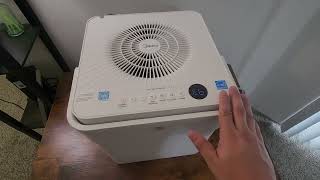
Connectivity basics (Wi‑Fi + voice assistants)
The Midea Cube 20 Pint Dehumidifier is Wi‑Fi Ready with smartphone app control and supports Amazon Alexa and Google Assistant. In practice, it’s positioned as a «smart-capable» appliance—useful for remote control and schedules, but not required for basic operation.
The hOmeLabs Dehumidifier 3,500 Sq Ft Wi‑Fi is explicitly Wi‑Fi enabled with smartphone app control and also supports Alexa and Google Assistant. Editorially, it tends to be treated as a more «dashboard-first» product, where remote monitoring and routines are a bigger part of daily ownership.
Conclusion: On paper, smart feature checklists are effectively identical—app control + Alexa/Google on both—so neither wins on core connectivity.
Setup friction & network requirements
The Midea Cube 20 Pint Dehumidifier can be straightforward physically, but pairing can be the make-or-break step on finicky home networks; once connected, many owners treat the app as optional. That said, both units’ Wi‑Fi generally assumes 2.4 GHz networks, which can trip up initial onboarding in modern dual-band setups.
The hOmeLabs 3,500 Sq Ft Wi‑Fi similarly depends on solid 2.4 GHz setup for smooth onboarding, and its value proposition nudges buyers to pair immediately for schedules and remote status. The hOmeLabs documentation also reinforces appliance-first troubleshooting habits (installation correctness and addressing faults before power-up), which matters when users assume an app will «fix» a hardware/setup issue.
Conclusion: Tie—both can suffer pairing hiccups largely driven by home-network realities (not unique hardware advantages), and both should remain usable even if you abandon Wi‑Fi.
App ecosystem & long-term software risk
The Midea Cube 20 Pint Dehumidifier benefits from a broader appliance ecosystem with more frequent app iterations, which can mean faster feature rollouts and compatibility work over time. The trade-off is that frequent updates can also introduce UX friction (UI shifts, login/permission changes) that impacts day-to-day reliability even if the dehumidifier itself is fine.
The hOmeLabs 3,500 Sq Ft Wi‑Fi app is typically more focused on core dehumidifier tasks (remote status, target tweaks, schedules) rather than a sprawling platform. The trade-off is longevity risk: with a smaller ecosystem, long-term satisfaction hinges on whether the app/cloud stays well-maintained across phone OS updates, since a Wi‑Fi appliance is partly a cloud product.
Conclusion: No clear winner—Midea looks stronger on ecosystem momentum, while hOmeLabs is arguably simpler and more dehumidifier-centric; the better choice depends on whether you prioritize platform depth or minimalism.
Winner: Tie
Tank Capacity & Maintenance
Tank size (how often you empty it)
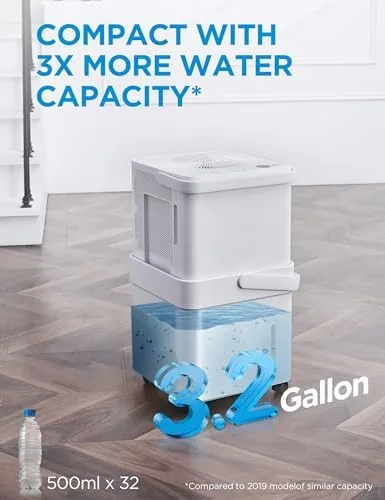
Midea Cube 20 Pint Dehumidifier pairs a 12 L tank (about 3.2 gallons) with a 20 pints/day removal rating, which typically translates to fewer «bucket runs» before hitting full. For many homes, that larger reservoir is the main reason the Cube feels lower-effort day to day—especially if you’re not using a hose.
hOmeLabs Dehumidifier 3,500 Sq Ft Wi‑Fi uses a 1-gallon tank despite higher stated extraction (e.g., 25 pints/day at 80°F/60% RH, with higher «max» claims at hotter/wetter conditions). In practice, that smaller bucket can fill quickly in damp periods, pushing you toward more frequent emptying unless you set up continuous drain.
Conclusion: On tank convenience alone, Midea clearly wins—12 L vs 1 gallon is a large, practical gap that reduces maintenance interruptions for anyone relying on the bucket.
Drainage options & routine upkeep
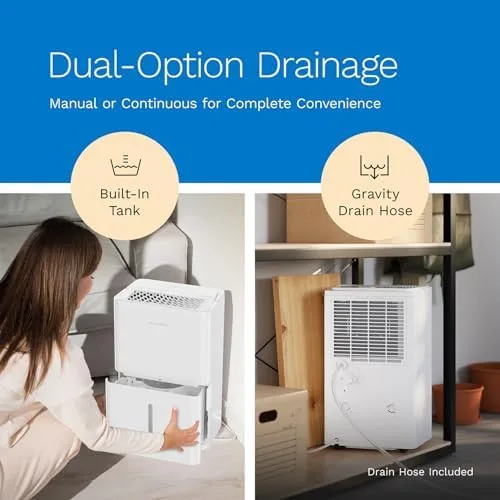
Midea Cube 20 Pint Dehumidifier supports continuous drain and includes a drain hose, letting you shift from Bucket Mode to a more hands-off setup when you have a suitable drain location. It also has a washable air filter and auto shut-off when full, so the maintenance loop is mostly «clean filter, manage water,» with overflow protection baked in.
hOmeLabs Dehumidifier 3,500 Sq Ft Wi‑Fi also supports continuous drain, includes a drain hose, and offers a washable air filter plus auto shut-off when full. Manufacturer guidance emphasizes keeping the drain path clear—e.g., ensuring the auto drain hose isn’t clogged—which matters more when you’re trying to avoid frequent tank handling in a larger space.
Conclusion: For core maintenance features, it’s essentially a tie—both check the boxes (hose, washable filter, full-tank shutoff)—but Midea’s much larger tank remains the differentiator if you aren’t draining continuously.
Winner: Midea Cube 20 Pint Dehumidifier
Noise Levels
Midea Cube 20 Pint Dehumidifier is rated at 45 dBA, which puts it in the «background hum» category for most rooms rather than an intrusive appliance sound. That small edge can matter more in bedroom-adjacent spaces or open living areas where fan noise is closer to ear level and more noticeable over time.
hOmeLabs Dehumidifier 3,500 Sq Ft Wi‑Fi is rated at 47 dB, essentially the same class of quiet on paper but still a measurable step up from the Midea’s spec. In real homes, perceived loudness can swing with placement, hard-surface reflections, and whether the unit is working harder for a larger zone—factors the single dB rating doesn’t fully capture.
Conclusion: With 45 dBA vs 47 dB, Midea is the quieter pick on specs, but the difference is marginal enough that many basement/utility-room users may not perceive it day to day. Winner: Midea Cube 20 Pint Dehumidifier
The Bottom Line
After breaking down coverage, design, smart features, maintenance, and noise, the choice comes down to whether you need maximum reach or a more livable, low-effort dehumidifier.
Large Basement or Open-Plan Area (2,000+ sq ft): Choose the hOmeLabs Dehumidifier 3,500 Sq Ft Wi‑Fi, since it’s the clear leader on rated coverage and raw extraction power for consistently damp, sprawling spaces.
Apartment, Small Room, or Seasonal Use: Choose the Midea Cube 20 Pint Dehumidifier, thanks to its compact cube design, easier storage, and lower cost for targeted, part-time humidity control.
Maximizing Smart Home Integration: Tie — both support app control plus Alexa/Google, and the article’s takeaway is that long-term app reliability is a shared gamble, so the decision hinges on how much you want app/voice control in the first place.
Frequent Relocation or Multi‑Room Usage: Choose the Midea Cube 20 Pint Dehumidifier, because its squat, portable form factor makes it easier to move and live with across different rooms.
Overall, the hOmeLabs does better if your priority is brute-force dehumidification across a very large area, but for most households the everyday experience favors Midea—especially with its much larger tank convenience, slightly lower noise spec, and easier-to-place footprint.
If you’re outfitting a big, persistently wet basement, go hOmeLabs and plan for continuous drain; otherwise, pick the Midea Cube for the smarter, simpler balance you’ll appreciate every day.
FAQ
Which dehumidifier is better for a large basement?
Can I control both dehumidifiers with my phone?
Which one is easier to store when not in use?
Are these dehumidifiers noisy?
How do I set up continuous drainage on these dehumidifiers?
What are the water tank capacities of the Midea Cube and hOmeLabs?
Why won't my dehumidifier connect to Wi-Fi?
📄 Used Manuals & Documentation
Midea Cube 20 Pint Dehumidifier
hOmeLabs Dehumidifier 3,500 Sq Ft Wi-Fi
"Images are used for editorial and informational purposes only. All trademarks and images belong to their respective owners."