
M1 vs P17 Car HUD: GPS-Only Simplicity vs OBD2-Powered Intelligence
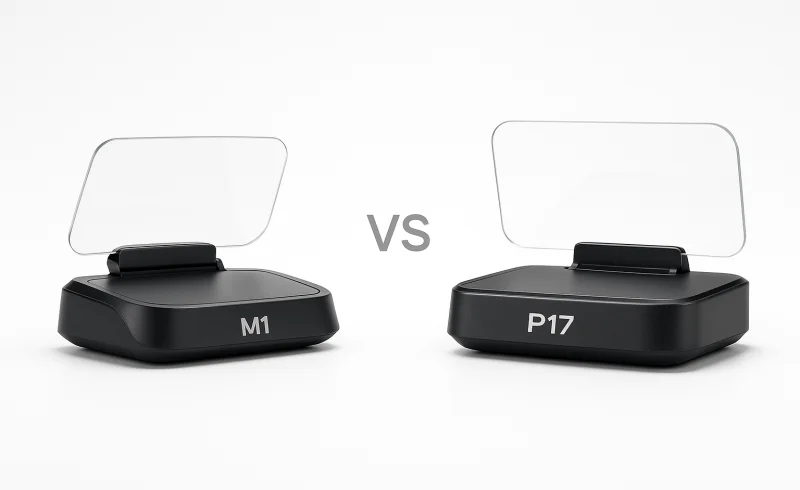
Explore the differences between the M1 and P17 Car HUDs in features, data depth, and usability. M1 offers straightforward GPS-based speed and direction display, suitable for any vehicle. In contrast, P17 provides extensive OBD2 metrics, diagnostics, and perfor...
TL;DR
- If you want a minimal, set-and-forget HUD that works in any vehicle without touching the diagnostic port → choose M1 Car HUD
- If you want live vehicle data, fault-code alerts, and performance tests and don’t mind some initial configuration → choose P17 Car HUD
- If you frequently switch cars (rentals, mixed fleets) and just need speed/compass in your line of sight → M1 is safer; P17 is better if you own one compatible car and actually use OBD2 features.
Key differentiators: The M1 is a windshield-projection appliance—GPS-only, USB-powered, and deliberately limited to speed and direction. Its simplicity is its strength: no OBD2 dependencies, no settings drift. The P17 is a configurable instrument panel with an LCD screen, pulling 50+ metrics and diagnostic alerts from your car’s ECU. That depth comes with trade-offs: setup can involve trial-and-error for OBD2 compatibility, and the extra data can feel noisy if you don’t tune alerts. One is a calm sidekick; the other is a live dashboard for drivers who monitor their car.
Who should skip both: If you need turn-by-turn navigation, smartphone mirroring, or a HUD that integrates with your car’s ADAS systems, look for a dedicated navigation HUD or a dash-mountable phone holder with a HUD app instead.
Market price overview

 Banggood
 Banggood
| Feature | M1 Car HUD Head-Up Display | P17 Car HUD Head-Up Display |
|---|---|---|
| Power | ||
| Working voltage / power input | 5V via USB | OBD mode: 11V-18VDC; GPS mode: USB power |
| Display | ||
| Speed unit selection | MPH, KM/H | MPH, KM/H |
| Driving direction display | Yes | Yes |
| Automatic brightness adjustment | Yes | Yes |
| General | ||
| Product type | Car head-up display | Car head-up display |
| Display technology | Windshield projection HUD | LCD HUD screen |
| Features | ||
| Safety alarms | Overspeed alarm; fatigue driving reminder | Overspeed alarm; low voltage, water temperature, RPM, and fault code alarms |
| Core displayed data | Speed, driving direction/compass | Speed, RPM, water temperature, voltage, fuel consumption, mileage, travel time, altitude, driving direction, satellite data, and more |
| Fault code read / clear | Not supported | Supported |
| Engine / ECU data display | Not supported | Supported |
| Performance test functions | Not supported | Acceleration, brake, and turbo tests |
| Connectivity | ||
| Operating mode | GPS | OBD2 + GPS dual system |
| Satellite system | GPS + BeiDou dual-mode chip | GPS + BeiDou dual-mode chip |
| Connection interface | USB cable | OBD cable or USB cable |
| Vehicle compatibility | All vehicles | All vehicles in GPS mode; OBD2/EUOBD-compatible vehicles for OBD functions |
📑 Table of Contents
Data & Diagnostics
Core data depth (what you can actually see while driving)
The M1 Car HUD Head-Up Display is fundamentally a GPS HUD: its core readouts are speed plus driving direction/compass, with user-selectable MPH or KM/H. It’s positioned as a minimal overlay rather than a vehicle-status display, which lines up with the fact it doesn’t support engine/ECU data. In practice, this keeps attention on a small set of cues, but it also means you’re not getting any engine context beyond what the car’s own cluster provides.
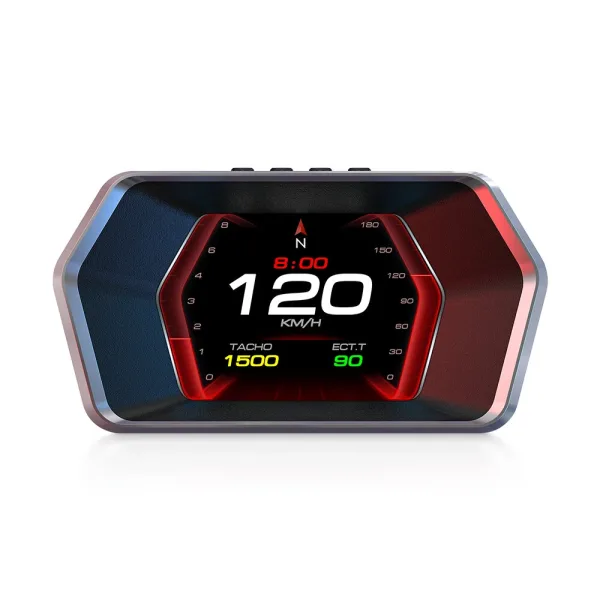
The P17 Car HUD Head-Up Display is designed to behave more like a lightweight instrument panel, with an OBD2 + GPS dual system. Its core displayed data explicitly includes speed, RPM, water temperature, voltage, fuel consumption, mileage, travel time, altitude, driving direction, satellite data, and more, and retailer/manual sources state it can show «more than 50» data points and alarms. That breadth is the point of the P17—if your priority is seeing vehicle metrics live, it’s built for it.
Conclusion: P17 clearly wins on raw data depth (50+ OBD2/GPS metrics vs speed + compass), while M1 wins only if your goal is a deliberately minimal display.
Diagnostics & fault-code functionality
The M1 has no fault code read/clear capability and no engine/ECU data display, so it can’t help you confirm or clear a check-engine condition. Its warnings are limited to driver-facing reminders like overspeed and a fatigue driving reminder, not diagnostic alerts sourced from the car. If you want a HUD that never «talks to the car,» this simplicity is a feature—but it’s a hard limitation for troubleshooting.
The P17 explicitly supports fault code read/clear and includes fault code alarms, which is the functional jump from «HUD» to «basic diagnostic gauge.» Because it pulls data through the OBD cable in OBD mode, the usefulness depends on whether your vehicle exposes consistent OBD2 data (and how cleanly it interoperates with add-on OBD devices). It also adds performance-oriented tools that the M1 doesn’t attempt.
Conclusion: P17 wins on diagnostics because it can read/clear fault codes and trigger fault-code alerts, whereas M1 cannot perform any ECU/OBD2 diagnostic functions.
Performance tests and «instrument panel» behavior
The M1 does not include performance testing of any kind—its feature set is intentionally constrained to basic driving essentials from GPS. That makes it «set and forget» day-to-day, but it also means there’s no way to use it for acceleration/braking benchmarking or engine behavior checks. If you’re hoping the HUD can double as a monitoring tool, the M1’s spec sheet says it won’t.
The P17 includes performance test functions—specifically acceleration, brake, and turbo tests—which reinforces the idea that it’s for drivers who want more than speed-on-glass. The trade-off is cognitive load: more pages, more alerts, and more configuration decisions (especially early on) to avoid noisy or irrelevant readouts. For drivers who enjoy tuning/monitoring, those extra modes are core value; for everyone else, they can be unused complexity.
Conclusion: P17 wins on advanced functions thanks to its acceleration/brake/turbo tests, while M1 is better aligned with drivers who want fewer screens and no monitoring overhead.
Winner: P17 Car HUD Head-Up Display — it has a defensible, feature-complete advantage in this category with 50+ data points, engine/ECU readouts, and fault code read/clear + performance tests, while M1 is limited to speed and direction with no diagnostics.
Display & Visibility
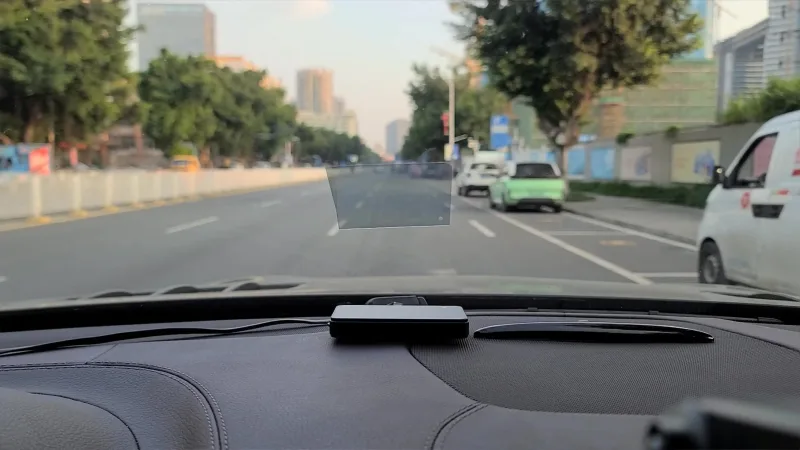
M1 Car HUD Head-Up Display uses windshield projection to put essentials (notably speed and driving direction/compass) in your line of sight. In practice, visibility is highly dependent on placement: reflections and readability can swing based on dashboard geometry and windshield angle, so small repositioning can make a big difference. The upside is that the UI stays minimal, which reduces the chance of the display feeling cluttered.
P17 Car HUD Head-Up Display uses a dedicated LCD HUD screen, so what you see is less dependent on windshield angle or the quality of a reflective film. It can show far more simultaneously—its spec list includes speed, RPM, water temperature, voltage, fuel consumption, mileage, travel time, altitude, driving direction, satellite data, and more, and sources claim 50+ data/alarms—which can be genuinely helpful if you want an instrument-panel-like view. The trade-off is that information overload is a common friction point: more pages, more alerts, and more chances the screen feels «busy» compared with a minimal HUD.
Conclusion: P17 wins for consistent, windshield-independent readability and dense at-a-glance data, while M1 wins for a simpler, less distracting presentation—but it’s more sensitive to glare and placement.
M1 Car HUD Head-Up Display includes automatic brightness adjustment (via a light sensor per the provided specs), which helps keep a projected image from being overly bright at night. Because it runs as a GPS HUD, it’s not adapting brightness based on the vehicle’s internal state—so the day/night experience is mainly about sensor behavior plus how reflective your windshield setup is. If you’re prone to noticing reflections, M1’s projection style can be the limiting factor even with auto-dimming.
P17 Car HUD Head-Up Display also supports automatic brightness adjustment, and the manual/retailer sources explicitly note an inbuilt light sensor for this behavior. Since it’s an LCD screen rather than a projection, brightness control tends to feel more predictable across different windshields, and you’re not fighting the same «double image» reflection dynamics. However, if you keep many readouts enabled at once, the benefit of auto-brightness doesn’t solve the cognitive load of parsing lots of small metrics.
Conclusion: Tie—both offer auto brightness, but P17’s LCD format is typically less affected by windshield/glare variables, while M1’s simpler screen can be easier to read quickly when the projection is well-positioned.
Winner: Tie
Setup & Onboarding
M1 Car HUD Head-Up Display is structurally the simpler install because it’s GPS-only and powered by 5V via USB, so it doesn’t require any vehicle compatibility matching beyond finding a USB power source. That «plug and play» approach is reinforced in retailer specs describing USB rechargeability and easy installation. In practice, onboarding is mostly physical: finding a dash position and routing the cable cleanly.
P17 Car HUD Head-Up Display gives you more than one startup path: it’s a dual system (OBD2 + GPS) with either an OBD cable or USB cable connection. Power differs by mode—11V–18V DC in OBD mode versus USB power in GPS mode—so the first decision is whether you want vehicle-fed data or a universal GPS-style setup. That flexibility can speed things up if you already know what you want, but it adds a decision point (and potential compatibility checking) that the M1 avoids.
Conclusion: For pure onboarding simplicity, M1 has the edge—USB + GPS means fewer «does my car support this?» variables than P17’s OBD2/GPS split.
Compatibility checks and «first-week» friction
M1 Car HUD Head-Up Display is listed as compatible with all vehicles, which largely removes up-front troubleshooting around vehicle data availability. The main setup sensitivity is placement-dependent readability, since it’s a windshield projection HUD and small changes in dash location can affect reflections and perceived clarity. That makes installation more about physical iteration than system configuration.
P17 Car HUD Head-Up Display is universal only in GPS mode; its OBD features depend on OBD2/EUOBD compatibility, and the real-world experience can vary by make/year because cars expose diagnostic data differently. The P17 manual-backed behavior that it can be powered by USB and that it auto powers off after ~3 minutes when connected by OBD suggests additional mode-specific behavior you may need to learn early. This aligns with the common reality of OBD accessories: setup can be quick, but the «first week» often includes selecting the right mode/pages and verifying readings are sensible.
Conclusion: M1 wins on predictability across vehicles, while P17 trades simplicity for flexibility—especially if you intend to use OBD data.
Settings stability and troubleshooting burden
M1 Car HUD Head-Up Display benefits from having fewer systems to configure (speed, direction, brightness, and basic alarms), which supports a «set-and-forget» onboarding flow once you like the placement. However, some users note the M1 may not retain settings after a restart and suggest checking the connector as a fix, which can turn onboarding into a repeat-adjustment loop for affected owners. The availability of an M1 troubleshooting manual helps, but it doesn’t eliminate the annoyance if the behavior shows up in your unit.
P17 Car HUD Head-Up Display can demand more initial configuration simply because it can show far more information—retailer and manual sources describe 50+ driving data and alarms and integration via the OBD2 port with an inbuilt light sensor for auto brightness. More pages, alerts, and modes typically mean more tuning during onboarding (deciding what to display, which alarms to keep, and which to disable). That said, if you choose GPS mode via USB, onboarding can resemble M1’s flow—just with more optional complexity waiting if you switch into OBD later.
Conclusion: M1 is generally easier to «finish setup» and stop thinking about it, but it carries a notable risk of settings-retention friction for some owners; P17 is more work up front if you use OBD, but its GPS-only path can be straightforward.
Winner: M1 Car HUD Head-Up Display
Safety Alarms & Alerts
The M1 Car HUD Head-Up Display keeps alerts to a minimum: you get an overspeed alarm plus a fatigue driving reminder. Because it’s a GPS-only unit (no ECU/OBD data), its warnings are limited to what it can infer without reading vehicle systems.
The P17 Car HUD Head-Up Display includes the same overspeed alarm, but adds low voltage, water temperature, RPM, and fault code alarms. In OBD2 mode, it can also read/clear fault codes and display engine/ECU data, which gives its alerting system more vehicle context to work with.
Conclusion: On alert coverage and early-warning potential, P17 is clearly stronger—it can flag electrical/cooling/engine issues (e.g., low voltage or high water temp) that the M1 can’t detect at all.
The M1’s narrower alert set can be a practical safety advantage for drivers who want fewer interruptions—especially if your goal is simply speed discipline plus a periodic fatigue cue. Editor notes also emphasize M1’s «set-and-forget» pattern, where less configuration typically means less day-to-day babysitting.
The P17, by contrast, can become more demanding in daily use because it has more alerts and modes to tune. Per editor notes, information overload is common at first, and if thresholds are set aggressively it can create nuisance warnings that don’t reflect real problems—pushing some owners to disable the very features they bought it for.
Conclusion: If you prioritize low distraction and minimal configuration, M1 has the edge; if you want a HUD that behaves more like a lightweight instrument panel with meaningful health alerts, P17 has the edge.
Winner: P17 Car HUD Head-Up Display — its added low voltage + water temp + RPM + fault code alarms (and OBD-backed fault handling) are a substantial, defensible advantage in safety-related warning capability, even if M1’s simplicity will suit drivers who prefer fewer prompts.
Power & Connectivity
M1 Car HUD Head-Up Display runs on a simple 5V via USB power input, with a USB cable as its only connection interface. That USB-only approach also supports its «all vehicles» positioning, since it doesn’t depend on whether a car exposes OBD2 data reliably. For long-term use, the upside is fewer integration variables, though some users note it may not retain settings after a restart, which can undercut the «set-and-forget» appeal if it happens on your unit.
P17 Car HUD Head-Up Display can be powered either via USB (GPS mode) or through OBD mode (11V–18V DC) using an OBD cable. In OBD mode, the manual states it will automatically power off in 3 minutes after the car is off, which can be more convenient than relying on a USB socket that stays live. The trade-off is compatibility and complexity: OBD features require an OBD2/EUOBD-compatible vehicle, and real-world experience can vary by make/year as different cars expose diagnostic data differently.
Conclusion: P17 has the connectivity advantage thanks to dual power options (USB + OBD) and 3-minute auto power-off in OBD mode, but M1 is simpler and more universal with its USB-only (5V) approach—better if you want a consistent experience across vehicles without OBD2 variability.
Winner: Tie
Long-Term Ownership
M1 Car HUD Head-Up Display is structurally set up for «set-and-forget» ownership because it runs in GPS-only mode and powers via 5V USB, avoiding any ongoing dependency on vehicle diagnostics. Over time, the most likely wear points are physical—USB cable strain and whatever mounting/adhesive solution you use—rather than compatibility shifts with different cars. Some users note M1 can fail to retain settings after a restart (report), which is a meaningful long-term annoyance if you frequently power-cycle the unit.
P17 Car HUD Head-Up Display tends to demand more long-term «ownership attention» because its headline features depend on OBD2 + GPS dual system operation, with power in OBD mode at 11V–18V DC and broader data/alert logic to tune. That richer feature set (e.g., fault code read/clear, engine/ECU data, and multiple alarms including low voltage, water temperature, RPM, and fault code alarms) is useful long-term only if you’re willing to periodically adjust screens and alerts as your needs change. The trade-off is that OBD behavior can be less universal across vehicles; in addition, the manual notes the P17 will auto power off in 3 minutes when connected by OBD cable and can also run via USB power, which can add another layer of «did I wire/configure this right?» over time.
Conclusion: For low-hassle longevity, M1 has the edge because its USB-powered, GPS-only design is inherently more consistent across vehicles and less prone to compatibility-driven tinkering, even factoring in the notable reports of settings not sticking. P17 can be the better long-term companion for drivers who will actually use its OBD-backed pages (RPM, temps, voltage, fault codes) and don’t mind periodic configuration and vehicle-to-vehicle variability.
Winner: M1 Car HUD Head-Up Display
The Bottom Line
After digging into data depth, visibility, setup, alerts, and long-term ownership, the choice comes down to whether you want a simple GPS overlay or a more instrument-panel-like HUD with OBD2 features.
For the Minimalist Driver: Choose the M1 Car HUD Head-Up Display for its GPS-only focus on speed and direction, plus the plug-and-play USB setup that keeps distractions and configuration to a minimum.
For the Data-Driven Driver: Choose the P17 Car HUD Head-Up Display because its OBD2 + GPS system delivers 50+ metrics, real diagnostics (fault code read/clear), and richer safety alerts like voltage and water temperature.
For Drivers Who Switch Cars Frequently: Choose the M1 Car HUD Head-Up Display since it’s positioned as compatible with all vehicles and doesn’t rely on OBD2 behavior that can vary by make and model.
In the full comparison, there isn’t a single «best for everyone» winner: M1 wins on onboarding simplicity, predictability across vehicles, and low-hassle day-to-day use, while P17 wins decisively on live engine/ECU data, diagnostics, and broader alert coverage—at the cost of more screens and setup.
Your choice between M1 and P17 depends on whether you value simplicity and low cost or comprehensive data and diagnostics. For most drivers, M1 covers the basics well; for car enthusiasts and data seekers, P17 is the clear winner.
FAQ
Can I install the P17 in any car?
Does the M1 display engine RPM?
Which HUD is easier to set up?
What is the price range of the P17 HUD?
Does the P17 automatically shut off when the car is off?
Can the P17 read and clear fault codes?
Does the M1 HUD have any known issues?
📄 Used Manuals & Documentation
M1 Car HUD Head-Up Display
P17 Car HUD Head-Up Display
"Images are used for editorial and informational purposes only. All trademarks and images belong to their respective owners."