
Lutron P-BDG-PKG2W-A vs TP-Link HS200: Caséta Dimming Kit or Standalone Wi-Fi Switch?
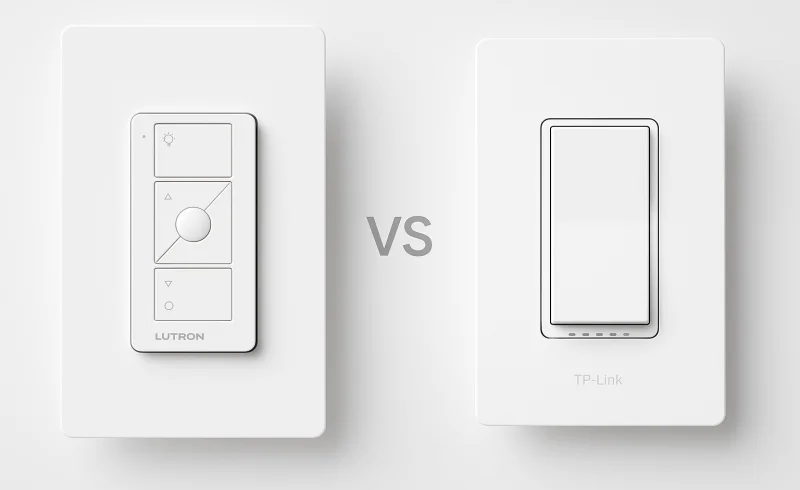
Explore the differences between Lutron's hub-based dimming system and TP-Link's simple Wi-Fi switch. Understand the compatibility, installation requirements, connectivity challenges, and long-term reliability to make an informed decision for your smart home li...
TL;DR
- Lutron P-BDG-PKG2W-A fits lighting circuits that need dimming, lack a neutral wire, or benefit from additional physical control points. The kit combines two Caséta in-wall dimmers, two Pico remotes, and a Smart Bridge.
- TP-Link HS200 fits a single-pole circuit where a neutral wire is available and simple on/off automation is enough. It connects directly to 2.4 GHz Wi-Fi and does not require a separate hub.
- For an existing 3-way circuit, HS200 itself is the wrong Kasa model. TP-Link's HS210 line is designed for 3-way on/off switching, while Caséta can use one wired dimmer plus Pico remotes for additional locations.
- For dimming without a hub, neither product is an exact match. The Kasa HS220 adds direct-Wi-Fi dimming, but it still requires a neutral wire and is intended for single-pole installations.
The most important distinction is easy to miss: these are not equivalent smart switches with different radios. P-BDG-PKG2W-A is a two-circuit dimming starter system; HS200 is a single on/off Wi-Fi switch. The electrical box, the fixture, and the number of control locations should decide the comparison before app features enter the conversation.
This article refers to the U.S. versions of these products. Electrical requirements and model specifications can differ by region.
| Feature | TP-Link HS200 | Lutron P-BDG-PKG2W-A |
|---|---|---|
| Product | ||
| Product type | Single-pole smart Wi-Fi light switch | 2-pack smart dimmer starter kit |
| Package contents | 1× smart Wi-Fi light switch, 1× wall plate, 4× wire nuts, 1× quick start guide, 4× wire labels | 2× in-wall dimmers, 2× wallplates, 2× Pico remotes, 2× tabletop pedestals, Smart Bridge, power supply, Ethernet cable, wire connectors, screws |
| Electrical | ||
| Compatible load types | Incandescent, LED, halogen, compact fluorescent | Dimmable LED, halogen, incandescent |
| Lighting control type | On/off switching | Dimming |
| Neutral wire requirement | Neutral wire required | No neutral required |
| Maximum incandescent load | 600 W | 600 W per dimmer |
| Environment | ||
| Indoor use | Yes | Yes |
| Operating temperature | 32 °F to 104 °F (0 °C to 40 °C) | 32 °F to 104 °F (0 °C to 40 °C) |
| Connectivity | ||
| Smart hub | No hub required | Included Smart Bridge |
| Home network connection | Direct 2.4 GHz Wi-Fi (IEEE 802.11b/g/n) | Smart Bridge connects to router via Ethernet; dimmers and remotes use Clear Connect RF |
📑 Table of Contents
- Start With the Wall Box, Not the App
- Dimming: Lutron Changes Brightness; HS200 Does Not
- Wiring: No Neutral vs Neutral Required
- Multi-Location Control Is a Much Bigger Difference Than It First Appears
- Connectivity: Clear Connect Hub vs Direct 2.4 GHz Wi-Fi
- What Still Works When the Network Does Not?
- Smart-Home Integrations
- Scaling Beyond One Room
- Package Scope: These Are Not Equivalent Boxes
- Which One Fits Which Situation?
- The Bottom Line
- FAQ
Start With the Wall Box, Not the App
Before comparing Wi-Fi with Clear Connect or Kasa with Lutron, three questions matter more:
- Is the circuit single-pole or multi-location?
- Is there a neutral conductor in the switch box?
- Does the fixture actually need dimming, and is its load compatible with the dimmer?
Those answers can eliminate one of these products immediately.
The HS200 requires a neutral wire and is designed for single-pole installations. TP-Link documents both requirements in its HS200 support materials.
The PD-6WCL dimmers supplied with the Lutron kit do not require a neutral wire. They can also participate in multi-location control when paired with Pico remotes. That makes Caséta particularly relevant in older switch boxes and in rooms where a second physical control point is useful.
But no-neutral compatibility does not make the Lutron dimmer universally compatible with every light. The fixture still has to be appropriate for its type of dimming.
Dimming: Lutron Changes Brightness; HS200 Does Not
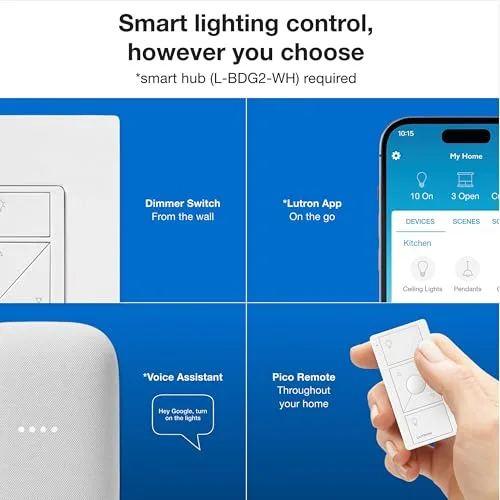
The fundamental difference is visible on the wall.
The Lutron PD-6WCL is a real dimmer, with on, off, raise, and lower controls. Lutron rates it for up to 150 W of compatible dimmable LED lighting or 600 W of incandescent/halogen lighting.
The important word is compatible. A smart dimmer does not make a non-dimmable LED fixture dimmable, and LED behavior can vary considerably between lamp and driver designs. Lutron provides compatibility guidance and low- and high-end trim adjustment for cases where LEDs flicker or become unstable near the edges of the dimming range.
The PD-6WCL also should not be treated as a universal solution for every low-voltage lighting system. Lutron's own Caséta documentation directs electronic low-voltage and some magnetic low-voltage applications to other dimmer models.
The HS200 takes the simpler electrical approach: it switches the circuit on or off. There is no brightness control. That is a limitation if the room needs adjustable lighting, but it also means a normal on/off lighting circuit does not have to satisfy the same dimmer-to-LED compatibility questions.
TP-Link has released several hardware revisions of the HS200, so exact load ratings should be checked against the version printed on the device rather than inferred from the model name alone.
For a hallway light, utility room, porch circuit, or another fixture that is always used at full output, dimming may add little. For a bedroom, living room, dining area, or nighttime pathway, the difference between on/off and adjustable brightness can fundamentally change how the light is used.
Wiring: No Neutral vs Neutral Required
This is the point most likely to settle the comparison before either device is connected to a network.
Lutron's PD-6WCL does not need a neutral conductor. It is designed to operate with line, load, and ground connections, which allows it to work in many switch boxes where a conventional smart switch requiring continuous power cannot.
HS200 requires neutral. If the existing box has only the conductors used by a traditional mechanical switch, HS200 is not an appropriate direct replacement.
That also complicates the idea that HS200 is automatically the easier installation.
Its network setup is simpler because there is no separate hub. Its wall wiring is not necessarily simpler, because the neutral requirement introduces a hard compatibility condition that the Lutron dimmer avoids.
Conversely, a home with modern wiring and an accessible neutral may gain little from Lutron's no-neutral design if the circuit only needs on/off control.
As with any in-wall mains device, the circuit configuration should be identified correctly before installation, and unfamiliar wiring is a reason to involve a qualified electrician rather than infer conductor roles from color alone.
Multi-Location Control Is a Much Bigger Difference Than It First Appears
The two products treat a second control location in fundamentally different ways.
P-BDG-PKG2W-A includes two Pico remotes. A Pico can control a Caséta dimmer wirelessly, so an additional physical control point does not need traveler wiring back to the dimmer. The supplied remotes can serve as portable or tabletop controls, and a Pico can also be mounted on a wall with the appropriate mounting hardware.
That is especially useful in rooms where the desired switch location is not where the electrical wiring happens to be.
For an existing 3-way circuit, Caséta's approach is different from installing two conventional wired dimmers: the PD-6WCL becomes the wired load control and Pico remotes provide the other control locations. Lutron publishes dedicated wiring instructions for these configurations.
The HS200 is a single-pole switch. It should not be treated as a substitute for a 3-way switch simply because app or voice control can reach the same light from elsewhere.
TP-Link has separate hardware for that job. The HS210 KIT is designed for 3-way on/off circuits, while the KS230 KIT addresses 3-way dimming.
That distinction matters most in stairways, hallways, kitchens with multiple entrances, and bedrooms where wall control from more than one location is part of the existing electrical layout.
Connectivity: Clear Connect Hub vs Direct 2.4 GHz Wi-Fi
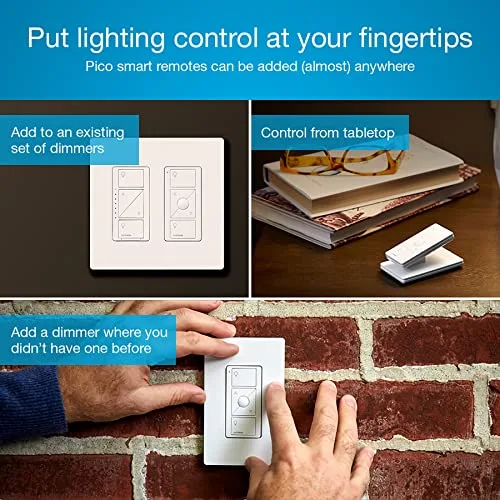
The Lutron kit adds one piece of hardware that HS200 does not: the Smart Bridge, now referred to as the Caséta Smart Hub in current Lutron support material.
The bridge connects to the home network over Ethernet. Caséta dimmers and Pico remotes communicate using Lutron Clear Connect RF rather than Wi-Fi.
That architecture has a practical consequence: the in-wall lighting devices are not individual clients on the household 2.4 GHz Wi-Fi network.
It also means the hub is necessary for app access, schedules, scenes, remote control, and integrations with connected platforms. Lutron states that Caséta dimmers and paired Pico remotes can still communicate directly even when Wi-Fi or internet service is unavailable.
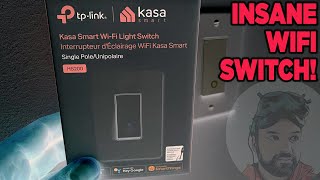
The HS200 connects directly to 2.4 GHz 802.11b/g/n Wi-Fi. There is no intermediary hub: each switch joins the home wireless network itself.
For one or two switches, that is a very straightforward topology. For a larger installation, each additional HS200 is another Wi-Fi endpoint rather than another device on a dedicated lighting network.
That does not mean a group of HS200 switches will automatically cause Wi-Fi problems, nor does the presence of a dedicated Lutron radio prove that Caséta will be more dependable in every home. It means the two systems place their network dependencies in different places.
What Still Works When the Network Does Not?
This is a more useful reliability question than simply declaring one radio technology superior.
With Caséta, the wired dimmer remains a physical dimmer, and a Pico paired directly with it can continue operating the light without relying on household Wi-Fi. The Smart Bridge is still required for connected features such as app access and smart-home integrations.
With HS200, the wall switch still provides physical on/off operation. What disappears when the required network path is unavailable is the connected layer: remote app access, voice-assistant commands, and other network-dependent features.
The resulting tradeoff is straightforward:
- Caséta adds a dedicated hub but keeps the lighting-control radio separate from Wi-Fi.
- HS200 eliminates the hub but makes each smart switch its own Wi-Fi device.
Neither design removes electronics or networking from the system; it simply distributes those dependencies differently.
Smart-Home Integrations
There is another ecosystem difference that can matter more than the switch itself.
The Caséta Smart Hub supports integrations including Amazon Alexa, Google Assistant, and Apple HomeKit, along with other platforms listed by Lutron.
TP-Link's official HS200 materials list Amazon Alexa and Google Assistant support. The longstanding HS200 should not be assumed to provide the Matter or Apple Home features found on some newer Kasa and Tapo switches simply because they come from the same manufacturer.
For a home already organized around Apple Home, that difference can favor the Caséta architecture. For an Alexa- or Google-based setup requiring only a straightforward on/off switch, both products cover the basic voice-control requirement.
The app feature sets also overlap more than the hardware comparison might suggest. Both platforms support scheduling and remote control once their respective network requirements are met. Those shared features are less important than the physical differences in dimming, wiring, and circuit topology.
Scaling Beyond One Room
The original temptation with these products is to equate "hub" with complexity and "Wi-Fi" with simplicity. That distinction becomes less useful as the number of controlled circuits grows.
With Caséta, the first installation includes the bridge. Additional compatible Caséta controls then join the same Clear Connect system. Lutron currently specifies up to 75 devices for a Caséta system, so it is designed for considerably more than a single room while still having a defined system limit.
HS200 expands independently: another circuit means another switch and another Wi-Fi connection. That can be perfectly reasonable for a small number of locations, especially when those locations only require on/off switching.
The more significant limitation is not the theoretical number of Wi-Fi clients. It is that HS200 remains the same single-pole, non-dimming device no matter how many are installed. Rooms requiring dimming or conventional 3-way behavior lead to different Kasa hardware.
Caséta takes the opposite approach: the starter kit establishes a lighting platform first, then compatible dimmers, switches, remotes, sensors, and other Caséta devices can share that platform.
Package Scope: These Are Not Equivalent Boxes
A direct comparison of the two product names can obscure how different the included hardware is.
P-BDG-PKG2W-A includes:
- two PD-6WCL in-wall dimmers;
- two Pico lighting remotes;
- two Claro wallplates;
- two tabletop Pico pedestals;
- a Caséta Smart Bridge;
- the bridge power supply and Ethernet connection hardware.
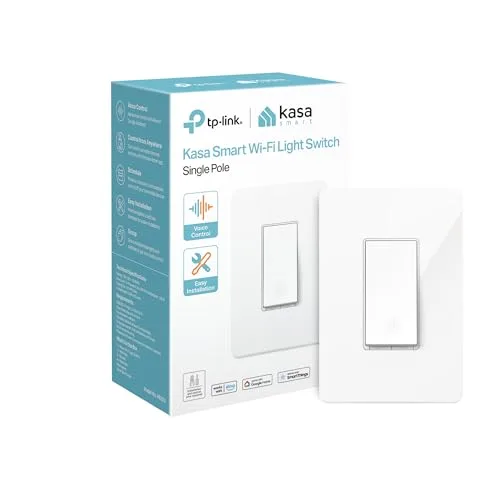
HS200 is a standalone smart switch, supplied with the parts needed for that individual switch installation.
That difference matters when interpreting the `` above. The Lutron listing represents the beginning of a two-circuit lighting system with remote controls and a network bridge; the HS200 listing represents one on/off circuit. Treating their displayed totals as though the packages contained equivalent hardware would distort the comparison.
Which One Fits Which Situation?
A switch box without neutral
Lutron P-BDG-PKG2W-A is the relevant option between these two, assuming the connected lighting load is compatible with the PD-6WCL dimmer.
HS200 requires neutral and therefore does not solve this wiring configuration directly.
One single-pole light that only needs on/off automation
HS200 is the more direct match. Dimming hardware, Pico remotes, and a dedicated lighting hub do not address a requirement that the circuit does not have.
A room where brightness matters
Lutron provides actual in-wall dimming and matching raise/lower control from Pico remotes.
HS200 cannot reproduce that behavior through software because its hardware only switches the load.
An existing 3-way or multi-location circuit
HS200 itself is not designed for the circuit.
Caséta can handle multi-location control using a wired PD-6WCL and Pico remotes. Within the Kasa family, HS210 is the relevant on/off 3-way product, while KS230 addresses 3-way dimming.
Dimming without a separate hub
Neither product in this comparison provides that exact combination.
The Kasa HS220 is a closer match because it combines Wi-Fi with dimming, but it still requires a neutral wire and is designed for single-pole switching. That distinction is important in precisely the older-wall-box scenario where the Lutron PD-6WCL has an advantage.
A home centered on Apple Home
Caséta has documented Apple HomeKit support through its Smart Hub.
The standard HS200 documentation centers on Kasa, Alexa, and Google Assistant rather than HomeKit or Matter, so ecosystem compatibility should be checked at the exact hardware-model level rather than assumed from newer TP-Link products.
The Bottom Line
There is no meaningful overall winner here because Lutron P-BDG-PKG2W-A and TP-Link HS200 solve different electrical and lighting problems.
The Lutron kit makes sense when the light itself needs to behave like a dimmable lighting system: adjustable brightness, no-neutral installation, additional Pico control points, and a dedicated Caséta network that can extend to other rooms.
HS200 makes sense when the requirement is narrower: a compatible single-pole circuit with neutral available, binary on/off control, and direct connection to an existing 2.4 GHz Wi-Fi network.
The most useful decision sequence is therefore not "hub or no hub." It is:
neutral wire → circuit type → dimming requirement → physical control locations → smart-home ecosystem.
Once those five questions are answered, the architectural difference between Caséta and HS200 usually becomes straightforward.
FAQ
Does the TP-Link HS200 require a neutral wire?
Can the Lutron Caséta system work without Wi-Fi?
Is the TP-Link HS200 compatible with Alexa?
How many switches can the Lutron hub support?
Can the TP-Link HS200 be used in a three-way switch setup?
What comes in the Lutron Caséta starter kit?
Are there common issues with Lutron Caséta?
"Images are used for editorial and informational purposes only. All trademarks and images belong to their respective owners."