Google TV Streamer 4K vs Xiaomi TV Stick 4K (Original): Box or Dongle?
Compare Google TV Streamer 4K and Xiaomi TV Stick 4K across performance, software, connectivity, and design. Find out which streaming device suits your living room or travel needs, based on RAM, storage, ports, and long-term reliability.
TL;DR
Google TV Streamer 4K is the better fit for a permanent primary-TV setup when wired Ethernet, 32 GB of storage, 4 GB of RAM, Google Home controls, and a published security-support window matter.
The original Xiaomi TV Stick 4K is the better fit when the hardware needs to disappear behind the TV or move easily between screens, and Wi-Fi-only networking plus 8 GB of storage are acceptable.
Their basic picture and sound capabilities are closer than the hardware differences suggest: both handle 4K, Dolby Vision, and Dolby Atmos. Google also supports HDR10+, which the original Xiaomi stick does not.
Important: this comparison covers the original Xiaomi TV Stick 4K with Android TV 11, 2 GB of RAM, and 8 GB of storage. Xiaomi now has a TV Stick 4K (2nd Gen) with Google TV, Wi-Fi 6, HDR10+, and a newer Cortex-A55 processor platform. If that is the Xiaomi model in front of you, several parts of this comparison change.
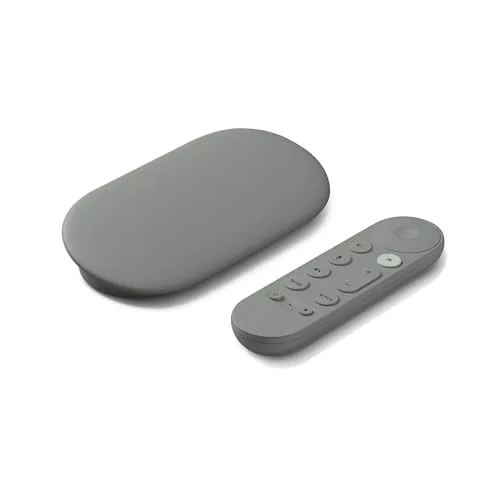
The central tradeoff is not simply "box versus stick." Google gives a fixed TV setup more breathing room: substantially more app storage, twice the memory, Gigabit Ethernet, a customizable remote with a locator feature, and Matter/Thread smart-home functions. Xiaomi keeps the hardware compact and direct-connected, but the original model is an older Android TV 11 device with much tighter storage and no wired-network option.
The name Xiaomi TV Stick 4K now refers to two materially different generations. The model compared here is the original version described in Xiaomi's specifications: Android TV 11, a quad-core Cortex-A35 processor, 2 GB of RAM, 8 GB of storage, dual-band Wi-Fi, Dolby Vision, and Dolby Atmos.
The newer Xiaomi TV Stick 4K (2nd Gen) keeps the same 2 GB/8 GB memory configuration but moves to Google TV, a newer Cortex-A55 platform, Wi-Fi 6, Bluetooth 5.2, and HDR10+. That newer stick narrows the software, wireless, and HDR gaps discussed below.
This distinction matters because the two Xiaomi generations look similar enough that a product page or marketplace title can be easy to skim past. If the specification says Google TV, Wi-Fi 6, or HDR10+, it is the second-generation model, not the original stick covered in the head-to-head below.
Performance & Storage
On paper, Google has the obvious hardware advantage. The Google TV Streamer 4K specifications list 4 GB of RAM and 32 GB of storage. The original Xiaomi stick has 2 GB of RAM and 8 GB of storage.
The storage difference is the one most likely to matter over time. Neither device gives the full advertised capacity to apps because the operating system and preinstalled software take part of it, but 32 GB leaves far more room for streaming apps, their caches, and system updates. With 8 GB, the Xiaomi can still cover a straightforward set of streaming services, but there is much less slack once several apps and their data accumulate.
The RAM gap is useful, but it should not be exaggerated into a promise of flawless speed. More memory gives Google TV more headroom for the interface and background apps, yet the Streamer is not a high-end media computer. In Tom's Guide's review, navigation was generally snappy but still showed occasional lag, and the reviewer did not see a dramatic responsiveness leap over the older Chromecast with Google TV.
That makes Google's advantage here less about benchmark-style speed and more about capacity and margin. The Streamer is easier to live with when several services stay installed for years. The Xiaomi's 2 GB/8 GB configuration is more appropriate for a smaller, stable set of apps.
Advantage: Google TV Streamer 4K.
Software, Updates & Smart Home
Both devices live in Google's TV ecosystem, but they do not present it in the same way. The Google TV Streamer uses the Google TV experience, which organizes recommendations and content across services around the home screen. The original Xiaomi TV Stick 4K runs Android TV 11. It still supports Google Assistant, Google Cast, and the same broad class of Android TV streaming apps, but it is an older software generation.
Google also publishes a concrete security-support commitment for its hardware. Its security-update policy lists the Google TV Streamer 4K for automatic critical security updates for at least five years from its U.S. release on September 24, 2024 — through at least September 24, 2029. That promise is specifically about security updates; it should not be read as a guarantee of every future Google TV feature or major Android version.
The bigger functional difference is smart-home hardware. Google TV Streamer is a Matter hub and Thread border router, and Google TV can expose a home panel for compatible lights, cameras, locks, thermostats, plugs, and other devices already connected through Google Home. The original Xiaomi stick can use Google Assistant for compatible smart-home commands, but it does not provide the Streamer's Matter/Thread hub role.
For a TV that also sits at the center of a Google Home setup, that is a meaningful difference. For a screen used only for video apps, it may be irrelevant.
Advantage: Google TV Streamer 4K, especially in a Google Home setup.
Networking & Ports
The most practical connectivity difference is Ethernet, not HDMI branding. Google TV Streamer includes 10/100/1000 Mbps Ethernet. The original Xiaomi TV Stick 4K has no Ethernet port, so its network connection is wireless.
A wired connection is useful when the TV is in a Wi-Fi dead zone, the local network is congested, or high-bitrate streaming is sensitive to interference. It does not make every stream look better, but it removes wireless conditions from the equation. The Xiaomi can work perfectly well on a strong 5 GHz connection; it simply has no built-in wired fallback.
Google's HDMI port is officially HDMI 2.1, but that should not be treated as a promise of gaming-style 4K120 or 8K output. Google rates the Streamer itself at up to 4K HDR at 60 fps. The practical issue is cabling: Google does not include the required HDMI cable, so the device needs a separate certified HDMI 2.1 cable between the box and the TV.
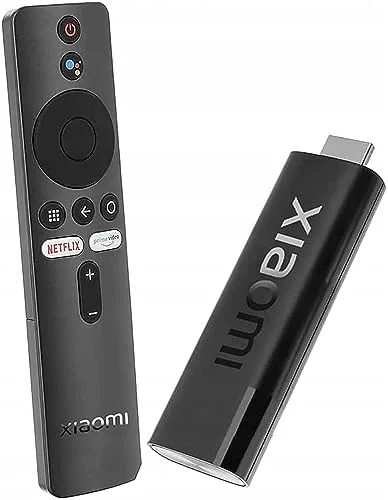
The Xiaomi takes the opposite approach. Its HDMI plug is built into the stick, so it can connect directly to the television. Xiaomi also includes a short HDMI extender, which is useful when the TV chassis or neighboring ports leave too little room for the stick's body. Power still comes through the stick's Micro-USB connection, and Xiaomi includes a power adapter.
Wireless specifications are not a strong reason to favor the original Xiaomi. Google TV Streamer uses dual-band Wi-Fi 5 (802.11ac). Xiaomi also uses dual-band Wi-Fi, and its official regional pages are inconsistent about the listed Bluetooth revision, so the Bluetooth version is not a useful basis for the decision.
Advantage: Google TV Streamer 4K when wired networking matters; Xiaomi is physically simpler at the HDMI port.
Picture & Sound
For mainstream streaming, the two devices overlap more than the RAM and storage figures might suggest.
Google TV Streamer supports 4K HDR up to 60 fps, plus Dolby Vision, HDR10, HDR10+, and HLG. It also supports Dolby Digital, Dolby Digital Plus, and Dolby Atmos.
The original Xiaomi TV Stick 4K supports 4K, Dolby Vision, HDR10, Dolby Atmos, and DTS-HD. Independent testing of that original stick, including Digit's review, found that it does not support HDR10+.
That creates a real format tradeoff rather than a clean sweep for either device. If a television or service relies on HDR10+, Google's broader HDR support matters. If a local-media library contains DTS audio, Xiaomi's explicit DTS-HD support is relevant because Google does not list DTS among the Streamer's supported audio formats.
Atmos is similar on both: the logo on the streamer is only one part of the path. The app, title, television or receiver, HDMI settings, and audio system all have to support the format being used. Neither streamer can create an Atmos track when the source does not provide one.
The practical conclusion is that HDMI branding alone should not decide this section. For mainstream Dolby Vision streaming, both cover the core path. Google has the stronger HDR format list; Xiaomi has the more explicit DTS support.
Advantage: Depends on the format mix in the rest of the setup.
Design & Placement
The form-factor difference is immediate. Google TV Streamer is a small tabletop device measuring roughly 6.4 × 3.0 × 1.0 inches. It needs a place near the television, a power connection, and an HDMI cable running to the display.
The Xiaomi is a 42.8 g stick that plugs into HDMI and can usually remain out of sight behind the screen. Its included HDMI extender gives some flexibility when the television's port placement is awkward.
That makes the Xiaomi easier to move between a spare television, monitor, projector, or temporary setup. The important caveat is power: the stick is compact, but it is not cable-free. Xiaomi supplies a Micro-USB power cable and wall adapter, so portability still means carrying a power solution unless the destination display provides a suitable USB power source.
Google's larger enclosure is less discreet, but it also gives you something the stick format cannot: an Ethernet jack, a physical button that can trigger the remote locator, and a USB-C port for power and data.
Advantage: Xiaomi TV Stick 4K for concealment and portability; Google for a permanent, connected setup.
Remote & Daily Use
Google's remote adds two features that matter in routine use. The Google TV Streamer Voice Remote has a customizable button that can open a favorite app, switch inputs, or bring up the smart-home panel. The Streamer also supports Find My Remote: pressing the button on the box can make the remote play a sound.
Xiaomi's original stick includes a Bluetooth voice remote with Google Assistant. It covers the essential navigation and voice-search job without requiring the streamer itself to stay visible, which fits the hidden-dongle design.
Both devices support Google Cast, so sending compatible video, music, or photos from a phone remains part of the experience on either one. The difference is that Google's remote and smart-home controls add more functionality around the streaming apps themselves.
The day-to-day question is therefore simple: if the remote is the main way the TV is controlled and Google Home devices are part of the room, Google's extra controls are useful. If the goal is mainly to launch a few apps on a secondary screen, Xiaomi's simpler arrangement covers the core task.
Advantage: Google TV Streamer 4K.
Long-Term Ownership
The strongest long-term argument for Google is not a claim that a tabletop box will physically last longer. There is not enough evidence to make that promise. The better-supported case is software policy and storage.
Google publishes a security-update window through at least September 2029, and 32 GB of storage leaves substantially more room for app growth and cached data. The original Xiaomi stick starts from 8 GB and Android TV 11, and it now has a second-generation successor with a newer platform.
A six-month look at Google TV Streamer 4K adds day-to-day context beyond the specification sheet.
That does not make the original Xiaomi stick unusable. It does mean that version identification matters more now than it did when the first model was current. Anyone expecting Google TV, Wi-Fi 6, or HDR10+ from a Xiaomi stick should verify that the device is explicitly the 2nd Gen model.
For a device expected to remain attached to the main television for several years, Google's larger storage pool and documented security horizon make its ownership case easier to define.
Advantage: Google TV Streamer 4K.
The Bottom Line
These two devices solve different physical problems even though both put Google's streaming ecosystem on a 4K screen.
Primary living-room TV:Google TV Streamer 4K is better suited to a fixed installation because of Gigabit Ethernet, 32 GB of storage, 4 GB of RAM, and the published security-support window.
Hidden secondary screen or travel setup: the original Xiaomi TV Stick 4K makes more sense when compact size and direct HDMI connection matter more than Ethernet or storage capacity.
Google Home, Matter, or Thread setup:Google TV Streamer 4K has the clear functional advantage because it can act as a Matter hub and Thread border router.
HDR10+ display:Google TV Streamer 4K is the safer match against the original Xiaomi stick because Google supports HDR10+ and the original Xiaomi model does not.
Xiaomi TV Stick 4K (2nd Gen): treat it as a different comparison. Its Google TV interface, Wi-Fi 6, HDR10+, and newer processor platform remove several disadvantages of the original stick, although it still has 2 GB of RAM and 8 GB of storage and still lacks Google's built-in Ethernet port.
Overall, Google TV Streamer 4K is the stronger all-rounder for a permanent primary-TV setup. The original Xiaomi TV Stick 4K is better suited to cases where the physical footprint is the priority and the narrower hardware limits are acceptable.
✦✧✦✧
🏆
Better fit for a primary TV
Best fit for most usersGoogle TV Streamer 4K
FAQ
Do both devices support Dolby Vision and Dolby Atmos?
Yes, both support Dolby Vision and Dolby Atmos for 4K HDR playback. The Google TV Streamer 4K additionally supports HDR10+ and HLG, while the Xiaomi TV Stick 4K lacks HDR10+. So both handle the most common HDR and immersive audio formats, but Google has a slight edge in HDR format coverage.
Can I use the Xiaomi TV Stick 4K as my primary streaming device?
Yes, for light use on a spare TV it's fine, but as a primary device it may struggle over time. Its 2GB RAM and 8GB storage (less usable after OS) can cause lag as apps fill the limited space. Android TV 11 is older and may not get major updates. For heavy daily multitasking, the Google TV Streamer 4K's 4GB RAM and 32GB storage is more sustainable.
Does the Google TV Streamer 4K come with an HDMI cable?
No. The Google TV Streamer 4K does not include an HDMI cable in the box. You must purchase a separate Ultra High Speed HDMI 2.1 certified cable for optimal performance, especially for 4K HDR content. Without this cable, you may not achieve the full bandwidth of its HDMI 2.1 port.
Which device is better for travel?
The Xiaomi TV Stick 4K is better for travel. Its compact dongle plugs directly into an HDMI port and can often be powered by a TV's USB port, making it easy to carry and set up. However, power stability can vary; weak TV USB ports may cause reboots. The Google TV Streamer 4K is a tabletop box requiring a power outlet, so less portable.
Can I expand storage on either device?
No, neither device supports storage expansion. The Google TV Streamer 4K includes 32GB of internal storage, four times the Xiaomi TV Stick 4K's 8GB. Both lack microSD slots or USB storage options, so the base capacity is all you get. Google's larger storage allows more apps and offline downloads before filling up.
What type of HDMI cable do I need for the Google TV Streamer 4K?
For optimal performance, use an Ultra High Speed HDMI 2.1 certified cable. This cable ensures full bandwidth for 4K HDR and future features. The Google TV Streamer 4K's box does not include an HDMI cable, so you must purchase one separately if you don't already own a compatible cable.
Can I reprogram the remote buttons on the Google TV Streamer 4K?
Yes. You can reassign the volume, power, and input buttons on the Google TV Streamer 4K's Voice Remote. Go to Settings > Remotes & Accessories > Set up remote buttons to customize them for your TV or soundbar. This flexibility is not available on the Xiaomi TV Stick 4K, whose quick-access keys are fixed.
Will 4K content play on a 1080p TV with either device?
Yes, 4K content will play on a 1080p TV, but it will downscale to the display's maximum resolution (1080p). Both the Google TV Streamer 4K and Xiaomi TV Stick 4K output up to 4K60, but the actual resolution is limited by your TV and content source, so you need a 4K display to enjoy full 4K quality.


 Rulez BY