
Cielo Breez Max vs Honeywell Home D6 Pro: Smart-Home Depth vs Thermostat-Style Simplicity
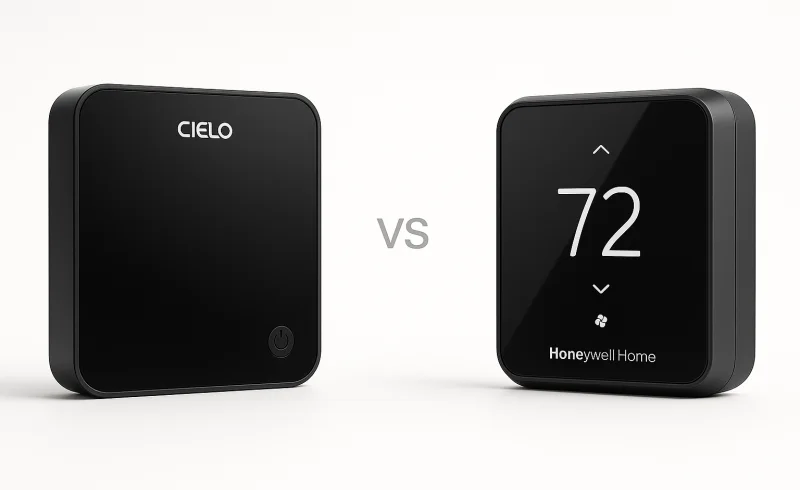
Explore the differences between Cielo Breez Max and Honeywell Home D6 in mini-split control. Discover which device offers better integration, scheduling, and ease of use for your smart home.
TL;DR
The most important difference is no longer a feature on the spec sheet: Resideo identifies the Honeywell Home D6 Pro (DC6000WF1001) as a legacy product that is no longer manufactured. Its documentation and app integration remain available, but that lifecycle status matters when comparing it with the actively supported Cielo Breez Max.
- Cielo Breez Max is better suited to a new smart-home installation where scheduling, geofencing, cross-platform automation, multi-zone coordination, or support for several kinds of IR-controlled air conditioners matters.
- Honeywell Home D6 Pro remains an unusually straightforward thermostat-style controller for a compatible mini-split. HVAC configuration can be completed from the device itself, and the D6 can regulate around the temperature measured at the controller rather than only the sensor inside the indoor unit.
- The D6 is less independent of its app and network than its simple hardware suggests: scheduling is configured through the app, and Honeywell's installation guide says a D6 that loses Wi-Fi can also lose its active schedule until connectivity returns.
- Both communicate with the HVAC equipment by infrared, so placement, line of sight, remote-control habits, and synchronization matter. Neither provides the same authoritative equipment-state feedback as a manufacturer-native wired interface.
One subtle difference is how the two products behave as thermostats. The D6 can use its own temperature sensor for control by default, with an option to rely on the ductless unit's sensor instead. Breez Max also has local temperature and humidity sensors, but in normal operation Cielo says the mini-split continues to rely on its own thermistor; Cielo's sensor becomes part of the control logic when features such as Comfy Max, Comfy Mode, or Follow Me are enabled.
| Feature | Cielo Breez Max | Honeywell Home D6 Smart Mini-Split Ductless Controller |
|---|---|---|
| Power | ||
| Power options | 5V DC wall adapter or 24V AC hardwire | USB cable and wall plug to 120V AC outlet |
| 24V AC hardwire power | Supported | Not documented |
| Included power accessories | 5V DC USB adapter and USB cable | Wall plug and 6 ft USB cable |
| Features | ||
| Warranty | 1-year limited warranty; 5 years if installed by a licensed HVAC Pro | 5 years |
| Geofencing | Yes | Yes |
| Scheduling | Yes | Yes |
| ENERGY STAR certification | Yes | Yes |
| Scheduling / program options | Weekly scheduling; custom schedule, preset schedule, Comfy Max schedule, Comfy schedule | Time-based 7-day, 5-2, 1-week, geofence with sleep period, non-programmable |
| Built-in room temperature sensing | Yes | Yes |
| Connectivity | ||
| Wi-Fi | Yes | Yes |
| Wi-Fi standard | IEEE 802.11 b/g/n | 802.11b/g/n |
| Mobile app support | Cielo Home app | Honeywell Home / Resideo app |
| Smart home / voice integrations | Amazon Alexa, Google Assistant, Siri Shortcuts, Samsung SmartThings, IFTTT, Home Assistant | Amazon Alexa, Google Home |
| Setup & Control | ||
| On-device HVAC controls | Power, temperature, mode, fan speed, swing, presets | Mode and temperature |
| Initial setup without app | No; registration is done through the Cielo Home app | Yes; setup can be completed on the device |
| Unit identification method | Automatic remote detection or manual configuration | Manual brand and model parameter entry on device |
| Product Overview | ||
| Product type | Smart thermostat / smart AC controller | Smart mini-split ductless controller |
| Installation placement | Wall mount or tabletop | Wall mount or tabletop |
| Supported appliance types | Mini-split, window, and portable air conditioners / heat pumps with an IR remote | Ductless mini-split systems |
| Display & Physical | ||
| Display type | LCD segment display | Touch screen |
| Color options | White or Black | Premier White with Black screen |
| Mounting hardware included | Backplate, mounting screws, drywall anchors, table stand | Wall mount plate, adhesive strips, tabletop stand |
📑 Table of Contents
Product Lifecycle & Compatibility
A current platform versus a legacy controller
This comparison needs to start with product status. Resideo's documentation now labels the Honeywell Home D6 Pro as a legacy product and states that it is no longer manufactured. Resideo still maintains D6 documentation and a product page describing Resideo-app integration, scheduling, geofencing, Alexa, and Google Home, so "legacy" should not be confused with "nonfunctional." It does, however, make the D6 a different proposition from a controller that remains in active product development.
Cielo Breez Max is still part of Cielo's current smart-controller lineup, with current documentation for features such as Home Assistant, IFTTT, multi-zone coordination, Comfy Max, and newer scheduling options.
For an existing D6 installation that already works with its mini-split, that lifecycle distinction may have little effect on daily temperature control. For a new installation, it is a meaningful long-term consideration.
Supported HVAC equipment
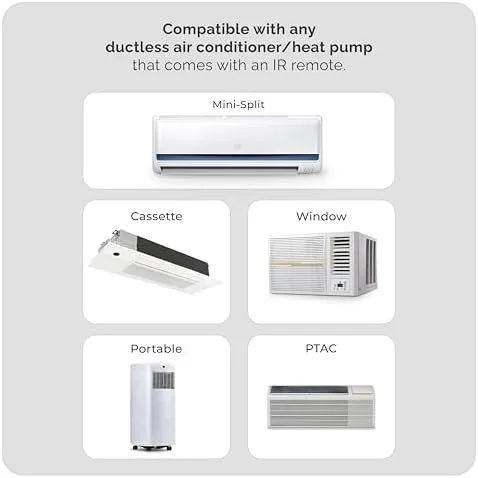
Cielo documents Breez Max compatibility with IR-remote-controlled mini-splits, window units, portable units, cassette units, and PTAC systems. That matters in homes where room-by-room HVAC equipment is not all the same type.
The D6 Pro is much more specialized. It was designed specifically for ductless mini-split systems. Honeywell Home's product page states that it works with more than 800 mini-split models from major manufacturers, so its narrower equipment category does not necessarily mean narrow mini-split coverage.
The practical distinction is straightforward: D6 focuses on ductless mini-splits; Breez Max extends the same general controller concept to several other categories of IR-controlled HVAC equipment.
Both still depend on infrared
Neither controller becomes part of the mini-split's native communications bus. Commands are transmitted by IR, which introduces two practical requirements.
First, the controller needs an unobstructed signal path to the indoor unit. Honeywell specifies an IR range of up to 30 feet under the documented placement conditions. Cielo likewise instructs users to position Breez Max in the line of sight of the air conditioner.
Second, another remote can change what the HVAC system is doing without necessarily updating the smart controller. The two companies handle this problem differently. Honeywell's D6 installation guide explicitly instructs users to remove the batteries from the original ductless remote so the two controllers do not send conflicting commands. Cielo allows continued use of the original remote but recommends pointing it toward Breez Max when making changes so Breez Max can receive the same command and keep its displayed state synchronized.
That makes Cielo somewhat more accommodating in a household where the original remote remains in circulation, but neither approach turns IR into true bidirectional equipment communication.
Practical takeaway: Breez Max has the broader compatibility envelope and the more current platform. D6 remains relevant mainly where its supported mini-split focus and thermostat-style operation are already a good match.
Temperature Control & Automation
The thermostat behavior is more different than it first appears
The D6's strongest technical idea is not voice control or Wi-Fi. It is where temperature is measured.
Resideo's D6 specifications state that the controller can regulate using the temperature sensor in the D6 itself by default, or use the sensor in the ductless unit. That is useful because a mini-split head is normally mounted high on a wall, where the measured air temperature can differ from conditions around occupants.
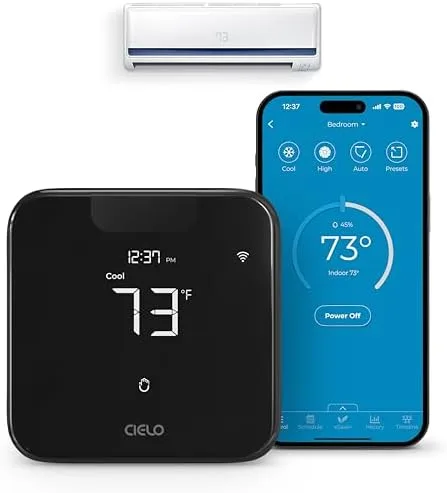
Breez Max also contains temperature and humidity sensors, but Cielo documents a different default behavior. In normal mode, those readings are displayed but do not replace the mini-split's internal thermistor in the control loop.
Cielo brings its local sensor into active control through additional features:
- Comfy Mode lets the user define temperature or humidity ranges and specify what the system should do when conditions move outside those ranges.
- Comfy Max uses the Breez Max sensor and an algorithm that Cielo says can dynamically change mode, fan speed, and HVAC setpoint to maintain a target room temperature.
- Follow Me, where supported by the underlying mini-split, uses the temperature measured at Breez Max rather than relying solely on the sensor in the indoor unit.
Cielo describes Comfy Max as "AI-based." That is the manufacturer's characterization of its control algorithm; it should not be interpreted as independent evidence that the algorithm produces superior comfort or efficiency in every room or with every mini-split.
The important difference is simpler: D6's thermostat-style local sensing is part of its basic control architecture, while Breez Max exposes more configurable ways to bring its room sensor into the control loop.
Scheduling
Cielo offers several scheduling paths through the Cielo Home app:
- custom schedules for power, mode, temperature, and fan settings;
- schedules built around Home, Away, and Sleep presets;
- Comfy Mode schedules;
- Comfy Max schedules.
That is more than a conventional weekly setpoint calendar. It allows a schedule to invoke a broader comfort rule rather than merely changing a temperature at a certain time.
D6 programming is more traditional. Resideo documents 7-day, 5-2-day, and one-week schedules, along with geofencing with a sleep period and a non-programmed mode.
There is an important limitation: D6 scheduling is an app/network feature, not an autonomous clock program stored entirely in the wall controller. Honeywell's installation guide says that if the controller disconnects from Wi-Fi and loses its schedule, reconnecting to Wi-Fi is required for the schedule to resume.
So the D6's simpler appearance should not be mistaken for completely self-contained programmable-thermostat behavior.
Geofencing and occupancy logic
Both platforms support geofencing.
On Breez Max, geofencing can trigger a defined set of HVAC settings when someone enters or leaves a geographic area, and it can interact with Cielo's other comfort features.
D6 also supports location-based operation through the Resideo app, including the documented geofence-with-sleep-period programming mode.
For simple home/away behavior, either architecture covers the basic use case. Cielo provides substantially more additional logic around it.
Multi-zone mini-splits
Cielo also documents a dedicated Multi-Zone Mini-Split Control feature for systems where several indoor heads share one outdoor unit. A separate Breez Max is required for each indoor unit.
The feature is intended to avoid contradictory heat/cool commands across heads sharing the same outdoor unit. Cielo provides two behaviors: other controllers can follow the newest operating mode, or incompatible zones can be turned off when a mode conflict occurs.
The D6 setup process recognizes multi-unit installations and lets installers identify individual indoor units, but Resideo's D6 documentation does not describe an equivalent cross-controller mode-conflict management layer.
Practical takeaway: D6 offers a conventional thermostat model with useful local temperature sensing. Cielo provides a substantially larger automation layer around the same basic IR-control concept.
Smart Home Ecosystem
Cielo currently documents integrations with Amazon Alexa, Google Assistant, Siri Shortcuts, Samsung SmartThings, IFTTT, and Home Assistant.
Those integrations are not all equivalent. Siri Shortcuts, for example, should not be confused with native Apple Home support. Cielo's Home Assistant integration is also cloud-based through the Cielo Connect API, so a Home Assistant server still needs internet access to communicate with Breez Max through that integration.
Even with those qualifications, Cielo offers considerably more paths for connecting HVAC behavior with other connected devices.
Resideo's D6 product documentation lists Amazon Alexa and Google Home alongside control from the Resideo app. That covers common voice-control scenarios but does not provide the same documented range of automation platforms.
This distinction matters mainly when the controller needs to participate in routines outside HVAC itself: occupancy automations, coordinated scenes, energy-management logic, or interactions with other sensors.
If the goal is simply adjusting a mini-split from a phone or voice assistant, the difference is smaller.
Practical takeaway: Cielo has the broader documented integration ecosystem. D6 covers the basic app-and-voice use case without presenting itself as a general smart-home automation endpoint.
Setup & Installation
D6 can configure the HVAC connection without a phone
One of the original D6's better ideas is that its basic ductless-system configuration happens on the controller.
The installer selects parameters for:
- tabletop or wall placement;
- temperature scale;
- single- or multi-unit configuration;
- indoor-unit identification when relevant;
- ductless-system brand;
- ductless-system model.
That means the D6 can be configured to operate the mini-split without first creating an app account.
However, the phrase "setup without an app" needs qualification. Connecting the D6 to Wi-Fi and enabling remote functions still requires the Honeywell Home/Resideo app workflow. Scheduling and other connected features also live in that software layer.
So the real advantage is not that D6 is app-free. It is that basic HVAC commissioning and local control do not depend on completing the connected-service setup first.
Cielo requires the app during initial configuration
Breez Max takes the opposite approach. Initial registration and Wi-Fi setup use the Cielo Home app.
Cielo attempts to reduce the model-selection work by using automatic remote detection. During registration, the original AC remote is pointed at Breez Max and its power command is used to identify the appropriate remote profile. Manual manufacturer and remote-model selection is also available if automatic detection does not produce the correct behavior.
That can be easier than entering numerical brand and model IDs, but it means the phone, app, account, and network are part of the initial workflow.
Power options
This is one of Cielo's clearest hardware advantages.
Breez Max can run from its included 5V adapter or from a 24V wired power source using an external transformer. The 24V option can eliminate the visible USB cable when suitable low-voltage power is available at the chosen controller location.
D6 is powered through its supplied USB cable and wall adapter. Resideo's specifications describe connection to a standard AC wall outlet and do not document an equivalent 24V hardwired installation.
Both can sit on a table or be mounted on a wall. Honeywell includes adhesive mounting strips, while Cielo includes a backplate and mounting hardware as well as a table stand.
Practical takeaway: D6 has the simpler device-first HVAC configuration. Cielo requires more software during initial setup but offers automatic remote identification and more flexible permanent power options.
Controls & Daily Use
What can be changed directly at the controller
Breez Max exposes considerably more HVAC functions without opening the app. Cielo documents direct control of:
- power;
- temperature;
- operating mode;
- fan speed;
- swing position;
- Home, Away, and Sleep presets.
Once Breez Max has been configured, these direct controls continue to work without an internet connection.
D6 intentionally reduces the wall interface to the essentials. Its capacitive controls handle temperature and operating mode, including turning the system off. Resideo documents fan-speed selection as an app-only function.
That makes the two controllers feel different even before their apps are considered. Breez Max is closer to an expanded replacement for the original AC remote; D6 intentionally hides most of those details behind a thermostat-like interface.
What happens when the network is unavailable
Cielo's local temperature, mode, fan, swing, power, and preset controls remain available after setup even without Wi-Fi or internet access.
D6 also continues to provide local mode and temperature control, but its connected programming has a more important dependency. The installation guide specifically identifies a disconnected state in which the controller has lost its schedule and must reconnect to Wi-Fi before that schedule resumes.
That makes D6's physical simplicity somewhat deceptive: it is easy to operate locally, but its scheduling intelligence is still network-dependent.
What happens when someone uses the original AC remote
This is one of the largest day-to-day differences between an IR controller and a native HVAC control interface.
The D6 manual recommends effectively taking the original remote out of service by removing its batteries. That prevents two independent controllers from issuing commands without sharing state.
Cielo takes a more permissive approach. The original remote can still be used, but Cielo recommends aiming it toward Breez Max as well as the HVAC unit so Breez Max can detect the command. The Cielo app also includes a manual Sync AC State function for correcting a mismatch.
Neither method guarantees synchronization if a command fails to reach its intended receiver or if the mini-split is changed through another control path.
Practical takeaway: Breez Max provides more useful control directly on the device and handles continued OEM-remote use more gracefully. D6 is deliberately minimal and works most predictably when it becomes the primary controller.
Hardware & Interface
The two devices take noticeably different interface approaches.
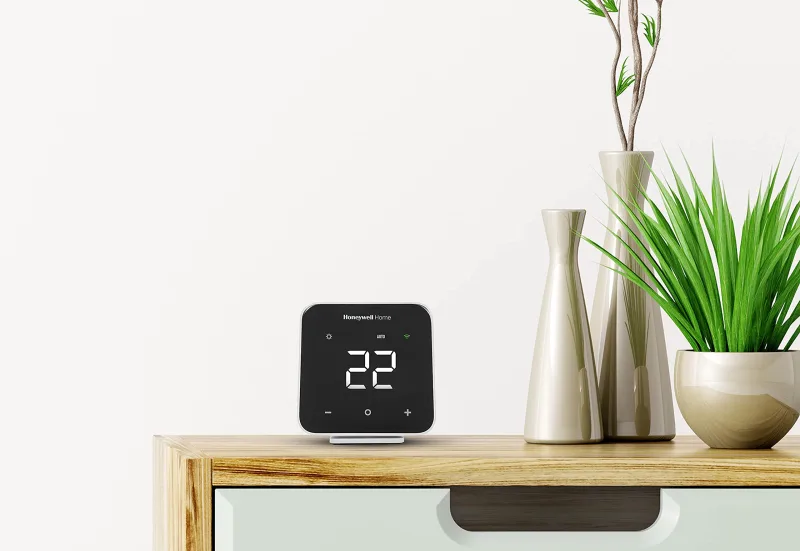
Cielo Breez Max uses a segmented LCD with dedicated touch controls. It is available in black or white and prioritizes access to several HVAC functions directly from the controller.
Honeywell Home D6 Pro uses a 3.5-inch capacitive-touch face with a large temperature display and three primary interaction areas for warmer, mode/select, and cooler. It is finished in Premier White with a black display area.
The D6's screen normally shows the measured room temperature, not simply the current setpoint. Pressing the temperature controls reveals the target temperature before returning to the room reading. This reinforces its conventional thermostat behavior.
Breez Max exposes more information and control states but retains the visual language of an advanced AC controller rather than reducing operation to temperature and mode alone.
The design difference therefore has a functional consequence rather than simply an aesthetic one: D6 intentionally limits what people can change from the wall, while Breez Max keeps more of the mini-split's normal controls accessible.
The Bottom Line
The original comparison between "deep automation" and "simple wall control" is directionally correct, but it misses several differences that matter more in practice.
For a new smart-home installation, Cielo Breez Max is the more complete current platform. It supports a wider range of IR-controlled HVAC equipment, exposes more functions at the controller, offers several layers of scheduling and sensor-based automation, coordinates compatible multi-zone installations, and connects to a broader set of smart-home systems.
For an existing D6 Pro installation, the case is different. The D6 remains a coherent thermostat-style controller: it can use the temperature measured where the controller is installed, its basic HVAC configuration can be completed without first setting up an app, and its wall interface is intentionally simple. If those are the only requirements and the system is already working correctly, its legacy status does not erase those strengths.
For households that frequently use the original mini-split remote, Breez Max is the more accommodating architecture because Cielo provides a way for the controller to observe those remote commands when they are aimed toward it. Honeywell's own installation guidance instead recommends removing the original remote's batteries.
For installations that require authoritative two-way equipment status, guaranteed access to manufacturer-specific functions, or communication that does not depend on infrared line of sight, neither controller is equivalent to a compatible OEM wired or native communication interface.
Overall, Cielo Breez Max has the stronger case for a new installation, largely because the D6 Pro is now a discontinued legacy model and because Cielo's current software and integration layer extends well beyond conventional thermostat scheduling. The D6's most meaningful remaining distinction is not smart-home breadth but its straightforward thermostat-style local control.
FAQ
Does the Cielo Breez Max work with my mini-split?
Can I set up the Honeywell D6 without a smartphone?
Which controller works with Home Assistant?
Do these controllers need a constant internet connection?
Can I use these controllers if my mini-split already has a remote?
Will the Honeywell D6 work with my specific mini-split model?
How is the Cielo Breez Max powered?
Which controller offers better smart home integration?
"Images are used for editorial and informational purposes only. All trademarks and images belong to their respective owners."