
Furbo 360 vs Nanit Pro: Interactive Pet Camera or Structured Baby Monitor?
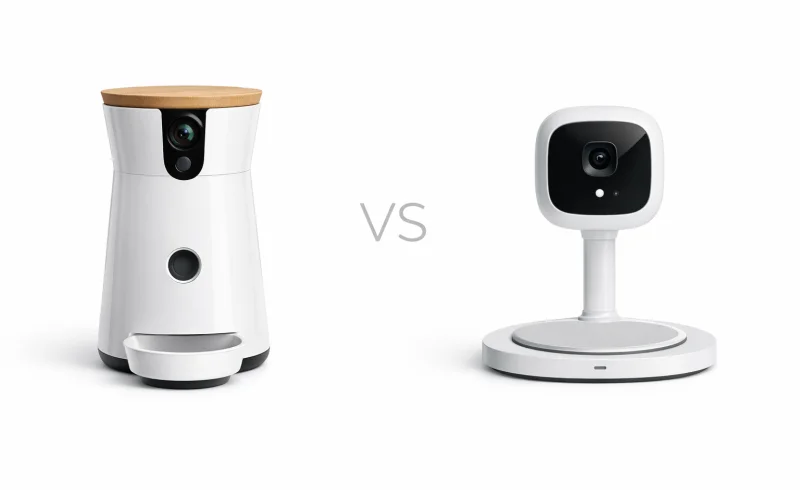
Furbo 360 focuses on interactive pet check-ins with a treat tosser and rotating view, while Nanit Pro is built for structured baby monitoring with sleep-focused insights. Compare use cases, setup, app experience, alerts, privacy, and total cost to choose the right camera for your home.
TL;DR
Quick Decision
- If you want to actively check in and interact with a pet while away → choose Furbo 360.
- If you need continuous, passive observation and data tracking for a sleeping infant → choose Nanit Pro.
- If you’re looking for a general-purpose camera for occasional, casual viewing → either works, but both are overkill.
Key Differentiators The core trade-off is interaction versus infrastructure. The Furbo is built for brief, engaging sessions where you might toss a treat or talk to your dog. The Nanit is designed to be a stable, always-on sentinel that provides reassurance and trends over long periods, demanding a more involved setup and consistent environment in return.
Who Should NOT Buy Either If you need to monitor a subject that moves between multiple rooms frequently or you want a simple, no-frills camera for lightweight occasional use, consider a standard pan-and-tilt security camera instead.
| Feature | Furbo 360 | Nanit Pro |
|---|---|---|
| Power | ||
| Battery operation | Not supported (plug-in power) | Not supported (must remain plugged in during use) |
| Power adapter output | 5V, 2A | 5V, 2.1A DC |
| Video | ||
| Night vision | Automatic night vision | |
| Pan / rotation | 360º rotating view | Overhead bird’s-eye view (mount-dependent) |
| Video resolution | Full HD camera | 1920 x 1080 resolution |
| Category | ||
| Primary device type | Pet camera with treat tosser | Smart baby monitor camera |
| Treat tossing / dispensing | Treat tosser | Not supported |
| Audio & Alerts | ||
| Two-way audio | Mic & speaker | 2-way audio |
| Sound detection / alerts | Barking sensor | Sound alerts |
| Motion detection / alerts | Motion alerts | |
| Connectivity & App | ||
| Wi-Fi required | WiFi connection required | Local Wi-Fi connection required |
| Mobile app platforms | iOS, Android | iOS, Android |
| Wi-Fi band requirement | 2.4GHz Wi-Fi | |
| Bluetooth used for setup | Required (phone Bluetooth must be turned on during setup) | Required (paired to the Nanit App via Bluetooth prior to use) |
| Monitoring & Subscriptions | ||
| Breathing motion monitoring | Not supported | Supported (with Nanit Breathing Wear) |
| Optional subscription available | Furbo Nanny plans available | Nanit Insights plans available |
| Temperature & humidity tracking | Supported | |
📑 Table of Contents
Best Use Case Fit
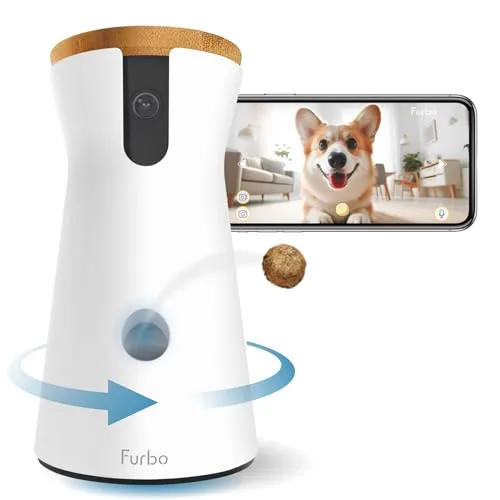
Furbo 360 is explicitly a «pet camera with treat tosser», and that shows in how it’s meant to be used: short, repeated check-ins where you can actively do something (treat toss + two-way talk). It also adds a 360º rotating view, which fits pets that move around within a room and are better handled with «find them, then interact» sessions. In other words, it’s optimized for interruption-based engagement rather than continuous observation.
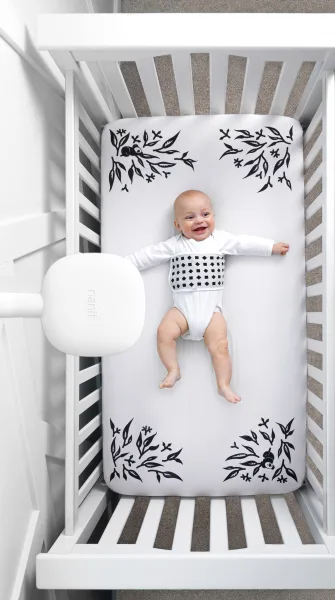
Nanit Pro is a «smart baby monitor camera» first, and its feature set maps to longer, calmer sessions: motion alerts, sound alerts, temperature & humidity tracking, and breathing motion monitoring (with Nanit Breathing Wear). Its «pan/rotation» is effectively an overhead bird’s-eye view (mount-dependent)—less about chasing movement around a room, more about consistent coverage of a fixed sleep space. That lines up with the product being used as part of a daily routine (sleep/rest monitoring), not a quick «drop-in and do something» device.
Conclusion: Neither is a strict substitute for the other—Furbo 360 fits pet owners who want interactive, brief check-ins, while Nanit Pro fits households that want continuous, routine-based monitoring plus environmental and breathing context.
Interaction vs passive monitoring
Furbo 360 has a clear interaction advantage because it supports treat tossing/dispensing plus two-way audio (mic & speaker), and its app features include treat tossing, bark detection, and live streaming. That combination is purpose-built for reinforcing or interrupting behaviors in the moment (for better or worse), especially when you’re away and want to actively engage. The 360º rotation further supports «tap in, locate pet, act, leave» usage.
Nanit Pro supports 2-way audio but does not support treat tossing, so it’s inherently less interactive as a behavior tool. Instead, it’s structured around observation and alerts—including motion alerts and sound alerts—which makes more sense for longer viewing sessions where you’re primarily watching and responding when needed. Its value increases when you treat it like a stable monitoring system rather than an attention-grabbing engagement gadget.
Conclusion: For active interaction, Furbo 360 has the meaningful edge (treat tossing + pet-centric alerts), while Nanit Pro is better aligned to passive, longer-form monitoring.
Room coverage style: roaming pet vs fixed crib view
Furbo 360 is designed to cover a room dynamically with its 360º rotating view, which is a practical match for pets that don’t stay perfectly framed. If your use case is a dog or cat moving between a bed, doorway, and couch within one space, pan/rotation matters because it reduces «dead zones» without moving the camera. Furbo also lists automatic night vision, supporting check-ins in low light without much user involvement.
Nanit Pro is described as providing an overhead bird’s-eye view (mount-dependent)—a coverage model that assumes a consistent placement and a predictable scene (typically a crib). That rigidity is a feature for baby monitoring because it keeps framing consistent for ongoing observation, but it’s less adaptable if you expect the camera to follow movement around a room. In practice, it’s best when you can mount once and leave it.
Conclusion: Furbo 360 is the better fit for roaming-in-a-room subjects (pets), while Nanit Pro is the better fit for fixed-position monitoring (crib/sleep space).
Winner: Tie — Furbo 360 clearly wins for interactive pet check-ins (treat tossing + 360º coverage), while Nanit Pro clearly wins for routine, long-session baby monitoring (motion alerts + temperature/humidity + breathing ecosystem).
Monitoring Features

Furbo 360 is built around pet-specific, moment-to-moment monitoring plus intervention: it supports bark detection and treat tossing/dispensing via the app. Video is listed as Full HD, and the camera can physically rotate 360º, which helps you «look around» a room rather than committing to a single fixed angle.
Nanit Pro, by contrast, is structured around baby-monitoring signals and routine: it offers motion alerts and sound alerts, plus breathing motion monitoring (when used with Nanit Breathing Wear) and temperature & humidity tracking. Its video spec is explicit at 1920 × 1080, and the design intent is a mount-dependent overhead bird’s-eye view rather than room-scanning rotation.
Conclusion: For breadth of monitoring signals (breathing + environment + motion/sound alerts), Nanit Pro has the clearer feature advantage, while Furbo 360 is the more purpose-built choice if «monitoring» means interrupting behavior (barking) and interacting (treat tossing).
Coverage & viewing behavior (rotation vs fixed overhead)
Furbo 360 offers a mechanical advantage for coverage: a 360º rotating view that can sweep around a space, which aligns with quick check-ins when your pet may move within the same room. That flexibility is tightly coupled to its pet-camera identity rather than a fixed «monitoring station.»
Nanit Pro is optimized for consistent framing using an overhead bird’s-eye view (mount-dependent), which supports long, uninterrupted observation in a stable environment (like a crib). The trade-off is less ad-hoc scanning—coverage depends more on placement than on the camera’s ability to pan.
Conclusion: Furbo 360 wins on flexible room coverage thanks to 360º rotation, while Nanit Pro wins on fixed, repeatable framing that suits continuous monitoring.
Alerts & reliability sensitivity
Furbo 360 centers alerts on pet-relevant triggers like a barking sensor, but its overall value is strongest in short, repeated sessions where you check the feed and act (talk/toss a treat). Furbo also documents app-side constraints—if a phone lacks resources, the app may crash or freeze, per manufacturer guidance on needing «enough memory» for effective operation.
Nanit Pro supports a wider alert set—motion alerts plus sound alerts—and ties them into a more structured monitoring workflow. That said, some users note connection instability when networks fluctuate between 2.4GHz and 5GHz (complain / complain), and some users note camera audio problems including no sound (report); Nanit’s own support also acknowledges frequent disconnects and poor audio/video quality can happen under low bandwidth conditions.
Conclusion: Nanit Pro has the stronger alerting/monitoring stack, but it also appears more network-dependent in practice, while Furbo 360’s monitoring is simpler and more interaction-driven (with its own app-performance caveat on the phone side).
Winner: Nanit Pro — it delivers the more comprehensive monitoring feature set (breathing support with wearables, environment tracking, and motion/sound alerts), whereas Furbo 360’s advantages are narrower but compelling if you specifically want pet interaction (treat tossing) and behavior interruption (bark detection) plus 360º scanning.
Video, View & Night Vision

Furbo 360 records in Full HD and is explicitly designed to keep a moving subject in frame thanks to a 360º rotating view. In practice, that rotation is a direct answer to the typical «pet left the frame» problem when your dog or cat moves around the room. It’s a more flexible viewpoint model for ad-hoc check-ins across a wider area without physically repositioning the camera.
Nanit Pro records at 1920×1080 (Full HD) but its viewpoint is described as an overhead bird’s-eye view (mount-dependent) rather than a pan/tilt system. That’s well matched to its intended use in a fixed crib setup, where the environment is consistent and the goal is stable, continuous coverage. The trade-off is that changing angles generally means changing placement/mounting, not rotating the lens on demand.
Conclusion: Both are effectively 1080p-class, but Furbo 360 has the edge for coverage flexibility thanks to 360º rotation, while Nanit Pro’s overhead approach is better when you want a locked-in, repeatable viewpoint.
Furbo 360 also calls out automatic night vision, and the product positioning (pet check-ins throughout the day) benefits from low-light switching without manual fiddling. That matters because pets are often active in mixed lighting—daylight, lamps, or dark rooms—so automated night handling reduces the chance you open the app to an unusable image. The emphasis here is «fast visibility,» not deep analysis.
Nanit Pro doesn’t list night vision in the provided specs, so we can’t claim parity or superiority on low-light performance from the data given. What we can say is that Nanit’s value is tied to consistent placement and conditions, and some users note video/history reliability issues—specifically, video and event history may malfunction at times (complain). That’s not strictly «night vision,» but it can directly affect how useful recordings are when you review nighttime events.
Conclusion: On the provided evidence, Furbo 360 wins the night-visibility feature callout because automatic night vision is explicitly specified, while Nanit’s low-light capability isn’t confirmed in the supplied data.
Winner: Furbo 360 — It’s the more defensible pick in this category because it pairs Full HD with a 360º rotating view and automatic night vision, which better fits dynamic, moving subjects and variable lighting.
Setup & Daily UX
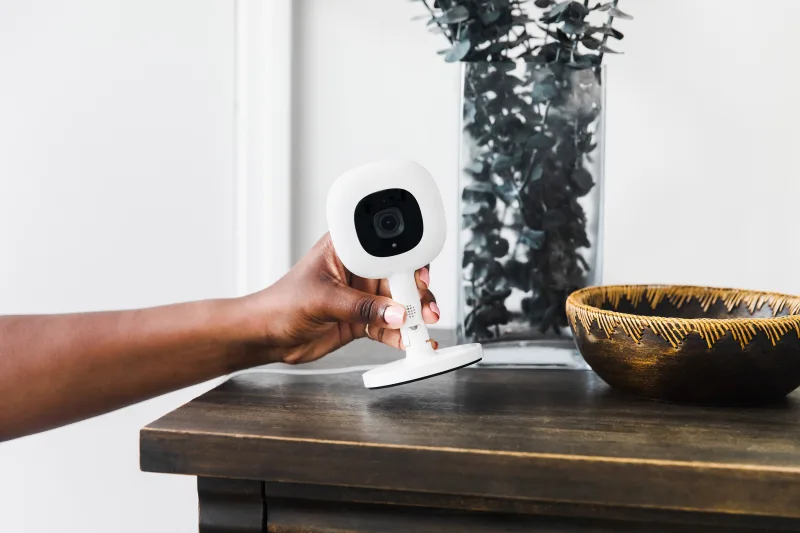
Furbo 360 uses an iOS/Android app and explicitly requires Bluetooth during setup (your phone’s Bluetooth must be turned on), plus a 2.4GHz Wi‑Fi connection for operation. The hardware is plug-in only (no battery), with a 5V/2A adapter, so placement tends to be «find an outlet, set it, and go.» In day-to-day use, the experience is optimized for fast open/check/interact cycles—especially because its core functions (treat tossing, bark detection, live stream) are designed for quick interventions rather than long viewing sessions.
Nanit Pro also runs on iOS/Android and similarly requires Bluetooth pairing prior to use, but it’s typically a more structured onboarding flow because the camera is meant to stay in a fixed monitoring context. Like Furbo, it must remain plugged in (no battery) and uses a 5V/2.1A DC adapter, reinforcing «set-and-leave» installation. Once configured, the UX is oriented around longer, calmer monitoring sessions and retrospective review—though some users report reliability friction points that can interrupt that routine.
Conclusion: Neither is «easier» in every way—Furbo 360 is faster to live with for quick check-ins (especially if you’re fine tuning alerts), while Nanit Pro rewards patients who want a more structured, routine-driven monitoring flow.
Connectivity expectations and day-to-day friction
Furbo 360 is straightforward about the basics: it needs Wi‑Fi (specifically 2.4GHz) and enough free phone memory to keep the app stable; Furbo’s own support notes the app can crash or freeze if the smartphone doesn’t have sufficient memory. That makes its daily UX feel «lightweight» when everything is in place, but it can become notification-heavy unless you proactively adjust sensitivity (a common reality for event-driven pet cams). Net-net, the friction tends to be about reducing noise, not about learning a complex system.
Nanit Pro is also Wi‑Fi dependent, but real-world reports suggest more sensitivity to network conditions. Some users note connection issues when networks fluctuate between 2.4GHz and 5GHz, and the manufacturer also acknowledges that low bandwidth can lead to frequent disconnects plus poor audio/video quality. Separately, isolated reports suggest a firmware update can render the camera inoperative, and some users report no-audio problems—both of which can undermine the «set-and-forget» expectation if they occur.
Conclusion: On daily reliability and «time spent troubleshooting,» Furbo 360 has the edge based on clearer, simpler connectivity requirements (explicit 2.4GHz) and fewer high-impact reported failure modes in the provided sources; Nanit Pro can be excellent once stable, but it appears more vulnerable to network/firmware-related disruptions.
Winner: Tie — Furbo 360 wins for immediacy and simpler day-to-day operation, while Nanit Pro wins for households that want a structured, routine-centric monitoring experience (as long as their network/setup stays stable).
Alerts, Audio & Reliability

Two-way audio (and how dependable it feels)
Furbo 360 supports two-way audio (mic & speaker), with its daily experience typically built around short check-ins plus interaction (talking, treating) rather than hours-long listening. From a reliability standpoint, the main documented friction is app-side: Furbo notes the app may crash or freeze if the phone doesn’t have enough memory—a failure mode that’s often fixable by freeing storage/RAM rather than changing the camera setup.
Nanit Pro also offers 2-way audio, and core features like live video and two-way audio work without a subscription. However, some users note audio problems (including no sound from the camera), which is a more disruptive issue for a device positioned around continuous monitoring.
Conclusion: Both have the baseline feature, but Furbo 360 has fewer serious audio reliability flags in the provided sources, while Nanit Pro’s reported «no audio» failures are higher-impact for its intended always-on use.
Alerts: pet-centric vs baby-monitor-centric (and the cost of noise)
Furbo 360 is centered on pet-triggered interruptions, with bark detection called out in its Audio & Alerts specs and alerting tied to quick, repeated sessions. That approach can be effective for «tell me when something happens,» but it also means you may need to tune sensitivity to avoid getting pulled into too many pings (especially if your dog is vocal).
Nanit Pro provides sound alerts and motion alerts, aligning with its role as a structured baby monitor where you may want fewer, higher-confidence notifications over long stretches. The trade-off is that those alerts depend more heavily on consistent connectivity and recording/event systems to stay trustworthy.
Conclusion: No clear spec-based winner on alerts alone—Furbo’s bark-first alerts fit reactive pet monitoring, while Nanit’s sound/motion stack fits continuous nursery monitoring—but the reliability of those alerts is strongly shaped by each product’s underlying connection stability (next section).
Connectivity and «stays online» reliability
Furbo 360 requires Wi‑Fi and explicitly calls for 2.4GHz Wi‑Fi, a narrower requirement that can simplify setup because the camera isn’t juggling bands. The bigger reliability risk Furbo documents is again on the phone side (app performance tied to available memory), rather than the camera frequently falling off the network.
Nanit Pro also relies on local Wi‑Fi, but some users note connection issues when networks fluctuate between 2.4GHz and 5GHz. Nanit additionally acknowledges that frequent disconnects and poor audio/video quality can occur under low bandwidth and recommends mitigation steps like improving Wi‑Fi levels and moving the router closer.
Conclusion: For homes with «messy» Wi‑Fi environments, Furbo 360 has the edge on practical stability based on the provided evidence, while Nanit Pro appears more sensitive to network conditions—a meaningful drawback for long, uninterrupted monitoring.
Firmware, recording, and history: what breaks first
Furbo 360 does not have any provided SoT flags about firmware causing the camera to fail outright, and its documented reliability issue is more narrowly scoped to the mobile app potentially crashing/freezing under resource constraints. In other words, it’s a «your phone may struggle» problem more than «the camera stops working.»
Nanit Pro has isolated reports suggesting a firmware update may cause the camera to become inoperative, plus some users note video/event history malfunctions. Because Nanit’s value proposition leans heavily on reviewability (history, events, trend awareness), failures in recording/history are disproportionately painful compared with a camera used mainly for quick live check-ins.
Conclusion: Furbo 360 is advantaged on reliability risk profile in the provided sources—its issues skew toward app performance—while Nanit Pro shows more high-impact failure reports (firmware + history) for a product designed for always-on monitoring.
Winner: Furbo 360 — Both cover the basics (two-way audio and alerts), but Nanit Pro has more reported high-impact reliability friction around connectivity, audio, firmware stability, and video/event history, which matters more given its continuous-monitoring intent.
Privacy & Account Sharing
Furbo 360 frames privacy mostly as a general assurance: it highlights «bank-level encryption» and explicitly recommends enabling 2-step verification (no cipher strength specified in the provided materials). It’s also built around a single-owner, quick-check workflow, and the device’s status light is documented as an in-home indicator of connectivity modes—useful for at-a-glance awareness that it’s online.
Nanit Pro is more specific and better-sourced on security: it connects via Wi‑Fi and uses 256‑bit AES encryption for data security. That’s a concrete standard you can evaluate, and it aligns with Nanit’s «infrastructure-like» role in continuous monitoring where trust and consistency matter.
Conclusion: Nanit Pro has the clearer, more defensible security story because it names 256‑bit AES while Furbo’s «bank-level» wording is less measurable, even though Furbo’s 2-step verification guidance is a practical plus.
Furbo 360 doesn’t provide, in the supplied sources, a defined multi-user sharing model (how many users, roles, or permission levels). In practice, that makes it harder to predict how well it fits scenarios where multiple caregivers need controlled access.
Nanit Pro explicitly supports monitoring access for up to two users with adjustable permissions, which maps cleanly to family use where you want to share viewing without giving everyone full control. That clarity also reduces day-to-day friction because the sharing model is spelled out rather than implied.
Conclusion: Nanit Pro wins on account sharing, since it offers defined two-user access with adjustable permissions and Furbo doesn’t list an equivalent permissions framework here.
Winner: Nanit Pro
Subscriptions & Long-Term Ownership

Furbo 360 is positioned as a low-commitment device: it’s priced at $44 and supports Furbo Nanny subscription plans for advanced features. In day-to-day ownership, its core value comes from repeat «check-in» sessions—live viewing plus interaction tools like treat tossing and bark detection—rather than long continuous monitoring.
Nanit Pro costs far more upfront at $249–$399, but its subscription story is more clearly tiered: you can use core features without a subscription (including live video and two-way audio), while sleep analytics and video history require Nanit Insights. That structure tends to push long-term owners toward treating it like a platform—especially if they want the features that differentiate it beyond basic viewing.
Conclusion: Both have optional subscriptions, but Nanit Pro is more defensibly «subscription-layered» (clear free core + paywalled analytics/history), while Furbo 360 is more about whether you personally keep valuing interactive check-ins over time—so the better fit depends on whether you want insights/history or interaction.
Long-term value: interaction loop vs «infrastructure» monitoring
Furbo 360 supports the «burst usage» pattern: open the app, stream in Full HD, toss a treat, respond to bark alerts, then close it. Long-term, that can feel repetitive because it’s event-reactive rather than insight-building; if you stop using treat-based interaction, there’s less that «unlocks» over time beyond detection/notification tuning.
Nanit Pro is built for routine and continuity: it records in 1920×1080 and adds a broader monitoring stack (e.g., temperature & humidity tracking and breathing motion monitoring with Nanit Breathing Wear). Over extended use, that «infrastructure» approach can create more durable value—if you commit to stable placement and, for many households, to Insights for history/analytics.
Conclusion: For long-term ownership, Nanit Pro has the clearer path to compounding value through tracking and add-ons, whereas Furbo 360 is strongest when you want lightweight, repeated interaction rather than trend awareness.
Reliability risk over time (software, connectivity, and subscription dependence)
Furbo 360 has fewer provided long-term reliability signals in the source set, but its manufacturer notes that the app can crash or freeze if the phone lacks enough memory, which can affect day-to-day continuity. Because it emphasizes quick sessions, brief app friction may be easier to tolerate—though it still disrupts the «check-in fast» promise.
Nanit Pro has stronger official guidance around connectivity sensitivity: the manufacturer warns that low bandwidth can cause frequent disconnects and poor audio/video quality, and it provides steps to improve stability (app updates, Wi‑Fi level checks, moving the router closer). On the user-report side, some users note firmware updates that «may cause» the camera to become inoperative, and some users report audio problems (including no sound), while some users report video/event history malfunctions—issues that matter more when you rely on history/analytics as part of the product’s core value.
Conclusion: Both depend on a stable app + Wi‑Fi experience, but Nanit Pro carries more documented long-term «platform risk» (connectivity sensitivity and occasional update/app-history issues) that can undercut its most differentiated subscription features.
Winner: Nanit Pro
The Bottom Line
After breaking down use-case fit, monitoring depth, video coverage, UX, reliability, privacy, and long-term ownership, the decision comes down to what you’re monitoring—and how.
You want to interact (treats, interrupt barking) during quick check-ins: The Furbo 360 is the better fit thanks to treat tossing and bark detection built for short, repeatable interventions.
You want continuous crib monitoring and routine-based tracking: Choose the Nanit Pro, which is designed around structured baby monitoring with breathing-wear support and temperature/humidity context in a consistent setup.
You need a calmer app experience for long viewing sessions: The Nanit Pro matches this best because it’s oriented around longer, passive monitoring rather than constant interaction loops.
You want the lowest upfront cost for a capable indoor camera: The Furbo 360 wins on value, delivering Full HD, two-way audio, and a rotating view at a much lower entry price.
Your environment or placement changes often: The Furbo 360 is the more practical pick since 360° coverage and quick check-ins adapt better than a fixed, mount-dependent routine.
Overall, there isn’t a single winner because these products excel at different jobs: Furbo is «interaction-first» with flexible coverage and fewer high-impact reliability flags in the provided sources, while Nanit is «infrastructure-like» with the stronger monitoring stack and clearer security/sharing model—but more network/platform sensitivity.
Pick based on your primary room (pet space vs nursery), how long you’ll typically watch (minutes vs hours), and your tolerance for subscriptions and a platform-style setup over time.
FAQ
Is Furbo 360 or Nanit Pro better for home security-style check-ins?
Do Furbo 360 and Nanit Pro both have two-way audio?
Does Nanit Pro work without a subscription?
Does Furbo 360 have night vision and a rotating view?
Which is better for multi-user access in a family?
Which camera has better connectivity reliability?
What are the main differences in monitoring features between Furbo 360 and Nanit Pro?
Which camera is more affordable upfront?
"Images are used for editorial and informational purposes only. All trademarks and images belong to their respective owners."
Navigating the Smart Pet Device Landscape
- a reliable automatic pet feeder with camera features → PETLIBRO Granary Automatic Cat Feeder with Camera vs PETKIT Fresh Element Solo Smart Pet Feeder: Camera Control or Simple Reliability?
- to improve pet hydration with a smart fountain → PETKIT Eversweet 3 Pro vs PETLIBRO Dockstream: Which Wins?
- a pet camera for interactive monitoring → Furbo 360 Dog Camera vs Petcube Bites 2 Lite
- self-cleaning litter boxes for odor control → FEELNEEDY vs OROLEY Self-Cleaning Litter Box Comparison
- a GPS tracker for extensive pet roaming → Tractive Smart vs Tractive XL: Best GPS Tracker for Your Dog?
- comparing pet GPS trackers for security and range → Petivity Smart GPS vs Fi Series 3: Best Dog GPS Tracker?
- a Bluetooth tracker for short-range monitoring → Tractive Smart vs Apple AirTag: Pet GPS vs Bluetooth Tracker
- UPFAS Little Box 500C vs Lohhuby CAST LB500B: Best Pick?